Crawl several sites at once, and watch it live
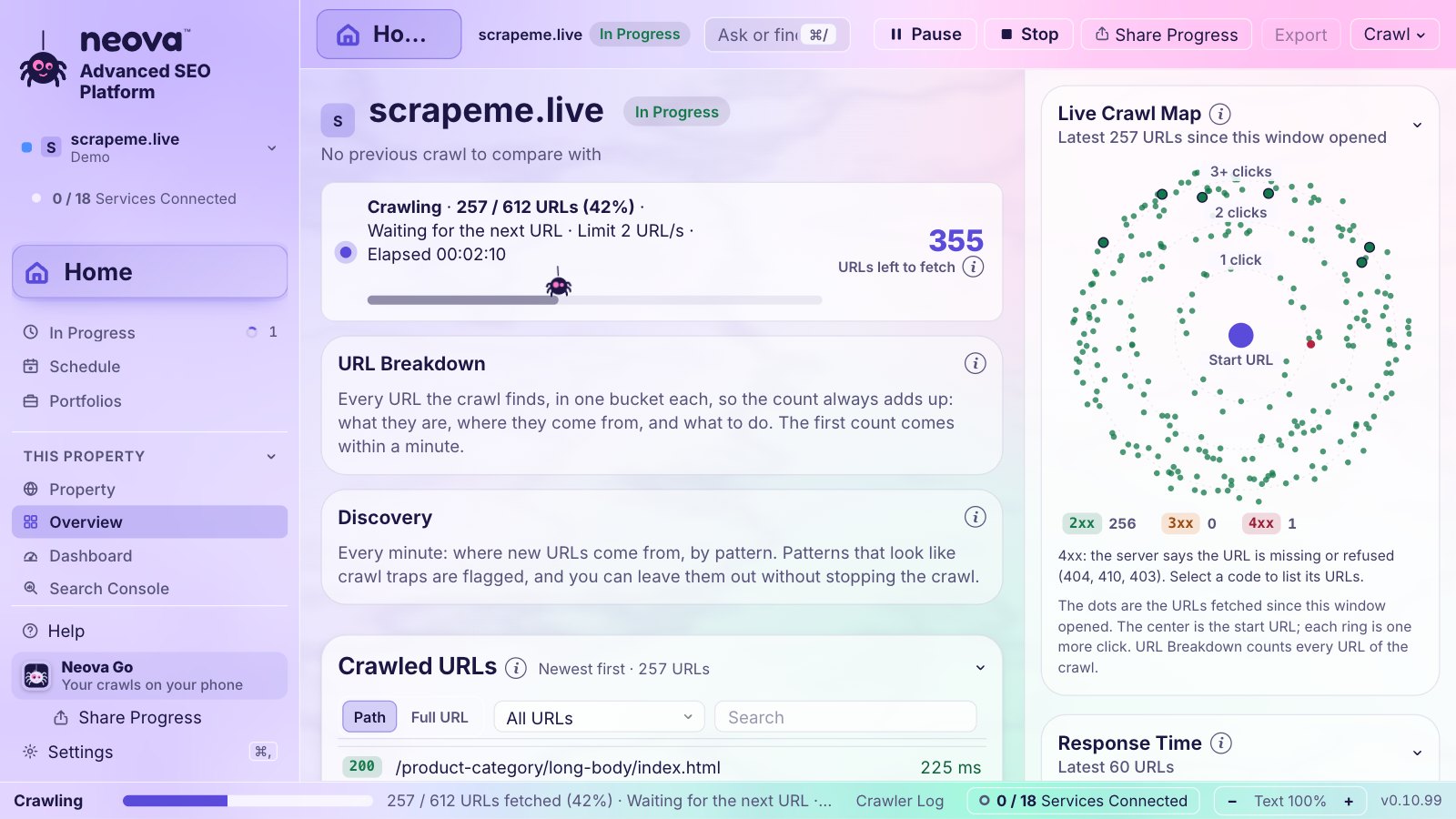
Several sites at once, each at its own pace, on a live map of every URL as it arrives.

Built by SEOs, for SEOs. Neova crawls from your own computer, then tells you which flags matter, what to fix first, writes the tickets, makes the client's report, and keeps watch on the site. Two minutes of video, then all of it.
The crawl is where it starts. Here is what Neova does with it.
Several sites at once, each at its own pace, on a live map of every URL as it arrives.

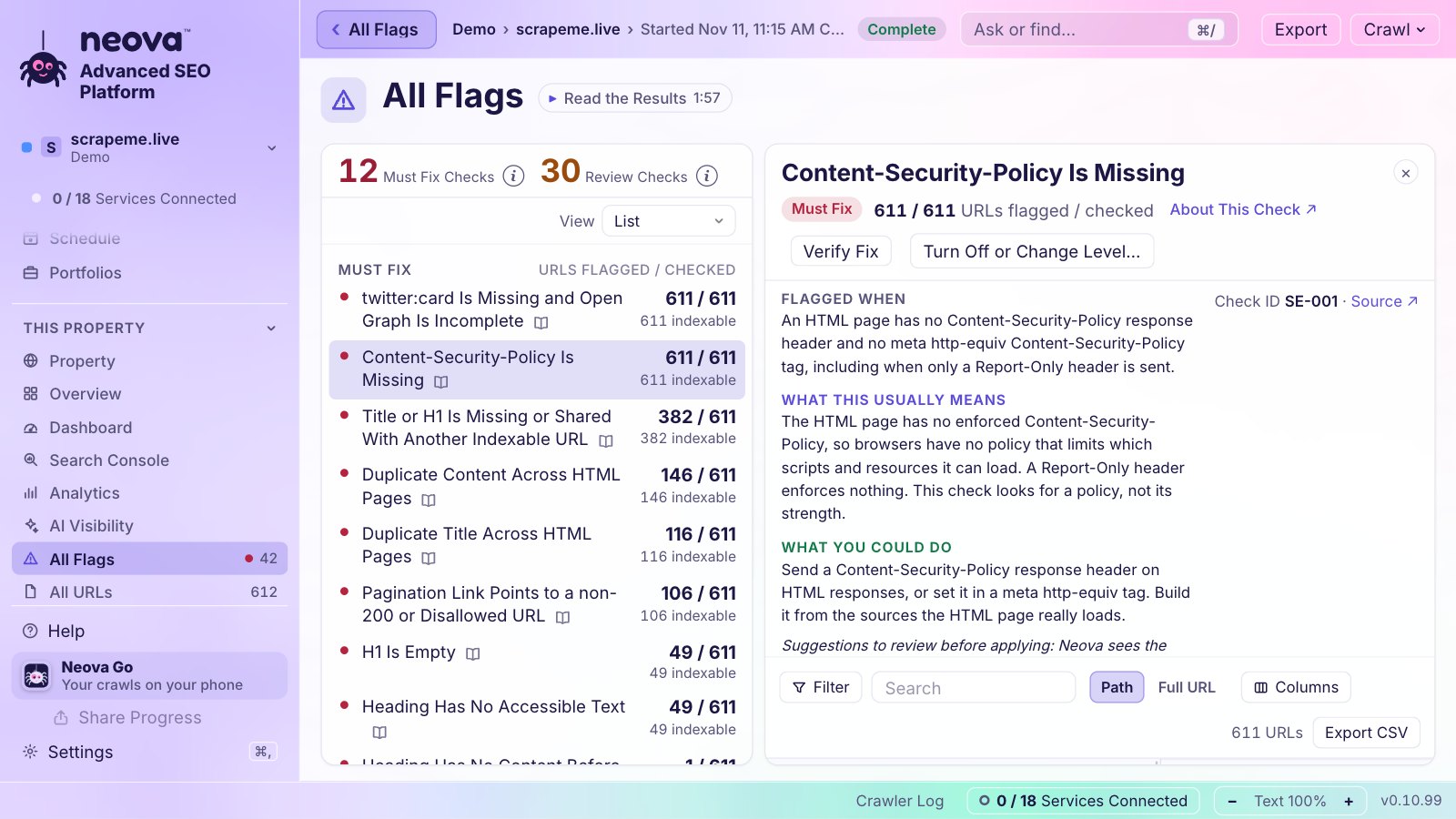
Every flag says why it fires, what it usually means and where the rule comes from.

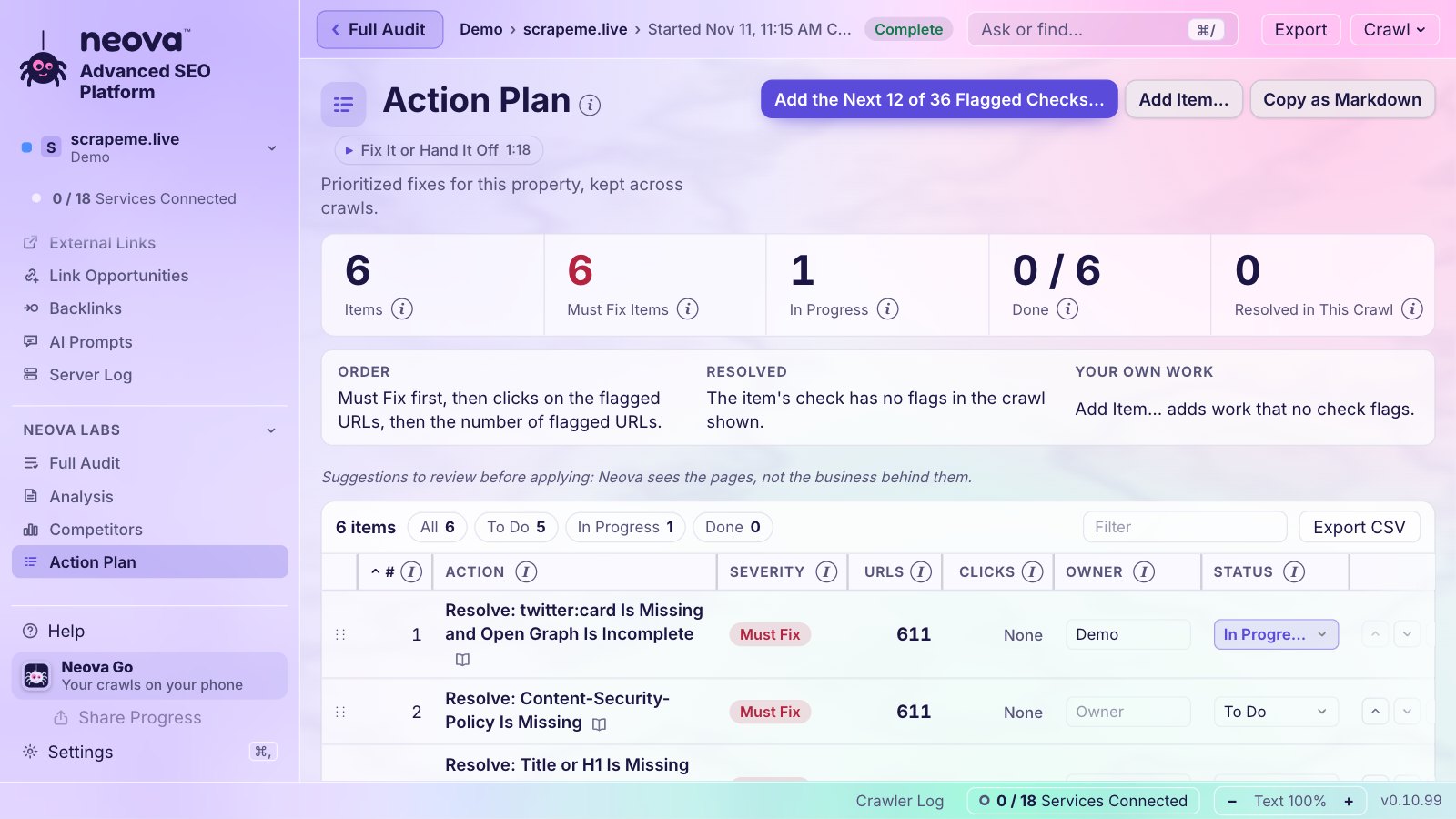
Flags become the work: owners, status, Must Fix first, kept from one crawl to the next.

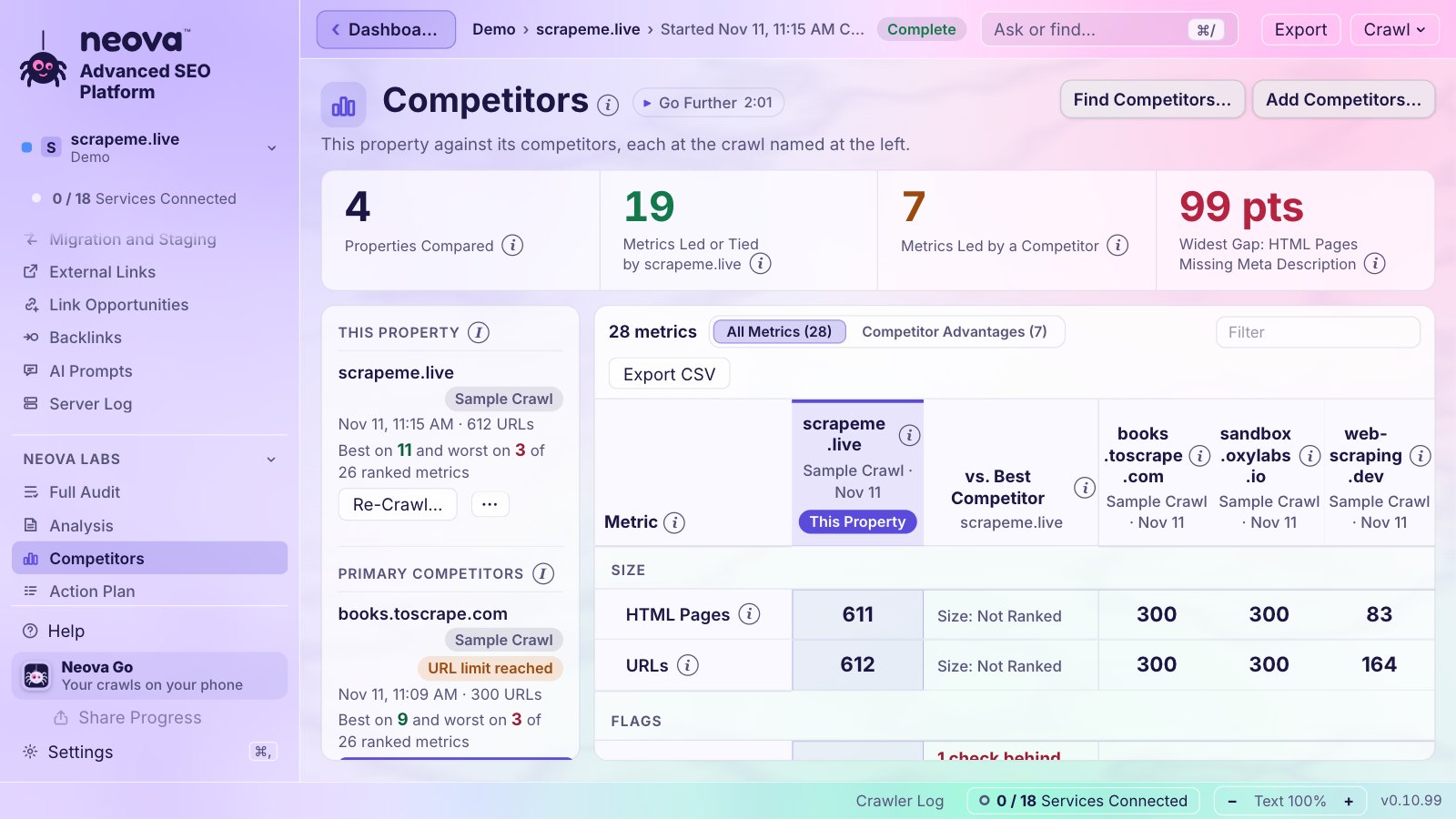
Paste a list. Neova sizes each crawl from their sitemaps, then shows who leads, metric by metric.

What real visitors on phones get, by page group, with an alert when a grade changes.

Open their exports and run Neova's checks on what they found. Keep the tools you like.
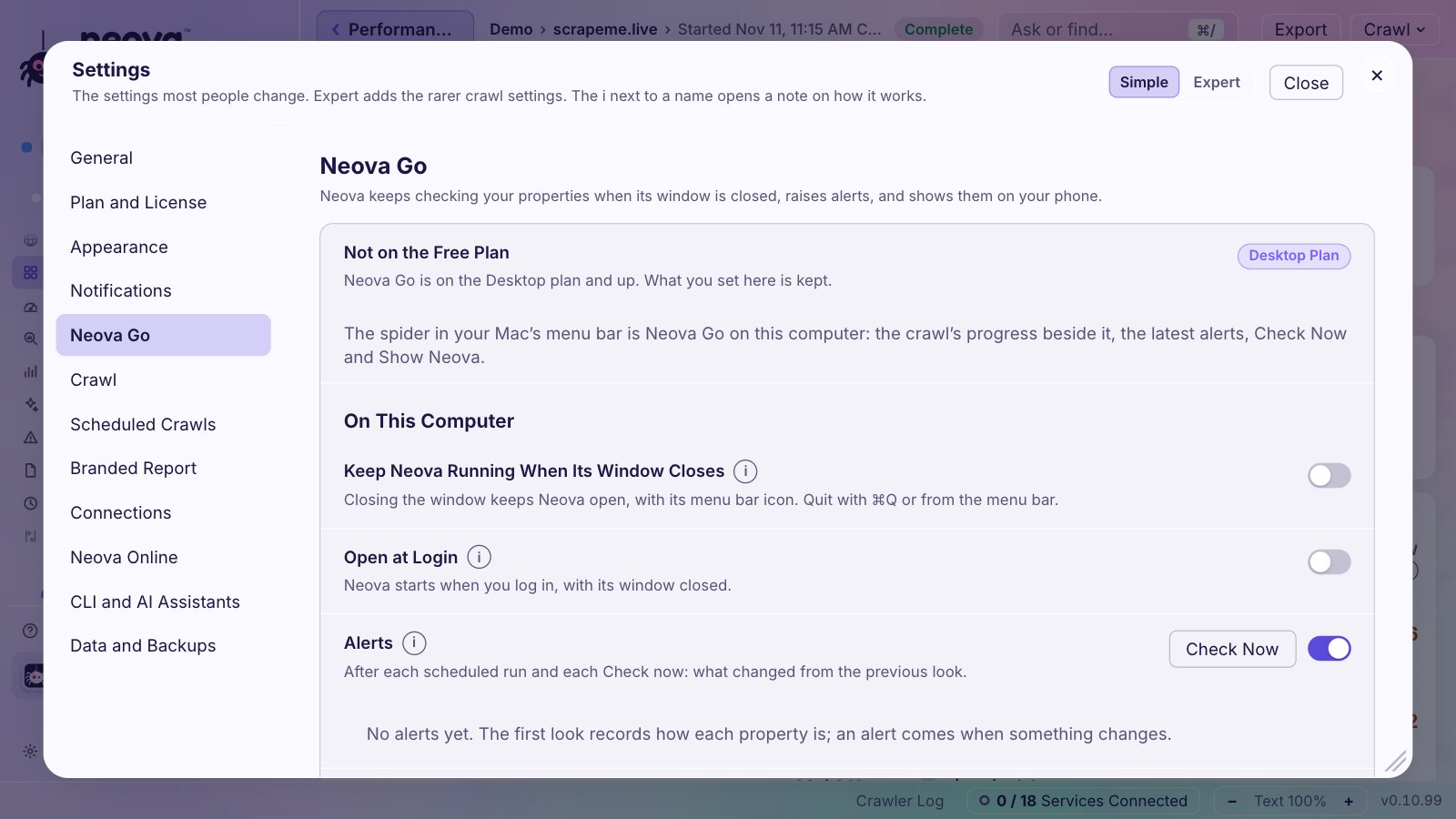
Close the window. The crawl keeps going in the menu bar, and your phone shows every property.

Everything your client gets, from one place, encrypted on your computer before any link is shared.
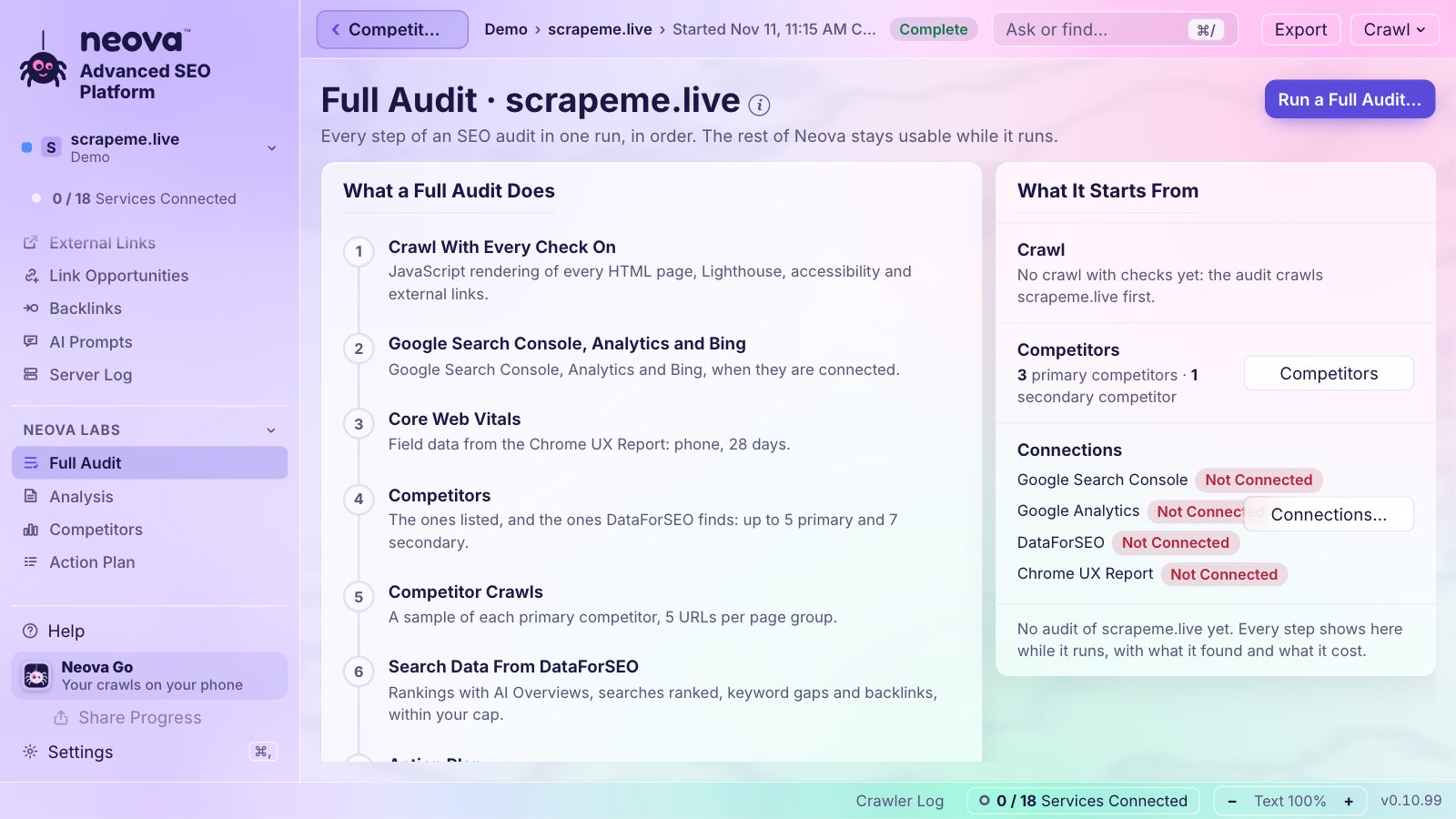
The crawl, Google, Bing and Analytics, Core Web Vitals, competitors, the plan and the PDF, in one run.

An animated mascot that sits on your desktop and keeps an eye on your crawls. It speaks up when a crawl needs you, answers your questions about the crawl, and takes you to the right screen in one click. Optional, and off until you pick one.
31 services, each optional: Neova does its job without any of them, and does more with them.
Open an area to see every feature in it, or search them all.
A live log of the crawl: every URL fetched with its colored status code and response time, each step in bold, failures in red and warnings in amber; Copy Log keeps every line for support.
Follows the internal links from a start URL, and the XML Sitemaps when they are on, the way a search engine discovers a site.
Crawls only the URLs you paste or upload from a file, nothing else.
Reads the site before the crawl starts and picks the version (http or https, with or without www) that answers 200, saying what the other versions do.
Asks whether to crawl the subdomains Neova found, and which ones.
Crawls the whole site with no URL limit unless you set one.
Crawls only the folders you type, and judges completeness against the XML Sitemap URLs under them.
Crawls a set number of pages from each page group, so a large site is audited in minutes with every template covered.
Three levels in one choice: Crawl Only, Site Audit (adds Core Web Vitals and a draft Action Plan) and Full Audit (adds competitors, search data and the analysis).
Adds extra start URLs from a TXT or CSV file or pasted, to reach pages no link leads to.
Crawls the URLs listed in the XML Sitemaps that robots.txt declares, after the pages the links reach.
Reads extra XML Sitemaps you name besides the ones robots.txt declares, for every crawl of the property.
Chooses which resources are crawled besides HTML pages: Images, CSS, JavaScript and PDFs.
Pages First fetches every HTML page before images and files, so the core of the audit is done first; By Depth fetches nearest the start URL first.
Records menu, footer and filter links without following them, while body links are always followed.
Crawls or skips URLs by regex pattern, one per line, with a field to test a URL against them.
One exclusion list that every crawl uses, whoever starts it: the window, a schedule or an AI assistant.
Rewrites URLs with regex rules before they are crawled, for example to drop tracking parameters, or to move a staging site's links to the live site, and the live site's XML Sitemaps, onto the staging host.
Keeps or drops query strings when crawling.
Crawls internal links marked rel=nofollow when you want them.
Treats /Page and /page as one URL.
Lets a crawl that starts in a folder go beyond it.
URL Limit, Crawl Depth Limit, Max URLs per Folder, Max URL Length and Max Query Parameters, to keep faceted navigation in check.
Crawls at 3 URLs a second by default and halves its speed by itself when the server slows down or answers 429 or 503, honoring Retry-After.
Spaces every request at the speed asked, robots.txt and XML Sitemaps included, so the site never gets a burst.
After you confirm the site is yours, goes up to 50 URLs a second and can ignore robots.txt, for your own site or a staging server.
Crawls as NeovaBot by default, or as Googlebot, Bingbot, Applebot, AI crawlers such as GPTBot and ClaudeBot, SEO tools, browsers or a custom string.
Respects the live robots.txt, ignores it for a site you own, or respects a draft saved in the robots.txt Tester to see what a change would do.
Renders the HTML pages in Chrome after the crawl, all of them or a few per page group, and compares the rendered page with the raw HTML; off by default.
Waits for the network to go quiet and for the page to stop changing, up to a settle limit, and says when a page was still changing.
Says over the results when a crawl ran without rendering, how many checks could not run because of it, and offers Crawl Again With Rendering.
Fetches each URL with Chrome like a visitor, for sites with bot protection; you solve any CAPTCHA yourself and Neova waits for you.
Sends HTTP authentication, cookies and custom headers to the crawled site only, for staging sites and logged-in areas.
Makes a secret header for a site you control, sent only to that site, with the rule to hand its IT team so the firewall lets Neova through.
Saves a configuration under a name to reuse on any site, with what it sets shown at a glance.
Gives a property its own crawl settings that New Crawl, Re-Crawl and its schedules start from, with Reset to Defaults.
Shows the settings most people change, or every setting with a note on how each one works.
Lists every setting that differs from the default before the crawl starts, each with an Edit link.
Reads a few pages first and says how many URLs the XML Sitemaps list, the images and files to expect, and the disk space needed against the free space.
Says from the sampled pages how many images per page, which parameters the links carry and which addresses are written wrong.
Checks the property's Google connection before a crawl or audit starts and holds it with Sign In Again, Crawl Without It or Cancel when the sign-in is broken.
Shows the crawl as it runs: numbered steps, what it does now, the URLs left, and every box below, each foldable.
Shows the steps by name (Crawling the Website, Crawling the XML Sitemaps, Crawling the Resources, Rendering the Pages, Running the 694 Checks) with what each fetched.
Says in one line what the crawl does at this moment and the address fetched last.
Three bars under the progress: HTML Pages, Images, and CSS, Scripts and Other Files, each fetched of found.
Shows the URLs still to fetch, then the URLs still to check, in large type with a bar.
Every minute, says where the new URLs come from by pattern, flags crawl trap shapes (calendars, repeating folders, session IDs, many parameters, deep and long URLs) and offers to exclude or skip them on the spot.
For each URL group found, offers Keep Crawling Them, Skip or Exclude, each with what stays in the audit and what leaves it, the recommended one marked.
Puts every URL the crawl finds in exactly one bucket (Clean Page URLs, Parameter Variants, Malformed URLs, Crawl Traps, Images, CSS, JavaScript and Fonts, Documents, Video and Audio, Other Resources) so the count is always explained.
Fetches the images of the first 1, 3, 5, 10, 25, 50 or 100 pages of each page group, with the images and time each size means, or skips the rest, or keeps every image.
Once every page is fetched, skips the images and files left so the crawl ends as done and the checks run.
Says the deepest page so far while crawling, amber from 4 clicks, with a warning line from 10 clicks.
Draws the latest 300 URLs by click depth, colored by status code, with sitemap-only URLs on their own ring.
Shows the median response time of the latest URLs on a chart with the 800 ms and 1,800 ms lines.
Lists the URLs as they are fetched, 10, 25, 50 or 100 a page, with filters for 2xx, 3xx, 4xx, 5xx and No Response, changed and new.
Compares each URL as it is fetched with the property's newest earlier crawl that read pages, a Full Site Crawl first, else a Sample or Specific Folders crawl, and shows the old value struck through beside the new one.
Shows the checks running by category, each with how many of its URLs are read, and the flag count once written.
Lists Google's own pages that fit what the crawl shows and Google Search news of the last 45 days: ranking updates, the Search Central blog and documentation updates.
Suggests reading that fits the crawl: the Google Search Status Dashboard and SEO ProCheck's case studies and algorithm updates.
Freezes the crawl and continues it exactly where it was.
Stop asks: Move On to the XML Sitemaps, Stop and Run the Checks, Stop and Delete This Crawl, or Keep Crawling; Skip Rendering while it renders.
Continues a stopped or interrupted crawl with its own settings restored, never from zero.
Runs every check again on what a crawl fetched, without fetching anything again, also on a crawl that ran to the end, so a check improved in a new version reaches stored crawls; it runs beside other sites' crawls.
Crawls the property again with the settings of its latest crawl, leaving its connected data, competitors and plan untouched.
When the site refuses the crawl, says why (rate limited, blocked by a firewall or in this country or region, forbidden) and what to do next.
An address that cannot be a URL, such as a sentence in an href, is not followed and is reported as a flag instead.
Reads every stylesheet it fetches for fonts, background images and imported stylesheets.
Lists the files and images the pages load from other hosts, without crawling them.
Counts CMS media URLs with no image extension, such as Sitecore's /-/media/ handlers, as images.
Groups pages by template from their HTML (the theme's own template words, else the page skeleton), and by address pattern on very large sites.
Follows rel=next and rel=prev links in the head as well as anchors.
Queues crawls and starts each as soon as a crawl slot is free, never two crawls of one site at once, with Start the Queue, Clear Queue and When the Checks End.
Keeps the crawl on disk rather than in memory (60 MB of memory at 60,000 URLs), so size is limited by the disk, not the memory.
Crawls of up to 4 sites run at the same time, each at its own pace and URL limit, with a memory guard that holds a crawl back when the computer runs low; any stored crawl or property opens while they run.
New Crawl fills its form from the property's saved settings (speed, scope, URL limit, rendering, user agent, XML Sitemaps and the rest), also when the site's address is typed on Start URL; your own last answers in this window still come first, and nothing you already changed is overwritten.
When this computer loses its internet connection, the crawl says so, waits and goes on by itself once it is back, instead of stopping as if the site were down; after 30 minutes offline it stops and says why.
Lists every HTML page with its title, meta description and H1 and their lengths, and the content checks with their flags.
Column sets of All URLs for titles, meta descriptions and H1s, each with filters for missing, empty, duplicate, too long and too short.
Flags duplicate titles, descriptions, H1s and H2s, and duplicate or near-duplicate text across HTML pages.
Flags main text in the Difficult and Very Difficult bands of the Flesch score, and thin pages under 200 words.
Flags possible spelling and grammar errors in the main text.
Flags titles and H1s that name a past year and text that mentions an offer, deadline or event date that has passed.
Checks the tags that set the title, description and image a page shows when it is shared.
Shows how a page's title and description read in search results.
A model on your computer reads the HTML pages for 20 content checks that need judgment, such as missing examples, unbacked claims or no author byline; its flags stay apart from Must Fix and Review.
Shows which titles, meta descriptions and H1s changed since the previous crawl, before and after.
Title, meta description and H1 length bars, page groups and the most linked HTML pages.
Exports the main content of every HTML page as one Markdown file each, with an index.
Flags missing, empty, long and duplicate H1s and H2s, a first H1 that is not the main title, and long pages with no H2.
Flags a missing charset, doctype or body tag, a broken favicon, obsolete elements and frames that hold the content.
Flags Lorem Ipsum, template code, empty script values and server error or debug output shown as page text.
Flags a low text-to-HTML ratio, main text under 200 words and over 5,000 words.
Flags syndicated copy with no noindex or canonical to the original.
Flags a missing About page or one not linked across the site.
Reads the entities of key HTML pages with your Google Natural Language key, for the content checks.
Every URL's status code, colored the same everywhere: 2xx green, 3xx orange, 4xx and 5xx red, with No Response named apart.
Where redirects go, how many hops they take, loops, temporary redirects, meta refresh and JavaScript redirects, and the links that point at them.
Flags internal URLs with 2 or more redirect hops, redirect loops, redirects to themselves and missing or malformed Location headers.
Flags internal 302, 303 and 307 redirects, leaving login and sign-in targets alone.
Flags internal redirects that end on a 4xx or 5xx, a noindex, a canonicalized or a disallowed URL, or on another website.
Flags URLs that redirect only to add a slash or change letter case, and pages that differ only that way with no canonical between them.
Flags redirecting images, scripts and style sheets, and external links that redirect or end on an error.
Column sets for canonicals and for meta robots directives, with Noindex and Nofollow filters.
Shows the response headers of any URL.
Shows the HTML a URL sent, and the rendered HTML when the crawl rendered it.
Says per HTML page whether it is Server-Rendered, Hydrated or Needs JavaScript.
Flags titles, canonicals, links and main text that appear or change only after JavaScript runs.
Twenty checks on AMP URLs and their canonicals, including the AMP validator.
Flags long URLs, underscores, double slashes, repeated segments, stray punctuation and too many parameters.
Shows the HTML pages by folder and by crawl depth.
Draws the crawl as a tree from the start URL, every dot colored by status code, with a key that filters it.
Your own URL groups by regex, per site, each with its status codes counted, and a Segment column in All URLs.
Searches the HTML of every page for text or a regex, or extracts values by XPath, CSS selector or regex, and saves an extraction as a column that runs again on every crawl.
Lists every URL's content type, size and response time, with response times colored from 800 ms and 1,800 ms.
Re-fetches only the URLs a check flags, runs every check again and says how many are fixed.
Turns a check off or changes its level to Must Fix or Review for one property, kept for every later crawl.
Leaves whole check categories out of a crawl.
One screen for rendering: how many HTML pages are in the HTML, partly in the HTML or need JavaScript, what only JavaScript shows, what each AI crawler is served, by page group, and the pages not all in the HTML.
The Dashboard's Technical and AI Search tabs show the share of pages in the HTML, the pages that need JavaScript, those whose main content appears only with JavaScript and the AI crawlers served the full page.
Whether each HTML page can be indexed: status code, noindex, canonical, robots.txt, and HTML that breaks the head before the SEO tags.
Marks each URL Indexable or not and why: status 200, no noindex, canonical to itself or none.
Explains every line of the live file or a draft in plain words, as Google documents it and RFC 9309 defines it, with the crawled URLs each rule matches.
Shows what Googlebot, Bingbot and the AI crawlers may fetch under robots.txt, with the URLs each one is blocked from.
Checks a draft against every URL of the crawl before it ships, listing the URLs newly blocked and newly allowed.
Says when a crawler's own group in robots.txt drops the rules of the * group.
What the XML Sitemaps list against what the crawl found: missing indexable pages, and redirecting, noindex, error and orphan URLs listed.
Fetches the pages only the XML Sitemaps list, as step 2, and counts them apart.
Gives robots.txt and the sitemaps their own time on slow sites and says when one did not answer.
Writes an XML Sitemap of the indexable pages, at any depth or up to depth 3 or 5.
Flags paginated archive pages that return 200 with no items, broken rel=next chains and pagination that canonicalizes to page 1.
Keeps every robots.txt version and XML Sitemap the crawls read, and flags robots.txt rule changes since the previous crawl.
Flags HTML that ends the head before the SEO tags (a noscript with text, an invalid element, omitted or repeated head tags), so titles and canonicals are read in the body.
Flags canonicals that loop, chain, point to redirects, noindex, 4xx, 5xx, HTTP or external URLs, or are set only by JavaScript.
Flags noindex, nofollow and canonicals that differ between the HTML and the HTTP header, are declared twice or are misspelled.
Flags pages that use images, scripts or style sheets robots.txt disallows.
Flags letter case, trailing slash and parameter order variants that return the same HTML.
Flags HTML pages that answer 200 with a phrase such as not found or no results found in their title or H1.
Flags HTML over 2 MB with links or content past the limit Google reads, and JavaScript or CSS files over 2 MB.
Flags a sharp change in crawlable URLs and robots.txt rules that changed since the previous crawl.
Flags XML Sitemaps over 50 MB or 50,000 entries, empty ones, relative sitemap lines in robots.txt, and URLs on another host or protocol.
Checks that the site hosts your IndexNow key file, with Make a Key to create one.
Reads Google's URL Inspection verdict for up to 200 URLs a crawl and flags indexable pages Google does not index or where Google chose another canonical.
After a Full Site Crawl that ends on its own, sends the pages that changed or are new since the previous full crawl to IndexNow (Bing, Yandex, Seznam, Naver and Yep), only when the site hosts your key; the window says what was sent or refused.
Lists the pages labeled explicit (the adult meta rating, the RTA label or a Rating header) and the pages that answer the crawler with an age gate, for you to review.
Broken links, links to redirects, anchors, and pages few links reach.
Lists every link to and from a URL with its anchor text.
Records whether each link sits in the body, the menu, the footer or the filters, with Body Inlinks and Menu and Footer Inlinks columns.
Scores each URL from 0 to 100 by the internal link weight it receives, an internal PageRank over the followed links of the crawl.
Clicks from the start URL for every URL, with a flag from depth 4.
Flags indexable pages no internal link reaches, found through the XML Sitemaps, the server log or Google Search Console.
Every URL the site links to on other sites, each requested once, with 4xx, 5xx and no response reported.
Turns the request of each external URL on or off for a crawl; on by default.
Suggests internal links from the text of the HTML pages: pages that mention another page's topic without linking to it.
Shows URL Rating, Trust Flow, Page Authority or Authority Score, referring domains and backlinks per URL from your own Ahrefs, Majestic, Moz or Semrush key.
Flags internal links with no anchor text or non-descriptive anchors, and linked images with no alt.
Flags pages reached only through nofollow links, nofollowed internal outlinks and affiliate links with no sponsored or nofollow.
Flags empty, malformed and whitespace hrefs, onclick-only links, tracking parameters, local file paths, localhost and fragments with no matching ID.
Flags URLs reachable only through a canonical, a redirect or noindex pages, and pages with inlinks from one URL only.
Counts addresses links wrote wrong (a space at the end, a double slash, a character encoded twice) as their own bucket.
Flags HTML pages that link to a staging, development or local host.
Lists every image the crawl fetched or a page uses, with its size, alt text and how many HTML pages use it.
Flags missing, too long, placeholder and repeated alt text, and tells a missing alt from a decorative one.
Flags images over 100 KB, GIFs over 100 KB and images without width and height.
With rendering on, flags images shown at the wrong aspect ratio or too low a resolution for their size.
Flags images not compressed, not in a modern format, larger than displayed, and a lazy-loaded LCP image.
Flags videos with no captions track.
Lets a large image library be sampled per page group instead of fetched whole, with the counts and time of each choice.
Leaves the images still queued, while every page is still crawled and alt text is still read from the HTML.
On sites that license images, flags ImageObject markup without license details and reads a sample of served images for their IPTC and XMP rights, which Google needs for the Licensable badge.
Language and region versions of each page and whether they point at each other: return links, self-reference, x-default, invalid codes, canonicalized and noindex targets.
Hreflang Languages and Hreflang Targets for each HTML page, with the full list on hover.
Flags a missing, empty or invalid html lang, and lang values that disagree with hreflang or the page's own text.
Flags missing return links, missing self-references and return links that point to canonicalized URLs.
Flags a missing x-default on the home page set and a broken, noindex or canonicalized x-default target.
Flags hreflang targets that are not 200, noindex, canonicalized, disallowed or have no inlinks.
Validates every hreflang language and country code and flags regional codes with no language-only fallback.
Flags locale equivalents with no hreflang and a target market with no hreflang on any page.
Reads hreflang from the HTML head and the HTTP Link header, and flags a set declared by more than one method.
Flags a response that varies by Accept-Language in a way Googlebot does not see.
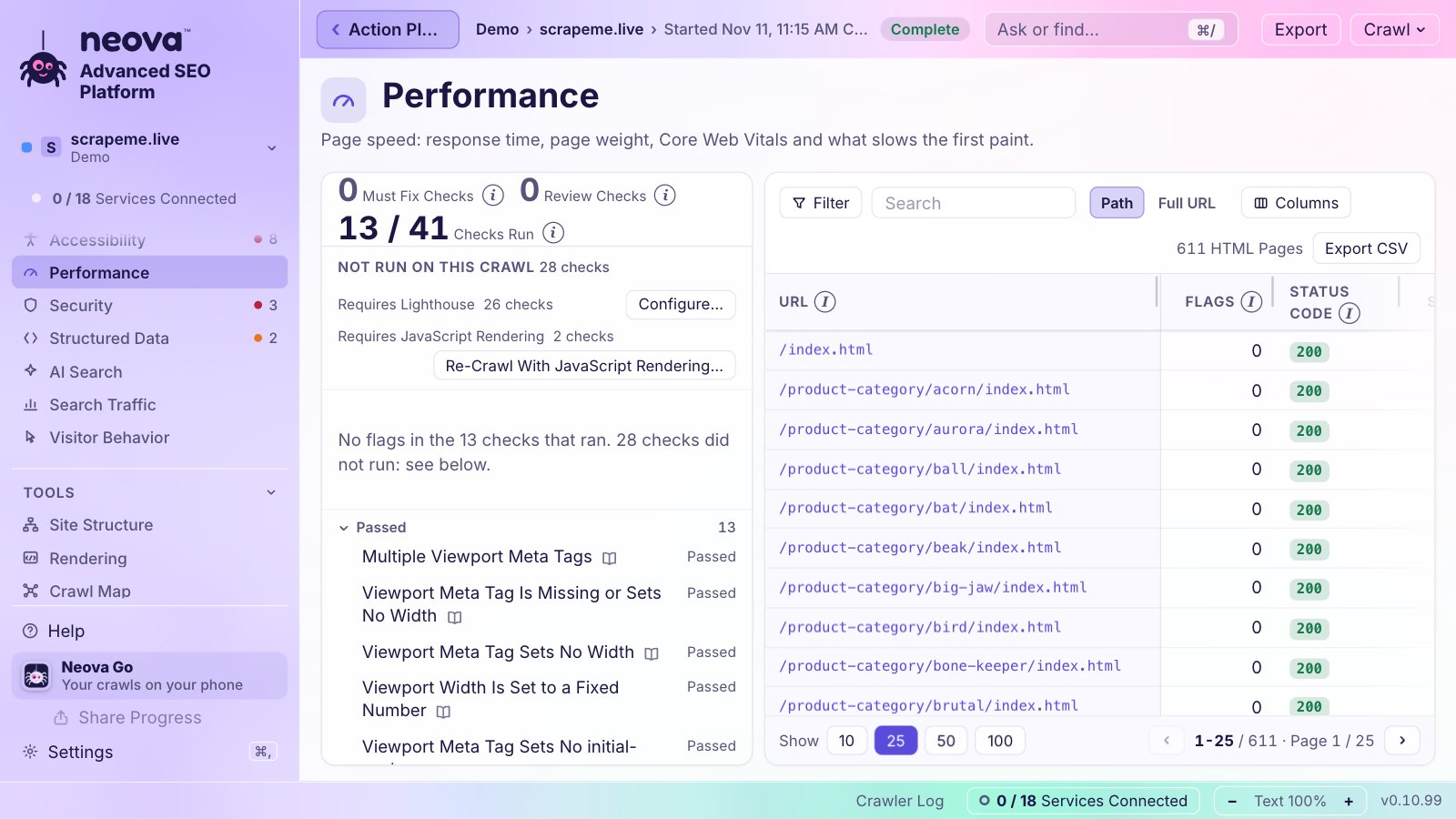
Page speed: response time, page weight, Core Web Vitals and what slows the first paint.
Runs Lighthouse lab checks on one HTML page per page group during the crawl.
LCP, INP and CLS of real Chrome users on phones, the 75th percentile, from your Chrome UX Report key.
Draws about 40 weeks of field data from the Chrome UX Report History on the first day, one point a week, with Google's good and poor lines.
LCP, INP and CLS of the most linked HTML pages of each page group, so a slow template shows itself.
Reads the Chrome UX Report for the origin, the most linked URLs of each page group and the 10 most linked URLs, without a crawl.
Takes the snapshot on its own, daily by default, or weekly or monthly, with the window closed.
Raises an alert when a metric gets a worse grade or comes back to Good, by Google's limits.
Shows the latest readings side by side, colored Good, Needs Improvement or Poor, with their dates.
Sets 0 to 3 HTML pages per page group for each snapshot and says the Chrome UX Report requests it uses.
The Site Audit level reads Core Web Vitals from the Chrome UX Report after the crawl.
Keeps every snapshot on your computer, past the 28 days the Chrome UX Report shows.
Flags text compression off, CSS and JavaScript not minified, short cache lifetimes and pages with no ETag or Last-Modified.
Flags render-blocking requests, long main-thread work, unused CSS and JavaScript, legacy JavaScript, HTTP/1.1 resources, slow third parties and a Lighthouse score under 50.
Flags slow server response, CLS over 0.1 and Core Web Vitals outside the good range, in lab or field data.
Flags pages whose JavaScript rendering takes over 4 seconds.
Flags missing or fixed viewports, zoom locks, and text under 12 CSS px on phones.
Median, 9 in 10 and the slowest response times while the crawl runs, with the 10 slowest pages.
What keeps people using assistive technology from using each page: names, labels, ARIA, landmarks, headings, tables and forms.
With rendering on, runs axe-core rules and visitor probes: contrast, keyboard focus, focus traps, 200% zoom, 320 px reflow and 24 px touch targets.
Flags buttons, links, form fields, images, dialogs and frames with no accessible name, and fields named only by a title.
Flags invalid roles and attributes, missing required attributes, wrong parent or child roles and deprecated roles.
Flags pages with no main landmark, duplicated or nested landmarks, skipped heading levels and no way to bypass repeated blocks.
Flags tables with no header cells, invalid scope and headers, and lists or definition lists built wrong.
Flags a missing focus indicator, focus traps, positive tabindex, dialogs that do not hold focus and scrollable regions with no keyboard access.
Flags text with insufficient contrast, text below enhanced contrast and links told apart only by color.
Flags zoom disabled, text cut off at 200% zoom, content cut at 320 px wide, orientation locks and touch targets under 24 px.
Flags video with no captions or audio description, silent video with no alternative and audio with no transcript.
Flags fields with no label or several labels, invalid autocomplete values, fields that block pasting and errors with no text.
A local model reads pages for 7 judgment checks such as charts with no text equivalent.
What AI crawlers may fetch, what they are served, and how AI answers cite the site.
Asks sampled pages as 10 AI agents (ChatGPT, Claude, Perplexity, their crawlers, Meta AI, Google-Extended, Common Crawl) and shows who gets full access and what robots.txt allows.
Judges a published llms.txt, a Markdown version through the Accept header, agent discovery manifests and WebMCP tools; a site without them is not flagged.
Flags key pages that block AI search crawlers or restrict snippets, and AI rules that differ from your written policy.
Flags a Markdown version that is empty or holds under half the main text.
Flags main content that starts after the first 5,000 characters of body text.
Flags invisible overlays over buttons and fields, task controls that are hard to see, and undated agent checkout decisions for Google UCP or OpenAI ACP.
Flags key pages that disallow Applebot and blocked user-triggered AI fetchers.
Flags falling Bing AI citations and key URLs Bing AI never cites, from Bing Webmaster Tools.
Reports AI-referred sessions and their engagement against organic, from Google Analytics 4.
Asks up to 20 of your prompts to ChatGPT and Perplexity through your DataForSEO account and reports brand mentions, cited URLs and third-party sites cited instead.
Says for each tracked search whether Google shows an AI Overview and whether it cites you, audit after audit.
Crawls with GPTBot, OAI-SearchBot, ChatGPT-User, ClaudeBot, PerplexityBot and other AI user agents.
Shows verified AI crawler visits and refusals per URL from the server log.
Runs your own prompts on each HTML page (meta description drafts, FAQ ideas, search intent, main entities) with Ollama on your computer or your Anthropic, OpenAI or Google Gemini key, answers as columns.
Runs 44 judgment checks across the categories with a local model through Ollama; nothing leaves the computer and its flags stay out of the counts.
AI assistants served, AI Overviews, what each AI assistant is served and requests by verified bots.
For each tracked search, loads Google's AI Overview 3 times through DataForSEO and reports how many of its sources rank on page one, whether your page ranks there and whether the Overview cites it, as a review.
Schema markup on each page: valid, with warnings, or with errors, and the Schema Types column.
Gives a verdict for each schema type on a URL.
Flags pages that lack a structured data or rich result type their page group carries.
Flags product prices not shown on the page, expired offers, dates that disagree and required properties missing.
Flags structured data with syntax errors, missing required or recommended properties, or text that differs from the page.
Flags Organization or Person markup that lacks identifying properties.
Checks Speakable selectors, paywalled pages without isAccessibleForFree false, and HowTo, QAPage and FAQ markup against the page.
Flags invalid rich results and AMP or rich result errors Google reports.
Compares Organization markup with the Google Business Profile, through DataForSEO.
HTTPS, mixed content and the security headers each page sends.
Lists the security headers each URL sends.
Flags HTTP pages, HTTPS to HTTP redirects, certificates that are invalid or close to expiry, and TLS 1.0 or 1.1.
Flags external scripts and styles with no integrity hash, and forms or password fields over HTTP.
Flags a missing Content-Security-Policy, Strict-Transport-Security, nosniff, clickjacking protection or Cross-Origin-Opener-Policy, and an unsafe Referrer-Policy.
Flags HTTPS pages that load HTTP or protocol-relative resources or link to HTTP pages.
Flags response headers that reveal the server or framework, and a Content-Type that does not match the file.
Flags a certificate that does not cover the hostname sent through SNI.
With rendering on, flags third-party cookies and permission prompts on load.
Signs in through Google's own page in your browser, read-only, and joins clicks, impressions and CTR to every URL of every crawl.
Joins visits and engagement to the crawl's pages for the analytics checks, connected with the same Google sign-in.
Holds one sign-in per Google account and uses the property's own account for each site.
Asks which Google Search Console and Google Analytics 4 property belongs to each site, preselecting the site's own.
29 checks joining Google data to the crawl, such as noindex, redirected or 4xx URLs that still get clicks.
Flags organic landing pages with 10 seconds or less of engagement, 80% bounce or more, forms with no key events, and organic sessions below 70% of the recent norm.
Flags searches where several URLs share the impressions, or where the home page or a non-indexable URL shows most.
Reports impressions and clicks by search appearance.
Flags GA or GTM IDs loaded twice and indexable URLs with no GA or GTM ID.
Ranks checks by the clicks of the URLs they flag, so the flags that cost traffic come first.
Keeps every month of Google Search Console data on your computer after Google deletes it at 16 months, with Archive Now and a monthly schedule.
Clicks and impressions per day for the last 28 days against the 28 before, on a chart.
The searches that bring clicks, with impressions and position.
Tracks up to 25 searches per property every day from Google Search Console: position over 7 days and 90 days, change, clicks and impressions, with searches at positions 4 to 20 suggested.
Inspects up to 200 URLs a crawl, the most clicked then the most linked.
Clicks and impressions from Google Discover, kept with each archived month.
Draws Google's ranking updates and incidents of the last two years on your clicks per day, with the clicks before and after each.
Clicks, queries, crawl errors and indexed URLs from Bing, with your API key and a Test that lists your sites.
Rankings, AI answers, competitors and backlinks through your own DataForSEO account, paid per request.
The real mobile position of each tracked search in the top 20, the best competitor beside it.
Searches a competitor ranks for in the top 20 and you do not, with their volume.
Reads a service you connected after a crawl and runs its checks again on that crawl, without crawling again.
Shows how many services are connected in the status bar, under the property in the sidebar and as a Dashboard block, each opening Connections.
Says the requests each connection makes for a property against Google's quotas, all on your own key and account.
Every crawl carries the links to Search Console's Security issues and Manual actions reports for the property, since Google's API cannot read them, so you can open both by hand.
Puts the property beside its competitors at their latest usable crawl, every metric colored by who leads and trails, with the gap to the best competitor.
Lists the metrics a competitor leads, the widest gap first, with the checks behind each number.
Takes a whole list pasted as it came, direct ones as primary (5 at most) and indirect ones as secondary, and queues their crawls in one step.
Reads each competitor's XML Sitemaps first, crawls 750 URLs by default and offers 1,000, 2,500 or 5,000 when the sitemaps list more.
Finds the sites that rank for the same searches through DataForSEO, sorted into primary and secondary.
Never proposes stores, delivery apps or marketplaces as competitors; you can still add them by hand.
Crawls a competitor where its home page now lives when it moved to another domain.
Proposes a "<property> | Competitors" sub-portfolio for a property's competitors and keeps it tied to the property.
Counts only the checks every compared crawl could judge, and ranks nothing against a crawl cut short.
Searches ranked, top 10, estimated visits and referring domains for the property and each competitor, audit after audit.
Referring domains and backlinks of the property and its competitors, from DataForSEO Backlinks.
Draws each competitor under its property with bars for URLs and flags and flags per URL compared.
A month calendar of every crawl and scheduled run, past and to come, with a property filter.
Full Site Crawls that run on their own Daily, Weekly, Every N Weeks or Monthly with the property's settings, with the window closed.
Google Search Console archives on a schedule, monthly by default.
Says what a scheduled crawl costs before it is added: URLs a run and runs a month.
Notifies 15 minutes before a scheduled crawl starts, and says it runs with the window closed.
Moves one run by 1, 3, 6 or 9 hours or to a date and time, or skips it, while the schedule keeps its rhythm.
Stops a scheduled crawl safely while it runs and gives it a new time.
Repeats the Full Audit every month from the scheduler; Neova finishes the analysis and the PDF when it next opens.
Raises alerts when Core Web Vitals change grade, clicks of the last 7 days fall 20% or more, a tracked search leaves or enters the top 10 or loses 3 positions, or a new crawl has new flags.
Keeps the latest 300 alerts, with Check Now and Clear Alerts.
Keeps Neova running when its window closes, in the menu bar with the crawl's progress beside the clock.
Keeps the Dock icon or leaves the menu bar icon only.
Starts Neova at login with its window closed.
A phone page added to the Home Screen by a QR code: each property's latest crawl, Core Web Vitals, Google Search Console clicks, tracked searches, next run and crawls in progress, locked on the Mac before it leaves.
The Mac sends the summary every 2 minutes while a crawl runs and every 15 otherwise; the phone checks every 2 minutes and says how old it is.
Makes a link for one running crawl so anyone can follow it and know when it ends, with its own key, giving nothing else away.
A copy of the live screen anyone can open: progress, URL Breakdown, Latest URLs, Live Crawl Map, Response Time, Redirects and Errors, Checks and Links & News.
The shared page can notify its reader when the crawl ends.
Every 3xx, 4xx, 5xx and No Response group of the whole crawl, up to 100 URLs each, the most linked first.
Posts alerts and how each crawl ends to one or several Slack channels through an incoming webhook, proved by a test message.
Posts alerts and how each crawl ends to Teams channels through a Workflows webhook.
Sends each portfolio's or property's messages to its own channels.
A system notification when a crawl ends while Neova is not in front, with a sound to choose.
Lists everything Neova does now, the crawl, an audit, Run the Checks, a scheduled crawl and the queue, each with the button that opens it.
Every count with a previous value carries its change since the previous comparable crawl.
Fetches only a list of pages, no discovery, and raises page alerts for status, redirect target, title, canonical, noindex, H1 and size changes.
The state of the crawl at a glance: Crawl Summary, Top Checks, Next Actions, Status Codes and Changes vs. Previous Crawl, every number opening its list.
Every check with flags: severity, URLs flagged of checked, how many are indexable, change since the previous crawl, category and clicks.
Each check says Flagged When, What This Usually Means and What You Could Do, with its ID, its source and About This Check, which opens its page in the check library.
Every URL with column sets, filters on any column, saved views, a column picker, frozen URL column and 10, 25, 50 or 100 rows a page.
Every table and grid exports what it shows as CSV.
Every column, count and card has an ⓘ that says what it counts.
Eight groups and 13 tabs built from 39 blocks: summary, performance, technical, Core Web Vitals, content, keywords, AI search, social, competitors, algorithm updates, workflow, program and reports.
Up to 10 dashboards of your own, started new or duplicated from a tab, blocks added, moved, sized and removed.
The Action Plan as a program by status and owner, each item's check with its flags on the latest crawl, red when an item marked Done is still flagged.
One ticket per check and page group, Must Fix first, with the rule, evidence, affected URLs, done when, how to check and where to fix (the template when 90% of a group is flagged).
A later crawl closes, keeps or reopens each ticket by its key, never deletes one.
Starts every ticket with the property's code, such as [DRH], and carries it as a label to Jira and Linear.
Creates one Jira ticket per Neova ticket in your Jira Cloud project with priority, labels and the URL list attached, never twice.
After each full crawl from the window, moves a gone ticket to Done, reopens one that came back and updates the rest.
Files shaped for each tool's own CSV import: Jira, Linear, Asana, ClickUp, monday.com, Azure DevOps Boards, Notion, Airtable, Smartsheet, and Basecamp's Markdown to-do file, each with its import page.
A client report with your name, logo and color: the crawl in numbers, flags by category, what to fix first with example URLs, rendering and AI visibility, changes since the crawl before and how the crawl was made, in Letter or A4; checks of one family count once, the second listed as Also Flagged.
Gives each client its own name, logo and color on the report, with Prepared For, Prepared By and notes.
One workbook: Summary, Tickets in fix order, By Page Group, a sheet per check with its 1,000 most clicked then most linked URLs, and All Flags.
Every HTML page that answered 200, up to 200,000, with title, description, H1, canonical, indexable, depth, inlinks, sitemap, size, response time, clicks and flags.
Sends the workbook to your Google Drive converted to Google Sheets.
One ZIP of what you pick: the PDF, the workbook detailed or brief, the tickets with their URL lists, the Jira and Linear files and every flagged URL as one CSV per check, with a README.
The URLs, flags and tickets as CSV files, for CSV, Excel (UTF-8 with BOM), Google Sheets and Looker Studio.
Each export carries a note when the crawl ran without rendering or covered part of the site.
Saves exports in Downloads by default, in a Neova exports folder.
Saves exports to a folder you pick on the computer.
Uploads to the Google accounts signed in to Neova through Google Drive's own interface into their Neova exports folder, replacing a file of the same name so its shared link keeps working; Neova sees only its own files.
Saves into the folders the Google Drive, OneDrive, Dropbox, iCloud Drive, Proton Drive and kDrive apps sync on a Mac (OneDrive, Dropbox and Google Drive on Windows), each account off until you turn it on.
Uploads exports to your own server by SFTP with a password or key file, FTPS, or plain FTP, tried before it is kept, the server's key remembered.
Saves each portfolio's or property's exports in its own folder or drive.
In Neova Online, writes an export straight into a folder on your computer in Chrome, Edge, Vivaldi, Brave and Arc; other browsers download it.
In Neova Online, a folder export such as the CSV tables or the Markdown pages downloads as one ZIP.
One read-only link of a portfolio or a property with the crawls, Action Plan, analyses, competitors and files you tick, encrypted on your computer with a key that travels only in the link; Update keeps the address and Turn Off deletes it.
What to do in order: drafted from the crawl (Must Fix first, then clicks, then reach), reordered and worded by you, items of your own added, with status, owner and note, kept across crawls.
Copies the plan as Markdown or exports it as CSV.
Writes the full audit on your computer: current state, prioritized flags, search visibility, tracked searches, keyword gaps and prioritized actions filled in, with the sections only a person can write marked To Write.
Keeps reports you add (Markdown, text, PDF or Word) with the property, with Mark as Reviewed.
Opens an email to Neova Labs with the crawl's numbers already in it, for the sections no check writes.
One run of every step: the crawl with every check on, Google, Bing and Analytics, Core Web Vitals, competitors and their crawls, DataForSEO search data, the Action Plan, the analysis and the branded PDF.
Run a Full Audit asks whether to read the latest crawl or crawl again, with its URLs and the time it took.
Crawl A against Crawl B: URLs new, removed and changed, flags new and resolved, Crawl B colored better or worse.
Everything kept for a property past the sources' own retention: every crawl, every Google Search Console month, every Core Web Vitals snapshot, robots.txt versions, XML Sitemaps and URL changes.
Every suggestion, ticket and report carries the line that it is to review before applying, since Neova sees the pages, not the business behind them.
A scheduled crawl posts how it ended to Slack and Teams and the monthly Full Audit makes its PDF when Neova next opens; no export file is written on a schedule yet.
The PDF report and the workbook say how the pages are rendered (overall, per page group and page by page), what robots.txt lets each AI crawler take and what the server hands it, and which AI Search checks passed or flagged.
A Google Sheet built for Sheets from the crawl: Overview with charts, an Action Plan with Owner, Status and Due drop-downs, Issues, URLs, Flags, Page Groups, Redirects & Errors, Rendering & AI and About, saved to your Google account as a new file each time.
Every file Neova makes from a crawl (Client Pack, PDF, workbook, Google Sheet, exports, Neova files) is listed with where it went, the crawl, the date and its size, with Open, Open the Folder, Copy the Path and Open in Google Drive.
The same Neova window in a browser at app.neova.app, its engine on Neova's server, crawling and checking there.
Accounts open from an invitation link, named or open, one link one account.
A password stored hashed, a sign-in that lasts 30 days from your last visit, a wait after 10 wrong passwords, requests from other sites refused, and a note when the page is opened in another app's built-in browser.
Each person's crawls, data and downloads in their own folders, never readable by another person.
One job a person at a time, 10,000 URLs a crawl, 10 URLs a second and 10 GB of crawls an account while Neova Online is tested.
Connects Google Search Console, Google Analytics 4 and Google Drive from the browser, the sign-in kept in your own space.
Keys and webhooks are kept in your Neova Online account, never shown again.
Every new account starts with a Demo: a test shop and three competitors already crawled, with portfolio settings, codes and an Action Plan, removable in one step.
An invitation can carry portfolios copied from another account with their latest crawls, settings and plans, with a banner while they are prepared.
The window fits phones and tablets: the sidebar becomes a drawer, sheets take the whole screen in one column, tables scroll sideways.
Signs the desktop app in once to Neova Online; the app keeps a key for that computer, never the password.
Keeps portfolios, competitors, your order, the Google Search Console and Google Analytics 4 choices, colors and codes in step on their own.
When one side already holds the other's content, signing in merges at once without asking; when both really differ, it asks where to start from, Keep Neova Online's, Keep This Mac's or Merge Both (recommended, it loses nothing), with each side's counts and a backup set aside first.
Uploads or downloads whole crawls in resumable parts checked at the end, beside any running crawl.
Sends each crawl that ends on this computer to Neova Online; off by default.
Neova Online shows a deploy at the next page load, never an old cached window.
Serves the installers and the tutorial video for testers, noindex.
Brings the connection keys your Neova Online account holds to this computer, or sends this computer's to it, after your password, showing only each key's last 4 characters and never replacing a key unless you tick Replace.
Each Neova Online account may keep 10 GB of crawls; Settings says how much the account holds and how many crawls, warns from 85%, and an upload or a crawl past the room is refused with what to do.
Neova SEO Platform for the Mac, its engine on board as native code, crawls on your computer.
A Windows x64 installer for your own account, no administrator password needed; tester build, not signed yet.
On Windows the app says this PC and uses Ctrl for every ⌘ shortcut.
The desktop app on Linux: a .deb for Ubuntu, Linux Mint and Debian, and an AppImage that needs no install.
The window and the check library in English, French, German, Spanish, Portuguese (Brazil), Italian, Japanese, Dutch, Polish, Turkish, Korean, Chinese (simplified), Russian, Indonesian and Vietnamese.
Neova Marble (the default), Neova, macOS, Liquid Glass, Windows 11, Linux, Terminal and High Contrast; a look changes colors, never where things are.
Light, dark or the system's choice, with an accent color.
Compact or Comfortable rows and text that scales with ⌘+ and ⌘−.
Shows URLs as a path or with protocol and host, in every table.
Writes dates and times your way or the language's way.
Shows or hides the Home row; the Neova name at the top left opens Home either way.
⌘N New Crawl, ⌘K Search Properties, ⌘, Settings, ⌘[ Back, ⇧⌘P Presentation Mode, ⌘/ Ask or Find.
One field finds a view, a check by title or ID, a page of the crawl, a property or a setting, with recent picks kept.
A longer question goes to a model on your computer, which picks an answer from what the window already shows, so it never makes up a number.
Blurs every portfolio but the one open, for screen sharing with a client.
Returns to the screen before, named on the button.
One focus ring, every row reachable by Tab, arrow keys inside tables, sheets as dialogs, and reduced motion respected.
Drag the sidebar, the list of checks and the detail pane to the width you want.
Quit asks once while a crawl runs, then saves it with its steps and progress shown, and Resume continues it later.
Names any scheduled crawl running in the background and offers to stop and save it before quitting.
A crawl running when Neova is updated saves itself and is continued by Resume.
A stop appends only the new HTML and says each saving step with a bar and Close Now.
Watches the free disk space during a crawl, warns when it gets close and stops safely below 3 GB, so Resume continues once space is freed.
A crawl cut by a crash or a closed pipe is listed as interrupted, never dropped, and its store is rolled back safely.
The queue and audits keep running while the window is hidden.
Checks app.neova.app for a newer build when the app opens, every 30 minutes and when the window comes back to the front, sending only the version number.
Copies the window's settings to a file after each change, one backup per version, restored if the window's storage is reset.
Moves where Neova keeps its crawls.
The icon carries Neova SEO under the spider from 64 px up.
A newer build shows New Version Available at the top left, in the toolbar, first in Help and in Settings › General, with Download; the app checks every 30 minutes and when the window comes back to the front.
Every table sizes its columns to what they hold, giving the width left to the URL and the columns cut first; every column head has a grip to drag, double-click fits, and a width you set is kept.
An optional animated mascot, 8 to choose from (Webster, The Head, Sir Canonical, Polly Glot, Hopper, Shelly, Bo, Zap), cute or pixel art, that watches your crawls; None by default, and with None nothing is loaded.
A speech bubble when a crawl needs you: a crawl's end with its Must Fix checks and how many are new, a crawl stopped or failed, a site blocking the crawler, the disk getting full, a scheduled crawl starting; a click opens the screen it names.
A click on the pet says what Neova is doing and, with a crawl open, takes a question about it, answered through the Ask bar's path (Ollama on your computer or your own AI key).
On the Desktop, the pet has its own window above every window and on every Space, out of the Dock; Neova keeps watching while minimized and a click brings it back on the right screen.
Seven sizes from Tiny (56 px) to Colossal (320 px), Big by default, and a toolbar under the pet: Open Neova, New Crawl, In Progress and More (hide, settings, mute), on hover or always.
Crawls are kept in Application Support/Neova on a Mac and %APPDATA%/Neova on Windows; nothing is sent to Neova unless you sync or share.
Every key, token and sign-in goes to the system keychain through the engine's standard input, never a file, a command line or the screen.
The app carries no key of Neova's: Google, Chrome UX Report, DataForSEO and the others use your own key and account.
The engine ships as native code with no readable source.
Google is connected with read-only scopes plus your email; Disconnect revokes the token at Google.
DataForSEO is off unless New Crawl turns it on for that crawl.
Before Start, estimates the cost from what DataForSEO charged this computer for its last 20 calls of each kind, else its price list, rounded up to the next $0.50 or dollar.
Stops asking DataForSEO once the cap you set is reached, $0.50 to $10 a crawl, $1 by default.
The Full Audit's search data stops at its own cap in US dollars and says what it spent.
Server logs are read on your computer; no IP address is written anywhere.
AI Review and Ask use a model on your computer through Ollama, so nothing leaves it; AI Prompts says when page text goes to a provider you chose.
Share links, Neova Go and Share Progress are encrypted on your computer with the key only in the link or QR code, so the server stores what it cannot read.
Sharing which glossary pages you open is off by default and sends only a random ID, the check and the language.
A deleted crawl goes to the Trash, where it can be put back, with bulk selection of old stopped crawls.
NeovaBot says who it is, respects robots.txt and 3 URLs a second by default, and never solves a CAPTCHA.
Saves a crawl, a property with all its crawls and data, or a portfolio as one .neova file, with or without the stored HTML, to Downloads, Google Drive, any drive or folder; schedules, connections, keys and passwords are never in it.
Installs a .neova file made on any Mac, Windows or Linux computer, saying what is new, already here or comes under another name before anything is written, and never replacing what this computer holds.
The neova command crawls, imports, publishes and reads sites, pages, flags, tickets and alerts from Terminal or scripts, as tables, CSV or JSON.
neova check compares a crawl with a baseline and exits 3 on new flags, or on a flag that grows past a share of URLs.
Gives AI assistants read access to your crawls, flags, tickets and settings over 16 tools, the data staying on your computer.
Adds Neova to Claude Desktop in one click, with copyable setups for Claude Code, Codex, Cursor, VS Code, Gemini CLI, LM Studio, Windsurf and ChatGPT.
Starts, stops and deletes crawls from an assistant, each start and delete asking your yes first.
Reads a crawl's log and names what went wrong (429 or 503 runs, 403s, robots.txt blocks, JavaScript-only pages, too few pages) with the setting to change.
One plain JSON file holds the exclusion list, the defaults and each property's settings and check switches.
Opens a Screaming Frog Internal export (with All Inlinks), a Sitebulb URL export, SiteOne Crawler's JSON or any CSV with a URL column, and runs the Neova checks on it.
Grades an import by re-fetching a sample of 50 URLs at 2 URL/s and against the live sitemaps, so an import never pretends to be a crawl.
Neova Online's HTTP API at app.neova.app/api/v1: read portfolios, properties, crawls, flags and tickets, start a crawl, and manage tickets, each script with its own Read Only or Read-Write key, 60 requests a minute per key and 20 keys an account.
Requests from search engines and AI crawlers per URL of the crawl, from the site's own access log.
Counts a request for Googlebot, Bingbot or an AI crawler only when its address is on the list its company publishes; a name used elsewhere is counted apart.
Lists HTML pages Googlebot never visited in the log window and URLs the bots asked for that the crawl does not know.
Counts the 429 and 403 answers each bot got.
Reads an Apache or Nginx combined log, plain or gzipped.
For a site behind Cloudflare, collects the search engine and AI crawler requests in your own Cloudflare account and reads them before each crawl, no server access needed.
Writes the request to send IT: crawler lines only, nothing to install, what security needs to know.
A Dashboard block of the bots' requests.
Matches every URL of the old site crawl to the new site crawl with a confidence, for a migration on the same domain or another one.
Checks each old URL's live redirect against the map and flags the wrong or missing ones.
Compares a staging crawl with production: status code, noindex, canonical, title, meta description, H1 and URLs only in one crawl.
Swaps which crawl is old and new, or staging and production.
Ignores robots.txt and goes faster on a site you confirm is yours, with HTTP authentication and custom headers.
Crawls a list of old URLs to check where each one lands.
When a staging subdomain's start page links mostly to the live site, New Crawl shows the counts and adds the URL Rewriting rule and the live site's XML Sitemaps in one click; an added XML Sitemap no rule moves onto the site is flagged before the crawl starts.
Each property of yours as a block in its color with its logo and key numbers, its competitors as rows under it.
Drag properties into your own order, kept on the Mac, online and on the phone.
Folds a family to one line, Collapse All and Expand All, and a pinned search reached with /.
A table of every property with each competitor nested under its property.
One hub per site: its crawls, For the Client, Core Web Vitals, Google Search Console, competitors, Action Plan, analysis and schedules.
Branded Report (PDF), All Flags Workbook (Excel) and the tickets, one button each, made from the crawl open.
Each button on the Property head says what it does and how it differs from the other.
Groups properties by client or company, with a color, and sub-portfolios one level deep.
Gives each property a color and a 2 to 6 letter code suggested from its domain.
Finds a property with ⌘K, the pinned and running ones first, each portfolio with its properties and competitors under them.
The latest five crawls of the property with what became of each, one click to open.
Selects crawls by box or Select Older Stopped and Interrupted, then Delete Selected.
Every list row has one main button, then ⋯ and right-click with every action, Delete last in red.
The check library at app.neova.app/checks, Neova SEO Platform Help, What's New, Report a Problem, keyboard shortcuts and Check for Updates.
Download, install, your first crawl, Neova Online and the desktop app, optional connections and the changelog, at app.neova.app/help.
All 694 checks by group at app.neova.app/checks, each with its own page and source, opened from About This Check wherever a check is named.
Says once that Neova's results are automated analysis for information, and you decide what to change.
Every check's pane has About This Check, which opens the check's own page in the check library, with what it flags and its source.
Every version since the first build, newest first, each change tagged New, Better or Fixed with its release time in your time zone, opening by itself once after an update; Coming Soon on top lists what is planned.
Builds one ZIP for support with the app's versions and the chosen crawl's log and small files, secrets masked, and says what it holds and never holds before it is made.
No feature matches that search.
Free plan, or 14 days of Desktop free, no card. Mac, Windows and Linux. Your crawls stay on your computer.
Download NeovaNeova Online, the same Neova in the browser, comes with Desktop + Online and Agency: see the plans.