Screaming Frog and Sitebulb set the bar for SEO crawlers, and we learned a lot from both. Here is Neova next to them and to Semrush, Ahrefs, Lumar and JetOctopus, from their own docs, with links.
4places to use it: Mac, Windows, Linux, any browser
15languages
Crawl Several Sites at Once
Desktop App
Crawl your client, its competitors and your own site in one go. Up to 4 sites crawl at the same time in one window, each at its own pace and URL limit, and a memory guard holds the next one back when your computer runs low.
Two Crawls, One Window2 Crawls Running at the top: click one to watch it.In ProgressEvery crawl, its pace, the slots in use and the free memory.
Up to 4 at OnceStart one crawl, then another: up to 4 sites crawl at the same time. Settings › Crawl › Crawls at Once, 2 by default; the next one waits its turn in the queue.
Each at Its Own PaceEvery crawl keeps its own speed, URL limit and settings, so a slow client site never holds the others back.
A Memory GuardEach crawl sets aside the memory it needs, more with JavaScript rendering. When the computer runs low, the next crawl waits and says why.
One Window for All of ThemSwitch between the running crawls at the top of the live screen. In Progress shows them all, each with Pause, Stop and Open.
Screaming Frog: one crawl per copy of the app: a window, and its memory, for each site. source Sitebulb: the desktop app runs audits one after another; at the same time only on Sitebulb Cloud's Medium and Enterprise plans. source
A Look Inside
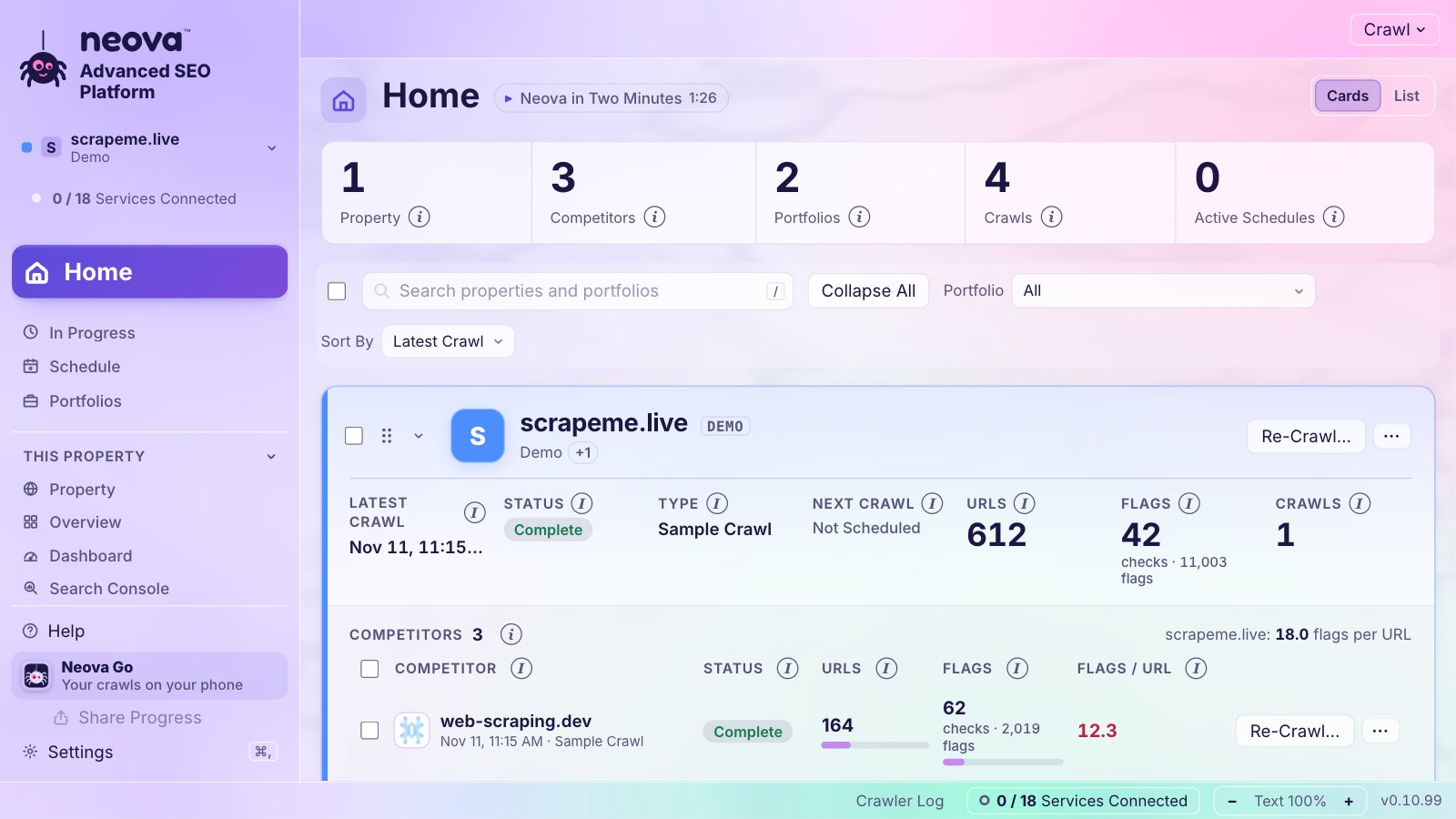
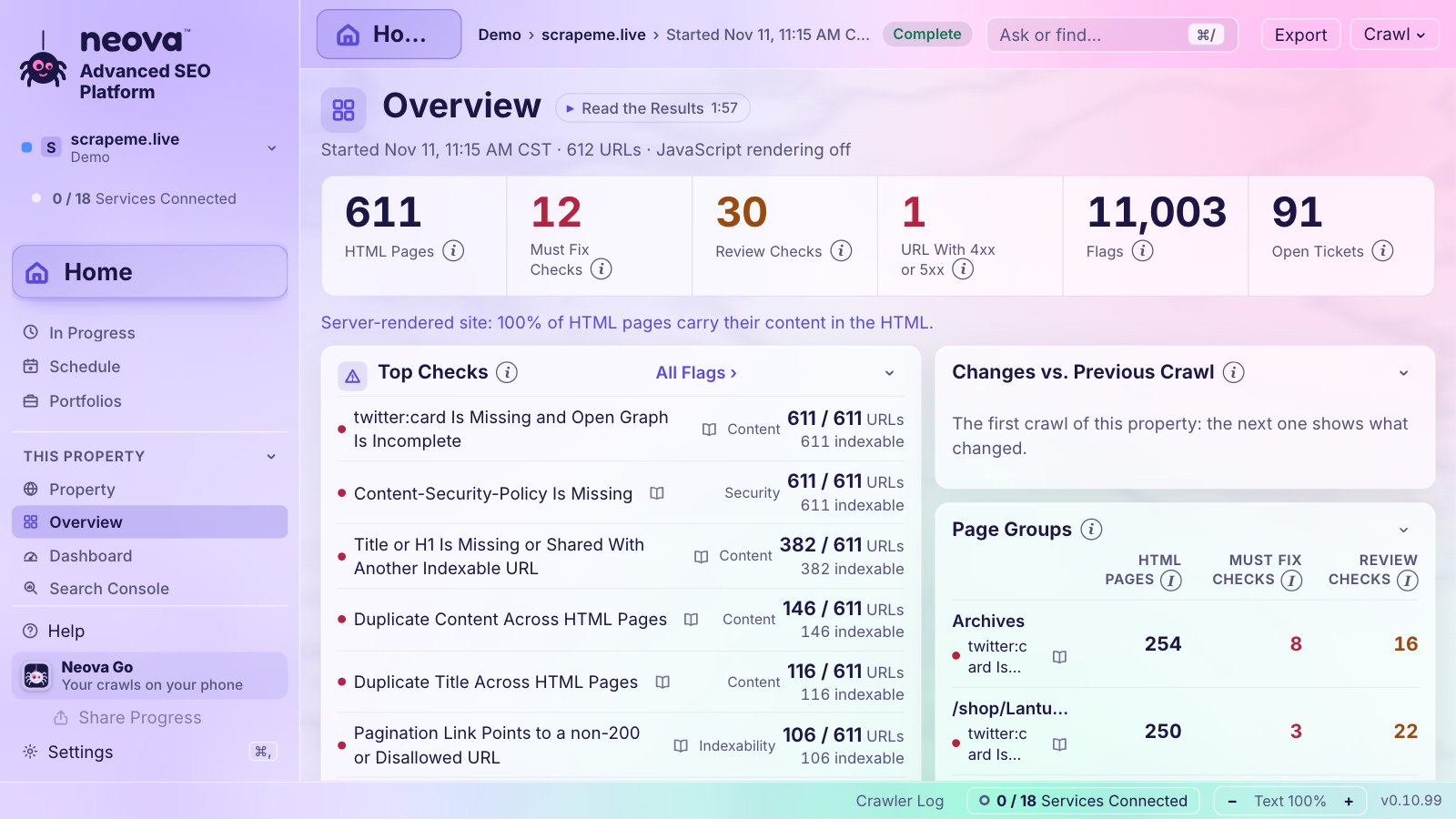
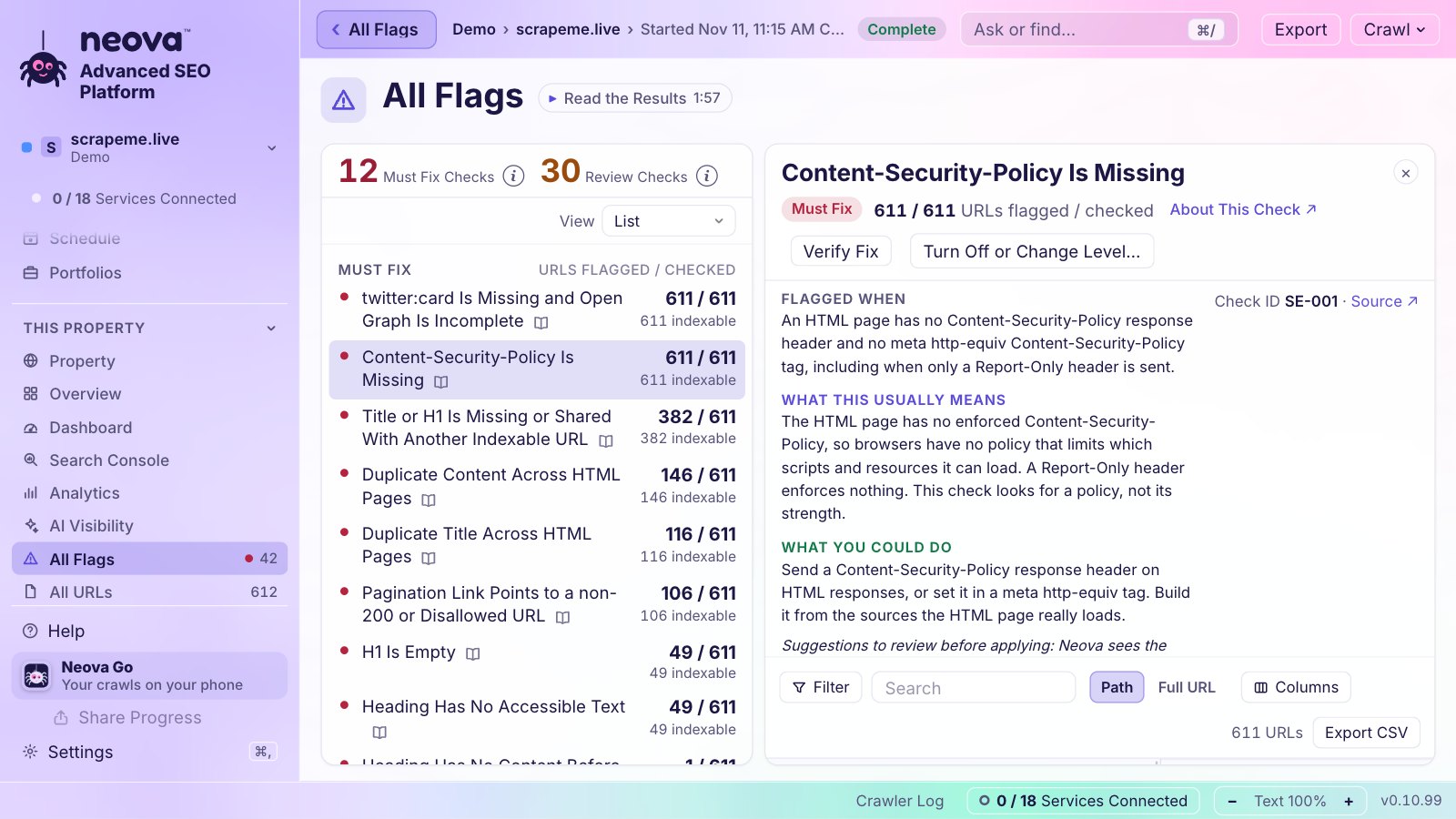
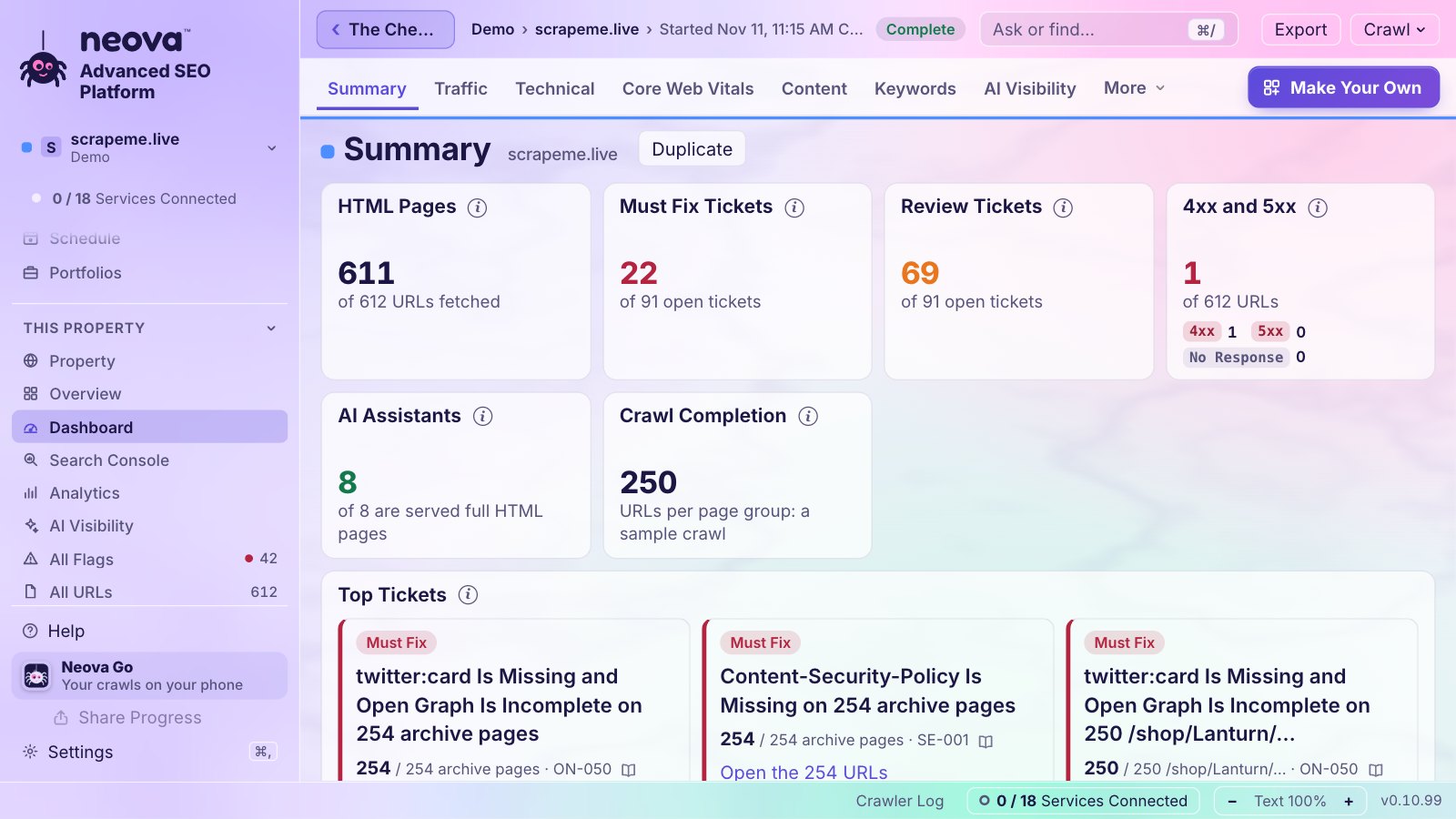
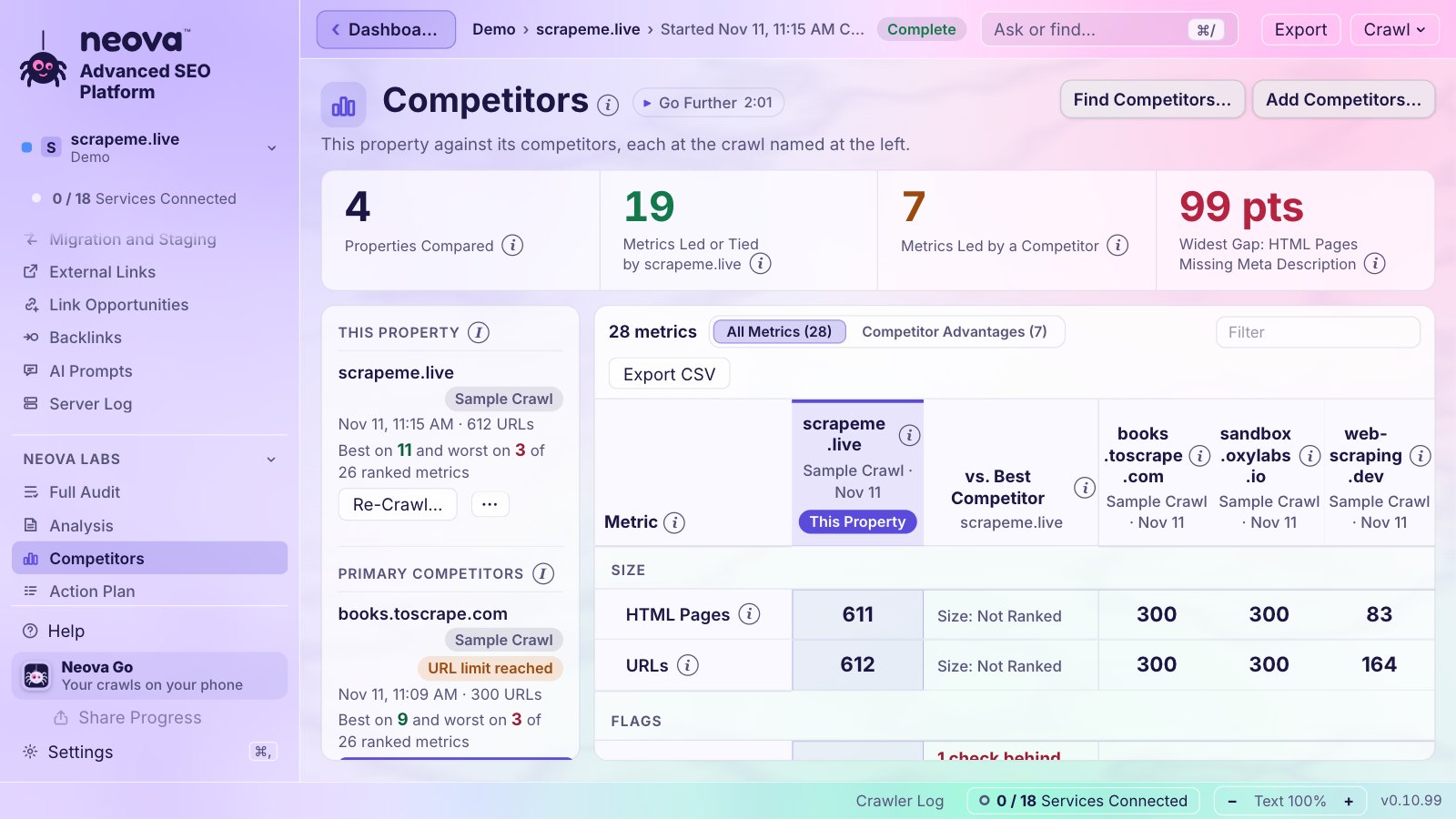
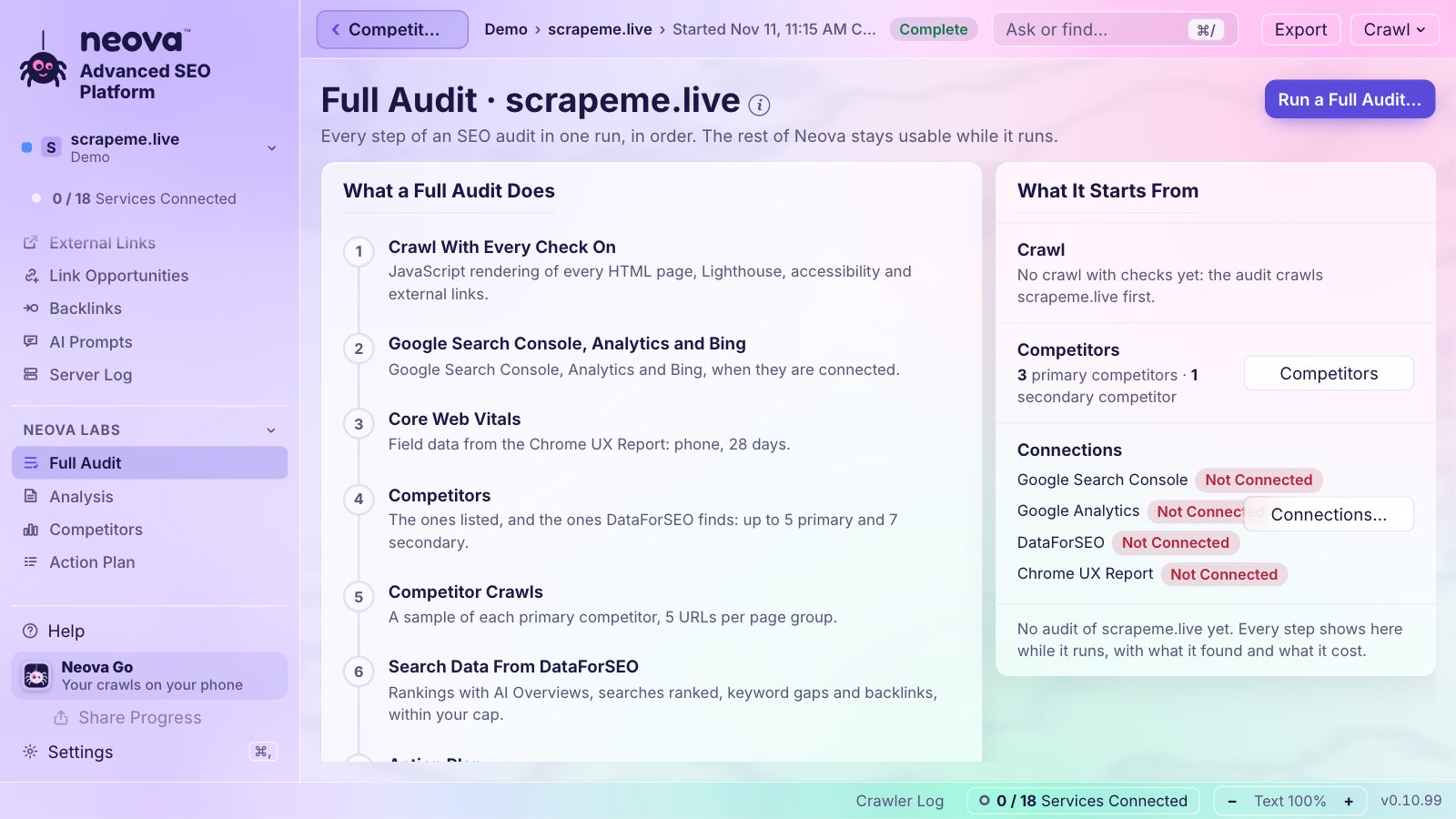
Neova on the demo shop every Neova Online account starts with. Click a screen to see it full size.
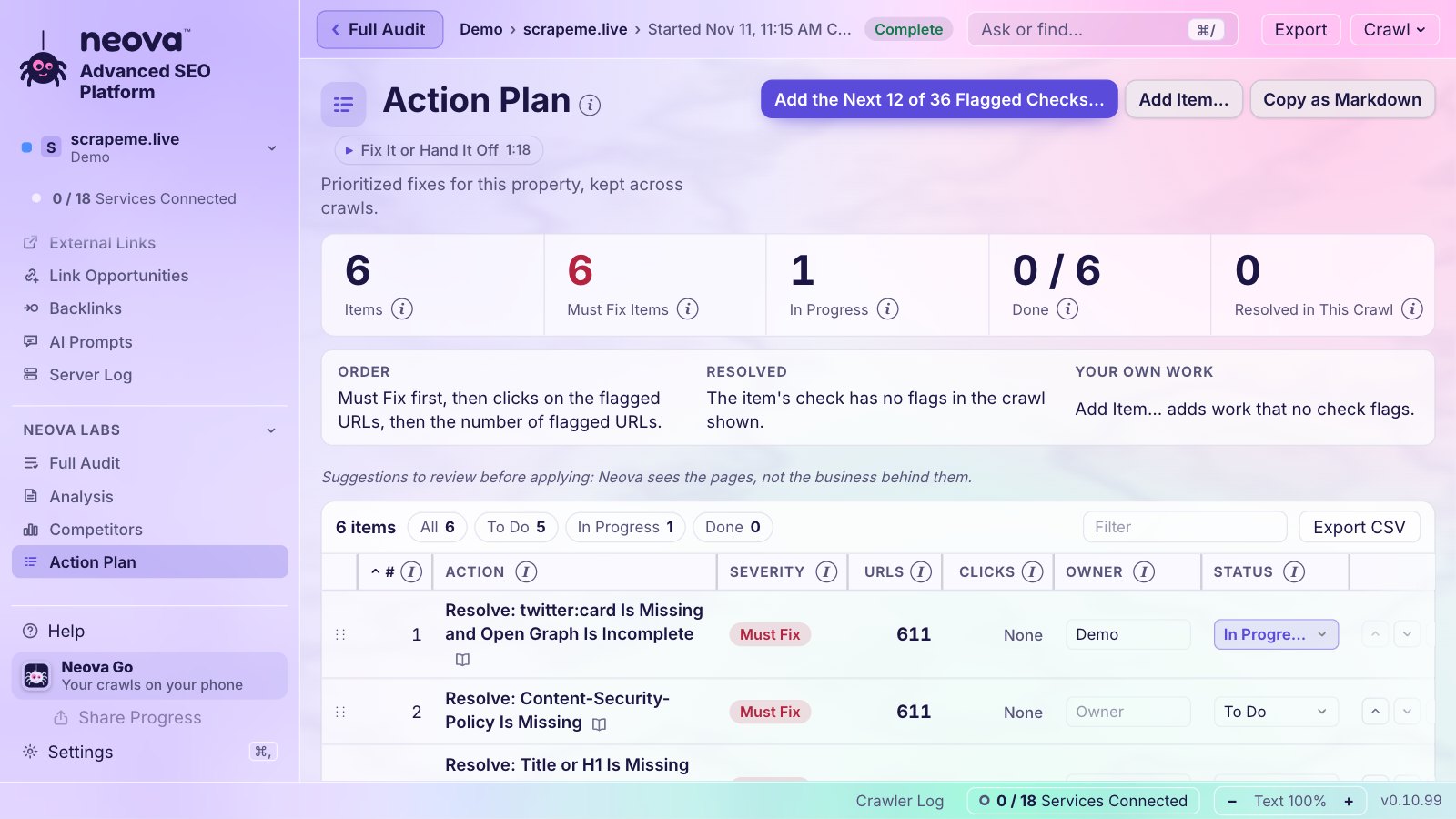
HomeEvery property with its competitors, URLs and flags per URL.The Live CrawlSteps, the crawl map, response times and every URL as it comes.OverviewThe site at a glance: top checks, changes, page groups.All FlagsEvery flag with why, how to fix it, its source and its pages.The Dashboard13 tabs, 39 blocks, and dashboards of your own.CompetitorsYour site next to theirs, metric by metric, colored by who leads.Full AuditCrawl, search data, competitors, plan and report in one run.Action PlanEach fix with an owner and a status, sent to Jira if you like.
Only in Neova
Checked in their docs
What Neova does that none of Screaming Frog, Sitebulb, Semrush, Ahrefs, Lumar and JetOctopus does, according to their own documentation, read on November 11, 2026. Each card says what it is in plain words, and why it matters.
Share a Live Crawl With Anyone
Share Progress gives you a link to the crawl that is running. Anyone opens it on a phone or a computer, no account, and watches it live: progress, the URL breakdown, the crawl map, response times, redirects and errors, and a notice when it ends.
Details
Your client or your boss follows the crawl without signing in to anything, and sees that crawl and nothing else. Stop Sharing ends it at once.
Screaming Frog: a Looker Studio crawl overview, fed by a Google Sheet that updates 'each time the scheduled crawl is run', can be emailed to 'any stakeholders'. source Sitebulb: Cloud's Data Studio dashboards open 'without needing a Sitebulb account' and update 'Every time a crawl runs' source Semrush: invited viewers 'still need to create an account' source Ahrefs: clients get outputs 'via exports, scheduled reports, or live Data Studio dashboards' source Lumar: 'public links allow anyone to view the crawls and reports', expiry '24 hours to 6 months' source JetOctopus: no public link found source
Share Every Crawl, Locked With Your Key
Publish a share link and Neova encrypts the site's crawls on your computer before they leave it. The key lives only in the link, so not even our server can read them. Stop Sharing, and the link opens nothing.
Details
Hand a client the whole audit, every tab and every table, and stay in full control of who sees it and for how long.
Screaming Frog: a Looker Studio crawl overview, fed by a Google Sheet that updates 'each time the scheduled crawl is run', can be emailed to 'any stakeholders'. source Sitebulb: Cloud's Data Studio dashboards open 'without needing a Sitebulb account' and update 'Every time a crawl runs' source Semrush: invited viewers 'still need to create an account' source Ahrefs: clients get outputs 'via exports, scheduled reports, or live Data Studio dashboards' source Lumar: 'public links allow anyone to view the crawls and reports', expiry '24 hours to 6 months' source JetOctopus: no public link found source
Your Computer, Your Browser, Your Phone
Crawl on your own Mac, PC or Linux machine, open the same portfolios, settings and crawls in Neova Online from any browser, and keep watch from your phone. One account, kept in step.
Details
Desktop crawlers stay on one computer, cloud crawlers stay in a browser. Neova goes where you are, and your crawls stay on your computer unless you choose.
Screaming Frog: Not found in their docs. source Sitebulb: Desktop plus browser Cloud source Semrush: browser platform plus an iOS app for rankings only source Ahrefs: browser only; Ahrefs says you can view crawl results 'from any location at any time' and 'even from your smartphone' (2024). source Lumar: Not found in their docs. source JetOctopus: Not found in their docs. source
Neova Go: Your Sites in Your Pocket
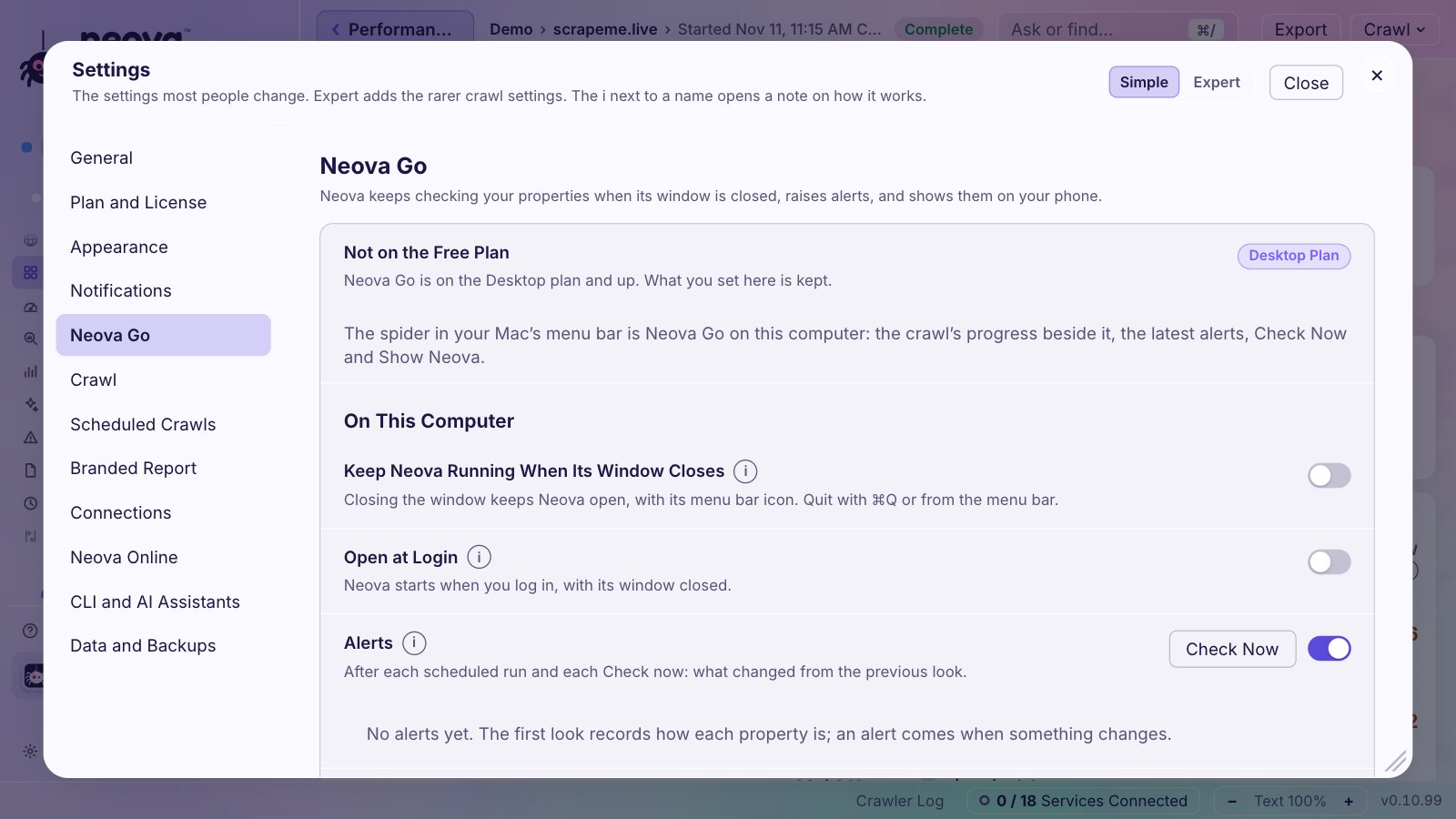
On your phone, every property's latest crawl, Core Web Vitals, clicks, tracked searches and next run, locked with a key that never leaves your computer. On your menu bar, the crawl's progress next to the clock, and Postpone or Skip for the next scheduled crawl.
Details
You know a crawl ended or a template got slower without opening your laptop.
Screaming Frog: Not found in their docs. source Sitebulb: Not found in their docs. source Semrush: an iOS app for rankings only source Ahrefs: no phone app found. The cloud web app works on phones source Lumar: Not found in their docs. source JetOctopus: Not found in their docs. source
Tickets That Close Themselves
Flags become tickets, one per check and page group. When the next crawl finds the problem fixed, the ticket closes; if it comes back, it reopens. Send to Jira, and Jira follows.
Details
Your developers get one clear ticket instead of 4,000 URLs, and nobody chases tickets that were fixed weeks ago.
Screaming Frog: Not found in their docs. source Sitebulb: no native Jira. The Dev Handoff Skill, run through an AI assistant, writes tickets 'straight into Jira, Linear, Asana, Monday or ClickUp'. source Semrush: Site Audit can 'send tasks to a Trello board' source Ahrefs: no Jira or ticket feature found. source Lumar: Tasks are created from reports by hand and moved by 'dragging and dropping tasks into different status sections' source JetOctopus: Not found in their docs. source
Every Check Names Its Source
Each check says which page of Google, the W3C, web.dev or another official source it rests on, with the link, and what to do about it.
Details
When a developer asks why, you send the source, not your opinion.
Screaming Frog: all 8 issue guides sampled end with 'Further Reading' linking Google or web.dev, but as reading, not the rule's basis source Sitebulb: many Hints end with 'Further Reading' (Google, MDN, Lighthouse docs, also blogs), but 'Canonical points to a redirecting URL' cites no source at all. source Semrush: some fixes link Google ('please see this Google article') source Ahrefs: some help pages link Google ('This guide from Google will tell you everything'), while issue pages like 'Hreflang to broken page' cite no outside source. source Lumar: Not found in their docs. source JetOctopus: Not found in their docs. source
Bing Webmaster Tools, Including Bing AI Citations
Neova reads Bing's own data about your site, including how often Bing's AI answers cite your pages.
Details
Bing feeds ChatGPT search and Copilot. Its data shows your AI search visibility.
Screaming Frog: Bingbot is a user-agent preset only source Sitebulb: Bing is a user-agent preset only source Semrush: Bing rank tracking only source Ahrefs: Site Audit pushes changes via IndexNow ('supported by Bing, Yep, and other search engines') source Lumar: no Bing Webmaster Tools source JetOctopus: Bingbot in logs and the robots.txt tester ('Full data on Googlebot, Bingbot, GPTBot, ClaudeBot and 40+ other crawlers') source
Open Your Screaming Frog and Sitebulb Crawls
Already crawled the site with Screaming Frog or Sitebulb? Open that crawl in Neova, and its pages are graded against the live site with Neova's checks.
Details
Keep the tools you know, and add Neova where it helps, without crawling twice.
Screaming Frog: list mode reads URLs from any .txt, .xls, .xlsx, .csv or .xml file ('you can directly upload an Adwords download') source Sitebulb: imports URL lists (.csv or .txt) source Semrush: Backlink Audit imports backlink files (CSV, 'up to 50 MB') source Ahrefs: Not found in their docs. source Lumar: imports CSV exports as crawl sources (Majestic, Ahrefs, Open Site Explorer, Screaming Frog Log File Analyser, Splunk, Logz.io source JetOctopus: generic import only: 'For import, you can use a file in CSV or TXT format', joined by URL key source
Built In, Not Sold Separately
The others have these too, often as an add-on or a separate product with its own price. In Neova they are part of the app. Where outside data is needed, such as DataForSEO or Google, you use your own account at its own price, with nothing added. Open What the Others Do for each one, with the page of their docs.
See If ChatGPT and Perplexity Mention You
Neova asks your own questions to ChatGPT and Perplexity, the way a customer would, and tells you whether your brand shows up in the answer.
What the Others Do
More people ask AI assistants before they search. This is how you know if you exist there.
Screaming Frog: Not found in their docs. source Sitebulb: Not found in their docs. source Semrush: Yes, in the AI Visibility Toolkit ($99/mo) source Ahrefs: Brand Radar custom prompts on ChatGPT, Perplexity, Gemini, Copilot, AI Overviews source Lumar: In AI Visibility (enabled per account) source JetOctopus: 'JetOctopus doesn't track citations, brand mentions or sentiment in AI answers' source
What AI Assistants Are Actually Served
Neova fetches your pages as 10 AI crawlers (ChatGPT, Claude, Perplexity and others), checks your llms.txt and agent files, and shows what each one gets.
What the Others Do
A page your visitors see can be blocked or empty for an AI assistant. Now you can see it.
Screaming Frog: Not found in their docs. source Sitebulb: Not found in their docs. source Semrush: Site Audit notices 'Llms.txt not found (AI Search)' and 'Llms.txt file has formatting issues (AI Search)' source Ahrefs: only a free generator ('build the perfect llms.txt file for you') source Lumar: In Lumar's free Agentic Readiness Scanner, separate from the crawl platform source JetOctopus: Not found in their docs. source
Your Competitors, Found and Compared
Neova finds the sites that compete with you on the same searches, crawls the closest ones, and puts every metric side by side, colored by who leads.
What the Others Do
You see where a competitor beats you, and by how much, without a spreadsheet.
Screaming Frog: Not found in their docs. source Sitebulb: Not found in their docs. source Semrush: Position Tracking: 'Competitors Discovery Report reveals organic competitors ranking for your keywords' source Ahrefs: New projects 'get suggestions of competitors based on websites that rank for similar keywords' source Lumar: In AI Visibility: 'Brands are discovered automatically from AI provider responses' and Lumar classifies each as Own, Competitor, Other or Context. source JetOctopus: Not found in their docs. source
Server Logs, Even Behind Cloudflare
Neova reads your Apache or Nginx logs, or Cloudflare's directly, and counts only verified bots, so you see what Googlebot and AI crawlers really fetch.
What the Others Do
Logs show what search engines do on your site, not what a crawler guesses.
Screaming Frog: a separate product, the Screaming Frog Log File Analyser (Windows, macOS, Linux), to 'verify search engine and AI bots'. source Sitebulb: FAQ: 'Sitebulb doesn't yet do log file analysis - but this is in the build pipeline and will be available soon!' source Semrush: Yes, as a separate Enterprise product source Ahrefs: Bot Analytics, a separate tool free in beta on paid plans, 'ingests HTTP request data' from Cloudflare, Vercel, CloudFront, AWS load balancers or Fastly source Lumar: included, but from per-URL summaries source JetOctopus: Included in every plan, not a separate product source
Real-User Core Web Vitals, With a Trend
With your free Chrome UX Report key, Neova reads what real Chrome users experience: a 40-week trend from the first day, a view per page group, snapshots on a schedule, and alerts.
What the Others Do
Lab tests say how fast a page could be. Real-user data says how fast it is for your visitors, which is what Google uses.
Screaming Frog: no in-app CWV trend chart found. source Sitebulb: the 'Historical Audit Data' Google Sheet has one row per audit for 'time-series data or charts' in Looker Studio, and includes Core Web Vitals band values (changelog, 13 source Semrush: lab data (Lighthouse) source Ahrefs: Site Audit Performance report source Lumar: In Site Speed: 'a trend chart for each of the KPIs' (FCP, LCP, TBT, CLS), split Slow, Moderate, Fast, one point per crawl (lab data) source JetOctopus: scheduled CWV checks ('+Create a CWV schedule') source
Jira Without the Busywork
Every ticket goes to Jira with its pages, its check and how to fix it, and Neova keeps the two in step after each crawl.
What the Others Do
Your team works where it already works.
Screaming Frog: Not found in their docs. source Sitebulb: no native Jira integration source Semrush: native 'Send to Trello' only source Ahrefs: no Jira integration found. source Lumar: Jira Cloud integration source JetOctopus: Not found in their docs. source
The Dashboard
Open a property, then Dashboard: everything Neova knows about the site, on one screen, and as many views of your own as you need.
Your Site on One ScreenEight groups, 13 tabs, 39 blocks. Every number shows its change since the previous crawl.
Speed, 40 Weeks BackCore Web Vitals of real Chrome users from day one, with Google's good and poor lines, per page group too.
Clicks and SearchesClicks and impressions per day against the 28 days before, and 25 tracked searches with their positions.
Google's Updates on Your ClicksTwo years of ranking updates drawn on your traffic, with before and after each one.
AI SearchWhich AI assistants visit, what each one is served, AI Overviews, and verified bots.
Content at a GlanceTitle, description and H1 lengths, page groups, and your most linked pages.
The ProgramThe Action Plan by status and owner; a fix marked Done that is still flagged turns red.
Make Your OwnUp to 10 dashboards: start one new or copy a tab, then add, move, size and remove blocks.
Keeps Watch for You
Neova does not stop at the crawl. It watches your sites between crawls and tells you when something moves, on your computer, your phone or your team's channels.
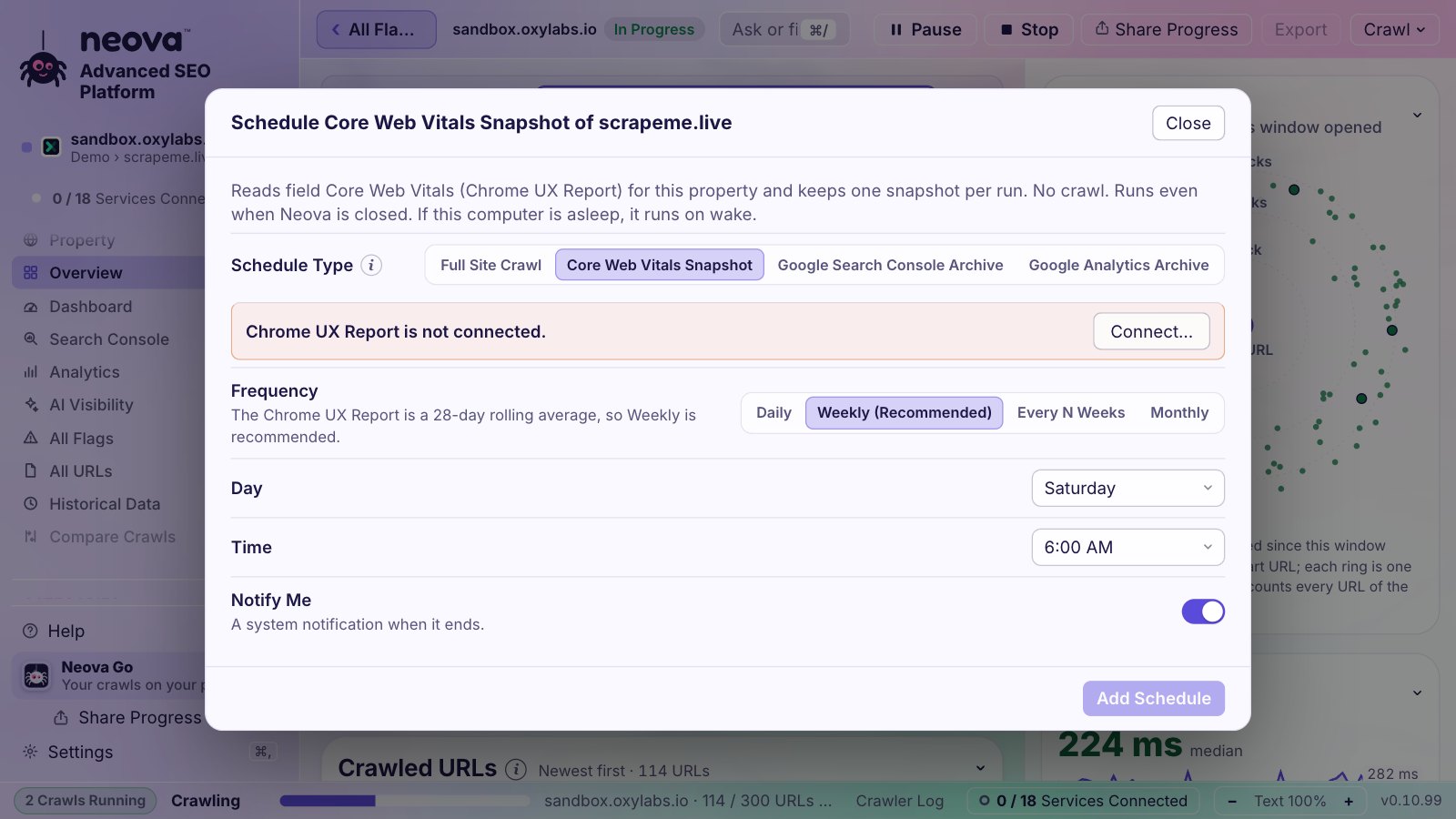
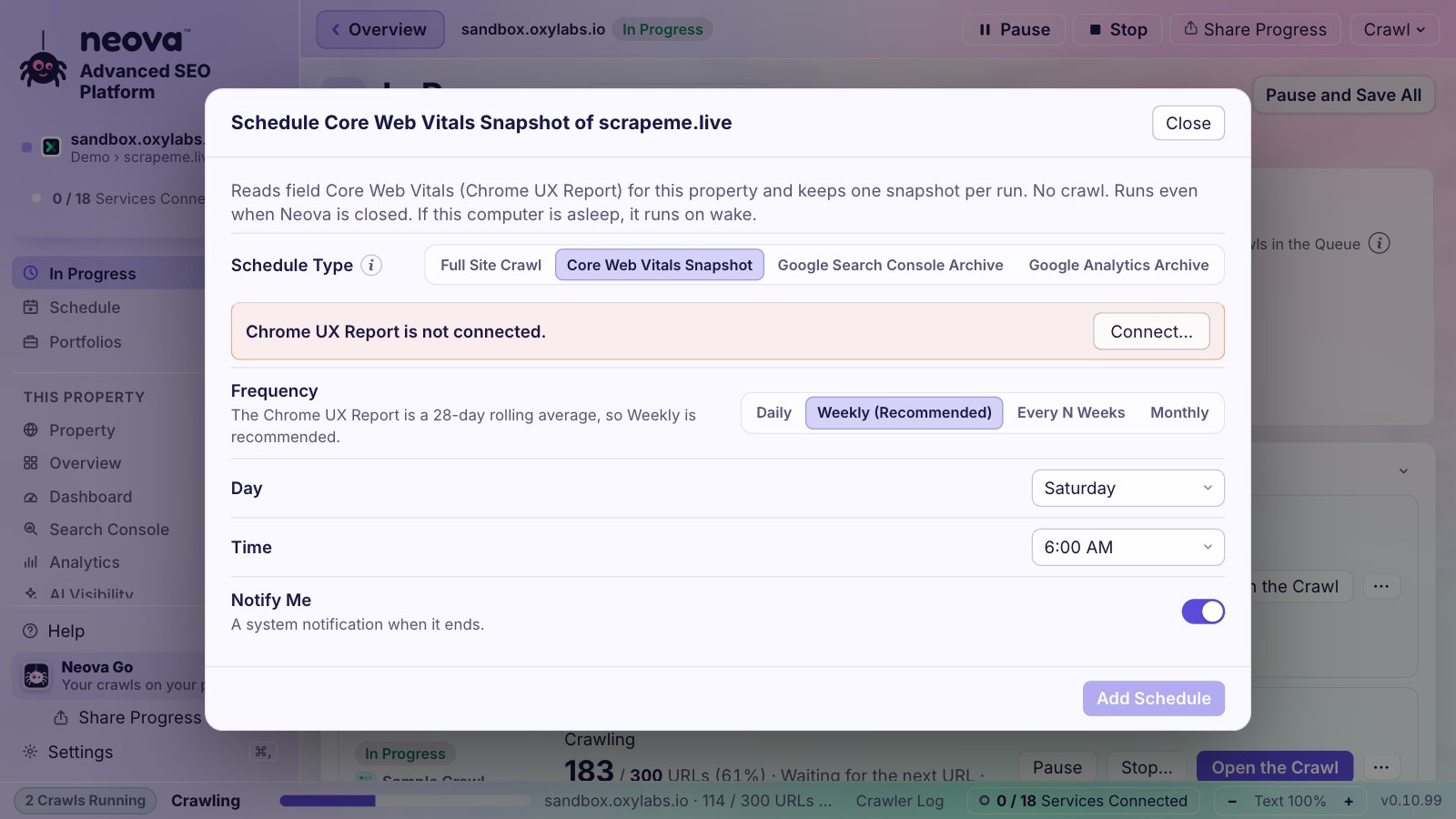
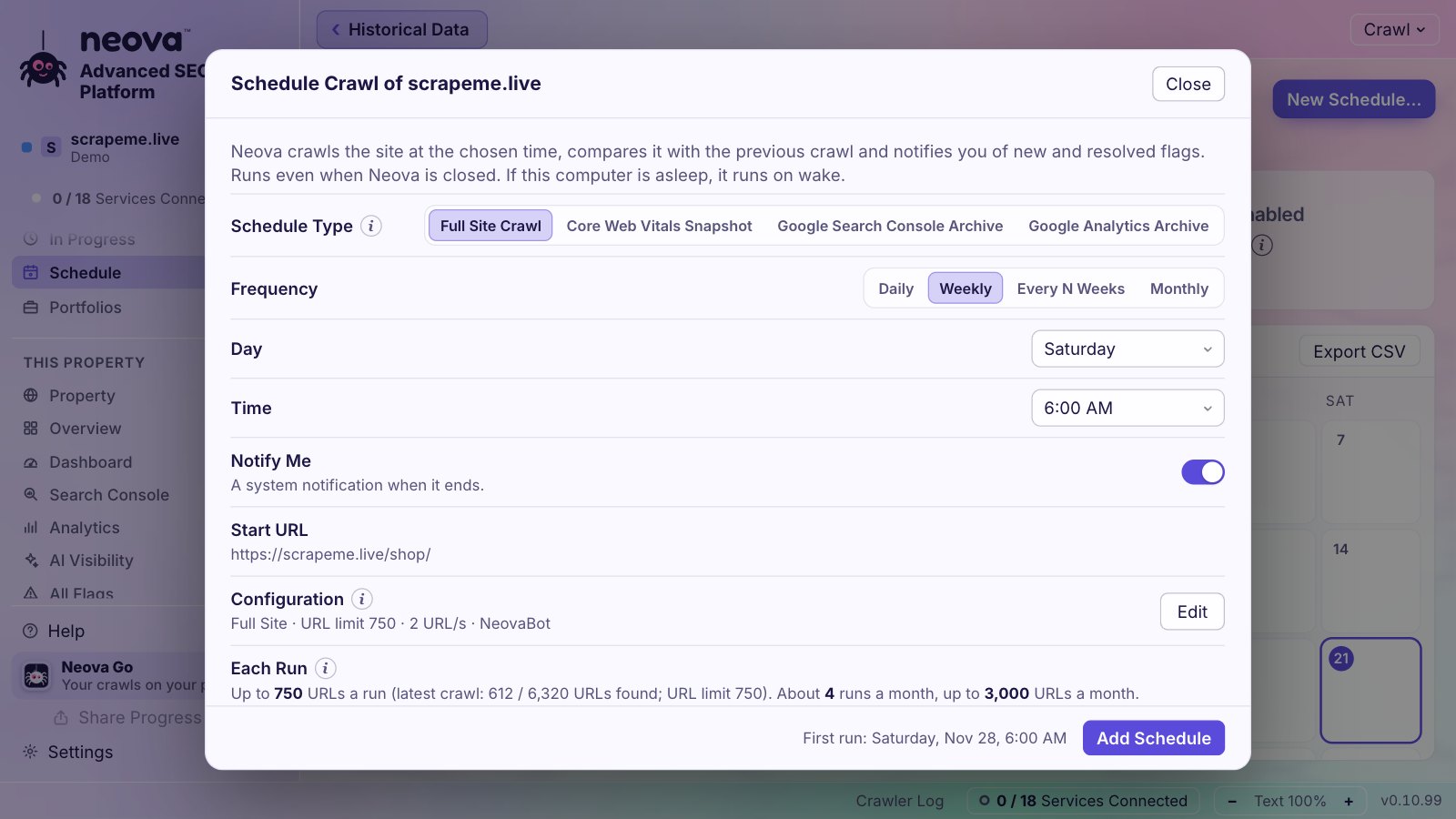
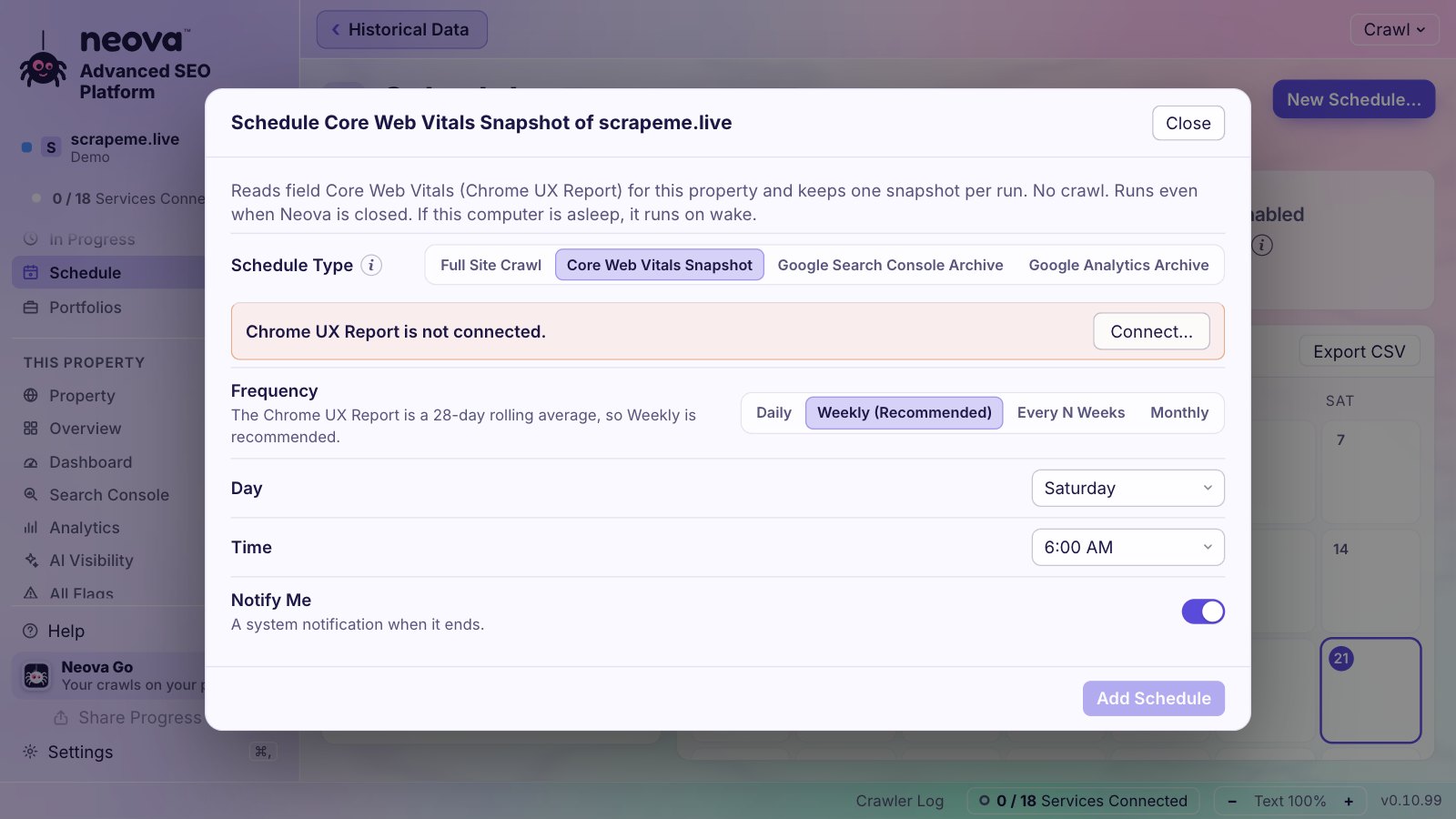
A ScheduleHow often, the day and time, and what each run costs.Neova GoThe menu bar, alerts, and your phone.Core Web Vitals SnapshotsReal-user speed on its own schedule, no crawl.
Crawls on a ScheduleDaily, weekly, every few weeks or monthly, per property, with the window closed. A heads-up 15 minutes before, Postpone or Skip from the menu bar, and the cost of a schedule shown before you add it.
Alerts That MatterCore Web Vitals change grade, clicks fall 20% or more in a week, a tracked search enters or leaves the top 10 or loses 3 places, a new crawl has new flags. Checked after every scheduled run, or when you click Check Now.
Watch CrawlRe-checks just your key pages, no discovery, and alerts you when a status, redirect, title, canonical, noindex, H1 or page size changes.
Core Web Vitals SnapshotsReal Chrome users' speed on a schedule, without a crawl, adding to a trend you can follow week after week.
Tracked Searches, Every DayUp to 25 searches per property from Search Console: position over 7 and 90 days, clicks and impressions, and whether Google shows an AI Overview that cites you.
Google Updates on Your ClicksTwo years of Google's ranking updates and incidents drawn on your clicks per day, with your clicks before and after each one.
A Full Audit Every MonthThe whole audit, with competitors, repeated every month; Neova finishes the analysis and the PDF the next time it opens.
Alerts Where You AreNeova Go on the menu bar and your phone, a notification when a crawl ends, and Slack and Microsoft Teams, with each portfolio or property sending to its own channels.
Also in Neova
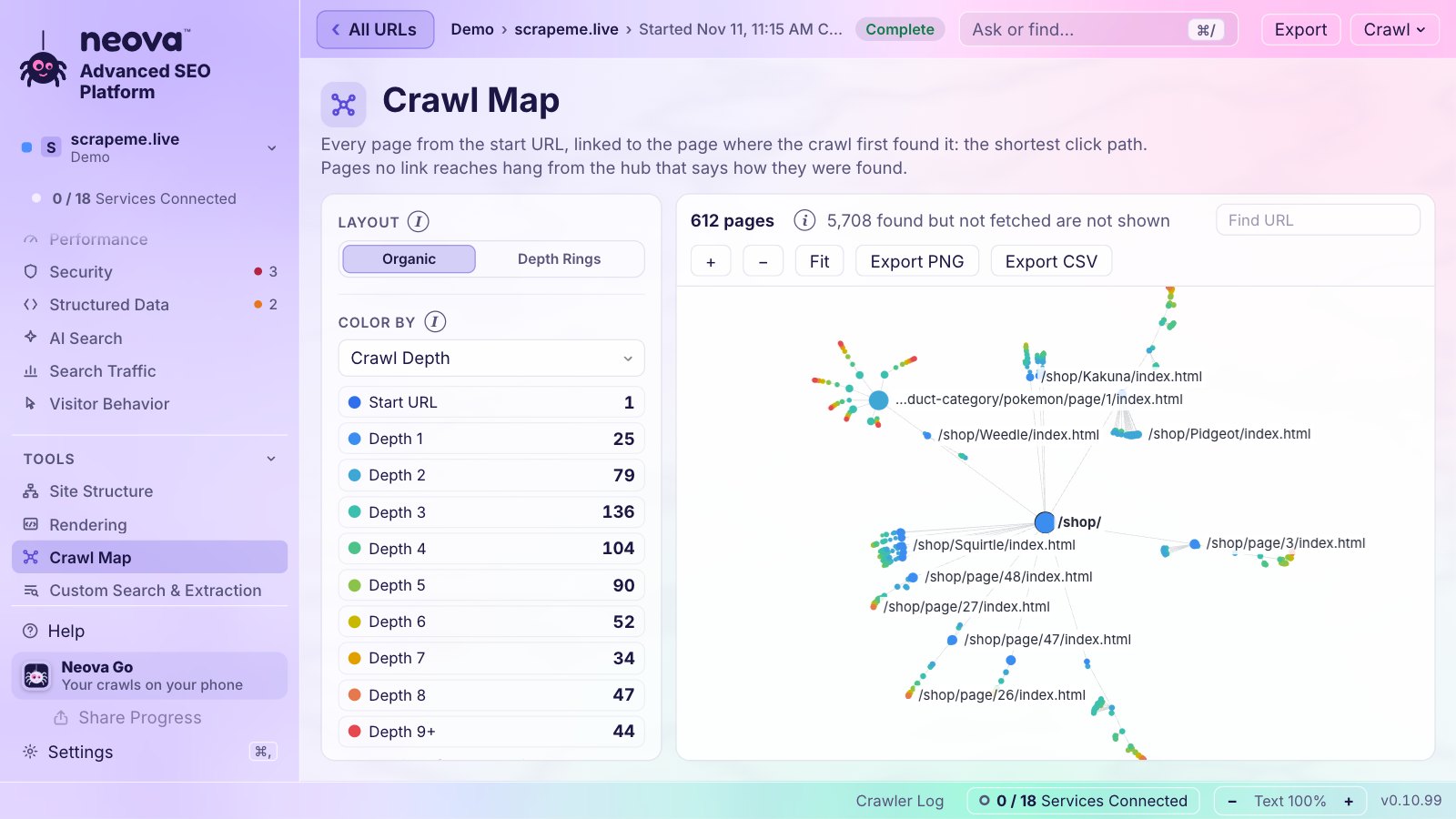
Crawl MapHow each page was first found, colored by status.All URLsEvery URL with its status, indexability and size.Historical DataYour crawls and Search Console, kept after Google drops them.
Crawler LogEvery URL the crawl fetches, live, with its colored status code and response time; the steps in bold, failures in red. Copy it for support in one click.
Blocked Crawl ExplainedWhen a site refuses the crawl, Neova says why (rate limited, a firewall, a country block) and what to do, with a secret allowlist header to hand to IT.
Diagnose a CrawlReads a crawl's log and names what went wrong, 429s, 403s, robots.txt blocks, JavaScript-only pages, with the setting to change.
URL BreakdownEvery URL found goes into exactly one bucket, so you always know where the extra thousands came from, while the crawl runs.
A Live Crawl You Can FollowSteps with arrows, Latest URLs, a live crawl map and the response time chart, and Share Progress to let anyone follow it.
Search Console and Analytics, Kept for GoodGoogle drops Search Console data at 16 months and Analytics event data at 2 or 14. Neova archives every month of both on your computer, on a schedule: pages, queries, days and Discover from Search Console; days, organic landing pages, channels, sources and countries from Analytics. For as long as you want.
Know Before You StartReads a few pages first and says how many URLs the sitemaps list and how many images to expect, so you choose the size of the crawl.
A Crawl You Never LosePages first, a disk guard, Quit saves the crawl, updates wait for it, and Resume continues with its own settings.
Costs Shown FirstDataForSEO costs are estimated before anything is spent, with a cap for each crawl. Your data bills go to you, at the provider's price.
Try It With Real DataEvery Neova Online account starts with a Demo: a shop and three competitors, already crawled, every setting filled in.
Your Keys Stay YoursEvery key, token and sign-in goes to your system's keychain, never a file or the screen. Neova ships no API key of its own: what you pay for is billed to you.
In 15 LanguagesThe window and the check library in English, French, German, Spanish, Portuguese, Italian, Japanese, Dutch, Polish, Turkish, Korean, Chinese, Russian, Indonesian and Vietnamese.
Works With
31 services
Neova connects to 31 services you already use, from Google Search Console to Slack, Jira and your own cloud drive. Each one is optional.
Google
Google Search Console
Google Analytics
Chrome UX Report
Google Cloud
Gemini
Microsoft and Bing
Bing Webmaster Tools
OneDrive
Microsoft Teams
SEO Data
DataForSEO
Semrush
Ahrefs
Majestic
Moz
SEO Gets
AI
Anthropic
OpenAI
Ollama
Tickets
Jira
Linear
Asana
ClickUp
monday.com
Alerts and Logs
Slack
Microsoft Teams
Cloudflare
Files and Storage
Google Drive
Dropbox
iCloud Drive
Proton Drive
kDrive
OneDrive
Opens Their Crawls
Screaming Frog
Sitebulb
Logos belong to their owners and show only that Neova connects to these services. Neova is not affiliated with any of them.
Side by Side
78 features
Every feature, a mark per tool. Show Details adds what each one does, with the page of that tool’s own docs it comes from.
Where and How It CrawlsScreaming Frog 15Sitebulb 13Semrush 10Ahrefs 10Lumar 13JetOctopus 13Neova 17of 17
Feature
Screaming Frog
Sitebulb
Semrush
Ahrefs
Lumar
JetOctopus
Neova
Desktop App
✓'A 64-bit OS is required to run the SEO Spider. source
✓Windows and macOS only ('64-bit version of either Windows 10 or 11' source
◐On your serverno browser or hosted version. source
✓Sitebulb CloudSitebulb Cloud: 'Sitebulb Cloud gives you all the capability of Desktop, accessible via your web browser.' Each customer gets a server like yoursite.sitebulb.cloud. source
✓Web appFully browser-based: Semrush describes itself as 'the leading online visibility management SaaS platform'. source
✓Neova OnlineNeova Online in any browser, on the same account as the desktop app, kept in sync
JavaScript Rendering
✓'Render web pages using the integrated Chromium WRS to crawl dynamic, JavaScript rich websites and frameworks, such as Angular, React and Vue.js.' Paid licence only. source
✓Chrome Crawler: 'Sitebulb uses an Evergreen Chromium rendering engine, just like Google' source
✓Yes, on Guru or Business tiers (Semrush One Pro+ or Advanced) source
✓'JavaScript rendering crawl mode is included in the plan price (no separate fee)', but 'one JS-rendered page counts as two regular crawled pages'. source
✓Chrome, for every page or a number of pages
List Mode
✓'Mode > List': 'check a predefined list of URLs... source
✓'Allow subfolders' and 'Disallow subfolders' rules, plus 'Parameters to ignore' so Site Audit strips URL parameters while crawling. source
✓Regex rules: 'Only crawl URLs matching the pattern' and 'Don't crawl URLs matching the pattern', plus 'Remove URL parameters' and URL rewrite rules. source
✓'Included Only URLs' and 'Excluded URLs' fields (Ruby regex source
✓'Allow Pattern' and 'Deny Pattern' rules in Advanced settings, as URL paths or regex with the 'rx:' prefix source
✓Include, Exclude, and an exclusion list for every crawl
Crawl Speed Limits
✓'control the speed of the SEO Spider, either by number of concurrent threads, or by URLs requested per second' (default 5 threads). source
✓Number of threads or Chrome instances and 'Max HTML URLs per Second' source
✓Default speed is 'limited to 30 max URLs per minute' source
✓Crawl speed in URLs per second (account maximum set by Lumar), and you can 'add restrictions to lower or increase the speed of crawls at particular times'. source
✓robots.txt Overwrite for 'Testing a new robots.txt before it's pushed live' across a full crawl source
✓Free Robots.txt Multi-tool 'validates your robots.txt file, highlights conflicting directives' and simulates rules per bot source
✓robots.txt Tester; respect, ignore or use a draft
Custom User Agent
✓'inbuilt preset user-agents for Googlebot, Bingbot, various browsers and more' plus a custom HTTP request user-agent and a separate Robots User-Agent. source
✓Presets 'including Google, Bing, Yahoo, and Yandex', plus 'Custom User Agent' and a custom robots.txt UA. source
◐presets only, 'There are 5 user agents in total' source
✓Any user agent, and Crawl as an AI Crawler
Logins and Authentication
✓'two forms of authentication, standards based which includes basic and digest authentication, and web forms based authentication.' source
✓HTTP authentication and forms-based authentication, plus custom HTTP headers. source
◐basic auth only: 'Crawl with my credentials' for sites 'hidden by basic access authentication', plus a Web Bot Auth signature option. source
◐HTTP authentication only, on Advanced and higher source
◐basic authentication ('include authentication credentials in all requests using basic authentication'), custom DNS, IP allowlisting and login cookies via custom request h source
✓A window eachFAQ: 'Open up multiple instances of the SEO Spider, one for each domain you want to crawl', or use list mode with a list of domains. source
◐Cloud: Medium and upDesktop queues audits ('they will run in succession') source
✓Force-directed crawl and directory diagrams (2D and 3D), crawl and directory tree graphs, word clouds, and the semantic content cluster diagram (v22.0). source
✓Interactive 'crawl maps' ('Best Software Innovation' at the US Search Awards 2018), other site visualisations, charts and timelines. source
◐charts plus a 'Site Structure' view of 'subdomains and subfolders, with the number of URLs and issues in each'. source
✓'Visualizes data with charts and graphs' for indexability, load speed, duplicates and status codes source
◐breakdown, funnel and trend charts on dashboards and every report ('Trends & Segments', 'Breakdown' tabs). source
✓'JetOctopus offers over 97 reports, 381 charts, 26 datasets' source
✓Crawl Map
Crawl Comparison
✓'Mode > Compare' shows Added, New, Removed and Missing URLs per tab and filter, a Change Detection tab and site structure comparison (licence and database storage require source
✓'Audit Comparison': 'Track changes over time, find out what's different since your last audit' source
✓'Compare Crawls' lets you 'view any of your past site audits in a side by side comparison' with Fixed and New issues source
✓'Site Audit allows you to compare any two crawls' source
✓Every report compares with the previous crawl source
✓'You can compare any crawls, not just the last two', with all crawler charts and data tables, also by segment source
✓'If the Site Audit bot identifies multiple pages with 85% similarities in content, it will flag them as duplicate content.' Duplicate titles and descriptions source
✓Duplicates report on titles, descriptions, H1 and content source
✓'Duplicate Pages' share 'an identical title, description and near identical content' source
✓'Duplication' reports for titles, descriptions, H1, H2 and main content, where 'you can choose the percentage of duplication' source
✓Duplicate and near-duplicate content
Thin Content
✓'Low Content Pages' check in the Content category, word count per page, and 'Low Relevance Content'. source
✓'you can configure up to 50 custom extraction rules during a crawl' source
✓Search and Extraction
AI Review of Page Content
✓OpenAI, Gemini, Anthropic, OllamaDirect API integrations with OpenAI, Gemini, Anthropic and Ollama (LM Studio via the OpenAI integration) source
◐MCP, read-onlyno AI prompts run on page content during a crawl. source
◐One page at a timeContent Toolkit, one page at a time source
◐Set tasksfixed AI tasks only: 'Ask AI' and 'Batch AI' write titles and meta descriptions (Project Boost), plus AI content detection source
◐Built inno user-written prompts on page content. source
◐Built in, MCPno user prompts run on each page source
✓Ollama, Anthropic, OpenAI44 AI review checks run by Ollama on your own computer; Anthropic and OpenAI keys in Connections
Semantic Similarity
✓Vector embeddings from OpenAI, Gemini or Ollama 'to identify semantically similar pages and low relevance content, as well as semantic search and the content cluster diag source
◐nothing built in. A guide on their site (8 October 2026, guest author) source
✓Errors 'Pages returning 4XX status code' and 'Pages returning 5XX status code', DNS and crawl failures, plus a notice for external links returning 403. source
✓Non-200 pages are 'listed under their respective issue' (404, 4XX, 5XX, 403, timed out, broken redirects) source
✓Reports for 200 pages, 301 and non-301 redirects, '4xx Errors', '5xx Errors', 'Uncategorized HTTP Response Codes' and failed URLs source
✓Status code charts and data tables in crawls and logs source
✓Yes, color-coded everywhere
Redirects and Chains
✓'Find temporary and permanent redirects, identify redirect chains and loops' source
✓13 Redirects hints (broken redirects, redirect loops, trailing-slash and case redirects, meta refresh) source
✓'Redirect chains and loops' (Error), 'Pages with temporary redirects', 'URLs with a permanent redirect' source
✓'Redirect chain' issue 'reports URLs that result in a series of redirects' source
✓'Redirect Chains' ('redirect to another URL which is also a redirect'), 'Redirect Loops', broken, JavaScript and meta refresh redirects, and 'Max Redirections' reports. source
✓Redirect chains data table, where 'you can also change the number of hops in the redirect chain' source
✓22 redirect checks, chains and loops
Canonicals
✓Canonicals tab covers canonical link elements and HTTP headers source
✓Errors 'Pages with a broken canonical link', 'Pages with multiple canonical URLs' and 'AMP pages with no canonical tag' source
✓Issues such as 'Canonical points to redirect', canonical to 4XX or 5XX, non-canonical page specified as canonical, and HTTP/HTTPS canonical mismatches. source
✓'Conflicting Canonical Tags' ('in either the HTML canonical tags or in HTTP headers'), Canonical to Non-200, Pages without Canonical Tag, Unlinked Canonical Pages, Change source
✓For rel=canonical, 'We have created several reports with the most common problems', plus a special mode for separate mobile subdomains. source
✓Yes
Indexability Report
✓Every URL is 'Indexable' or 'Non-Indexable' with an 'Indexability Status' reason source
✓'check for overlapping or inconsistent robots directives, canonical issues and robots.txt configuration errors' source
✓Checks crawlability of pagination pages in crawl and logs source
✓Pagination checks
Hreflang
✓'Audit missing return tags, inconsistent & incorrect languages codes, non-200 response hreflang and more' source
✓'check that hreflang tags are valid, reciprocal, unique, consistent & self-referential' source
◐International SEO report checks conflicts, values, broken links and missing tags, but 'At this time, Semrush only checks the HTML of your site' (not sitemaps or headers). source
✓Flags invalid codes, missing self-reference, missing return tags, hreflang to broken or non-canonical pages source
✓Sitemaps checks: 'URLs Not In Sitemap', 'Orphan URLs', 'Non-Indexable URLs In Sitemap', 'XML Sitemap With Over 50k URLs', 'XML Sitemap Over 50mb', 'URLs In Multiple Sitem source
✓9 XML Sitemaps hints (4XX, 5XX, noindex, canonicalised, disallowed, redirect, timed out, URL in multiple sitemaps), orphan detection, and an XML Sitemap generator. source
✓Errors such as 'Format errors in sitemap.xml files', 'Incorrect pages found in sitemap.xml', 'Sitemap.xml files are too large' source
✓Sitemap issues such as 'Non-canonical page in sitemap', noindex, 3XX, 4XX or 5XX pages in sitemap, timed-out sitemap pages and invalid format (XML only). source
✓Non-indexable, error and redirecting URLs in sitemaps, broken or disallowed sitemaps, too many URLs, empty sitemaps source
✓Sitemap report with orphan and non-200 URLs, 'Sitemaps problems by depth' and a 'Sitemap files' table source
✓20 XML Sitemap checks
Internal Links and Link Score
✓'Analyse internal links, link counts, crawl depth and calculate internal Link Score' source
✓'URL Rank, or UR, is a measurement of internal page strength based on relative link weight' source
✓Page Rating (PR) scores each URL's link strength 'on a logarithmic scale from 1 to 100' source
✓DeepRank: 'a measurement of internal link weight calculated in a similar way to Google's basic PageRank algorithm', scaled 0 to 10 source
◐deep link analysis (inlinks, anchors, nofollow, Linking Explorer) source
✓Link Score and 51 link checks
Orphan Pages
✓'To discover orphan pages additional URL sources are required, these come from XML Sitemaps and the integration of the Google Analytics and Search Console APIs.' source
✓Orphans are 'URLs that were discovered in the audit, but NOT by the crawler', found via XML Sitemaps, Google Analytics, Search Console or URL lists source
✓Notices 'Orphaned pages (from Google Analytics)' and 'Orphaned pages (in sitemap)' source
◐'Orphan page' covers URLs with no incoming internal links that came from crawl seeds or were 'found in the sitemap file' source
✓Orphan reports per source (Search Console, analytics, sitemaps, log files, URL lists, backlinks), e.g. source
✓'Orphan Pages' report from sitemap and GSC URL sources, filterable by source source
✓Orphan pages, from Search Console, Analytics and XML Sitemaps
✓Mobile configuration reports (responsive, dynamic, separate mobile), 'Discouraged Viewport Types' ('poor mobile compatibility'), separate-mobile mismatches source
✓A Googlebot Mobile crawl 'surfaces mobile usability issues' such as 'viewport misconfiguration, font size violations, tap targets' source
✓Viewport and mobile checks
Images
✓Missing alt text and alt attribute, 'Over 100 kb', alt text over 100 characters, 'Incorrectly Sized Images', 'Missing Size Attributes', background images, missing image t source
✓'Images with missing alt text', 'Has an anchored image with no alt text', 'Transferred image size is over 100KB', 'Properly size images', 'Add dimensions to images', next source
✓'We examine image size, load time and content types', broken images and alt attributes ('Set' and 'Not set') source
✓'Broken Images', 'Links with Images Missing Alt Tags', accessibility image-alt rules, and Lighthouse image audits in Site Speed (unsized, offscreen, unoptimized, non-resp source
✓20 image checks, and image sampling per page group
Speed and Core Web VitalsScreaming Frog 3Sitebulb 1Semrush 1Ahrefs 4Lumar 4JetOctopus 3Neova 4of 4
Feature
Screaming Frog
Sitebulb
Semrush
Ahrefs
Lumar
JetOctopus
Neova
Lighthouse
✓'Connect to the PSI API for Lighthouse metrics, speed opportunities, diagnostics and Chrome User Experience Report (CrUX) source
✓Lighthouse 'Opportunities and Diagnostics' run 'across every single web page crawled' by the built-in Chrome Crawler, plus Web Vitals lab metrics (LCP, CLS, TBT, TTI, FCP source
✓Core Web Vitals report 'Powered by Google's Lighthouse tool' (LCP, CLS, TBT) source
✓PageSpeed Insights per page with your own free Google API key source
✓In Site Speed: 'Lighthouse performance metrics at scale', with opportunity and diagnostic reports per page and an embedded Lighthouse Viewer (June 2025). source
✓PageSpeed API with your own key ('Your limit will be 30,000 requests per day') source
◐the 'Historical Audit Data' Google Sheet has one row per audit for 'time-series data or charts' in Looker Studio, and includes Core Web Vitals band values (changelog, 13 source
✓'ChatGPT Blocked' ('blocked in robots.txt for the GPTBot or ChatGPT-User user-agent tokens'), Google AI Blocked (Google-Extended), Bing AI Blocked, AI Bot Blocked, Common source
✓The free Robots.txt Multi-tool will 'Check access rules for search and AI crawlers in one place', including GPTBot, ClaudeBot and PerplexityBot. source
✓What each AI crawler may fetch, and what 10 AI assistants are actually served
◐no AI-answer checks. The Response vs Render report is pitched to 'identify exactly what LLMs can see' source
✓AI Search checks: 'Too much content', 'Outdated Content' (Last-Modified over six months), 'Low Semantic HTML Usage', 'Content not optimized' (headings, long paragraphs, r source
✓AI Discoverability: pages 'too slow or heavy for AI crawlers', 'Pages requiring JavaScript rendering', 'Similar AI-generated content' source
✓AI Page Optimizer will 'Match target keywords against title, meta and body content' for query fan-outs, and checks 'if JavaScript hides your content from AI agents'. source
✓GA4 and GA360: visits, bounce rate, pageviews and conversions per URL, filterable to organic, 'Google or Bing Organic Search Landing Pages, or All' source
✓'the integration works only with Google Analytics 4. source
◐Bingbot in logs and the robots.txt tester ('Full data on Googlebot, Bingbot, GPTBot, ClaudeBot and 40+ other crawlers') source
✓Bing Webmaster Tools, including Bing AI citations
Rank Tracking
◐no rank tracker. The GSC Search Analytics integration gives average 'Position' per URL. source
◐no rank tracker. The Keywords report uses GSC data source
✓Position Tracking 'monitors your website's search rankings daily' by device and location 'down to postal code', on Google, Bing, Baidu, ChatGPT Search and AI Mode. source
✓Rank Tracker: Google, 'Mobile and desktop tracking', 190+ locations down to ZIP code, 19 SERP features source
◐no rank tracker; GSC position per page and query only. source
✓Position Tracking: 'Competitors Discovery Report reveals organic competitors ranking for your keywords' source
✓New projects 'get suggestions of competitors based on websites that rank for similar keywords' source
✓In AI Visibility: 'Brands are discovered automatically from AI provider responses' and Lumar classifies each as Own, Competitor, Other or Context. source
✓'New scheduled crawl' with daily, weekly, every two weeks or monthly frequency, start date and time zone source
✓Schedules with a heads-up, Postpone and Skip (desktop app)
Change Detection
✓Compare mode 'Change Detection' tab for chosen elements (titles, descriptions, H1, word count and more) source
✓'Lost and Found compares the key URL metrics and hints triggered by your current audit with the most recent preceding audit' (Found, Lost, Remained) source
◐crawl-to-crawl comparison, and the Robots.txt report 'will tell you if Semrush noticed any changes to your robots.txt file'. source
✓Always-on audit: 'you can now see everything that changed on your site on any day' source
✓Changed Metrics shows 'which metrics have changed from crawl to crawl' per URL, plus reports such as Pages with Changed Title, Status Code and Canonical URLs. source
✓Alerts plus custom extraction 'track on-page element changes and see if they match expected values' source
✓Content changes between crawls; changes light up while it crawls
Alerts and Notifications
✓Email on crawl completion via Outlook, Gmail or custom SMTP, with an Issues table source
✓'Sitebulb will send you a friendly email whenever your audit is finished' (set per project, several addresses allowed). source
✓Site Audit sends 'automatic email updates' when scheduled source
✓Always-on audit emails 'if a new page is affected by an error-level issue' (custom issues too), plus crawl-finished emails, Rank Tracker reports and Ahrefs Alerts. source
◐'Sitebulb Cloud can be integrated with Slack so that you can receive Slack notifications about the progress of the audits' (Cloud only, admin user) source
◐Slack only for Traffic & Market competitor alerts source
◐no native Slack or Teams alerts found (alerts are email). source
✓In Lumar Monitor: alerts 'in-app or via email, Slack or Microsoft Teams' source
✓'Receive real-time notifications via email, Slack or MS Teams' source
✓Slack and Microsoft Teams, per channel, plus webhooks
✓CSV exports in spreadsheet formats, Google Sheets export (Keywords Explorer, Brand Radar, Bot Analytics), Looker Studio connectors for Site Audit, Site Explorer, Rank Tra source
✓CSV report downloads (plus CSV with Exploded Metric for Excel), an 'official Google Partner' Looker Studio connector with templates, and Google Sheets dashboards via Zapi source
✓Export to 'Excel, Google Sheets, CSV or Google Data Studio (Looker)' source
✓Excel workbook (to Google Sheets), CSV ready for Looker Studio
Export Destinations
✓Local folder; Google Drive as Google Sheets (manual or scheduled source
✓CSV and .xlsx exports, saved automatically after each audit to a local folder 'OR a shared save folder, such as a cloud storage service like Dropbox' source
✓CSV download, Google Sheets (some reports), PDF via print, Looker Studio connectors, plus API v3 and MCP source
✓CSV or XML report downloads, raw data as Parquet files, BigQuery and Looker Studio connectors, Google Sheets via Zapier, BI tools (Tableau, Power BI), the API and webhook source
✓CSV, Excel, Google Sheets and sitemap files from data tables, plus Data Studio connector, BigQuery ('Export crawl and GSC data directly to BigQuery'), API and MCP. source
✓Google Drive, OneDrive, Dropbox, iCloud Drive, Proton Drive, kDrive, SFTP or FTPS, any folder
Custom Dashboards
✓v25.0 Dashboard tab: 'build your own custom dashboards' from widgets (charts, counters, percentages, overview tables, issues list, segments chart...) source
✓API v3 on Lite and higher, 200,000 to 2,000,000 units/month, with Site Audit, Site Explorer, Keywords Explorer, Rank Tracker and Brand Radar endpoints. source
✓'the Lumar GraphQL API is available for all users', under 'a fair usage policy' source
✓All plans: 'access all the essential functions of JetOctopus, including project and crawl creation, chart data, data tables, and exports'. source
✓REST API of Neova Online with API keys (0.10.38), plus the MCP server and the command line
◐A licence eachlicences are per user ('If you have five people from your team that wish to use the SEO Spider, you will require 5 Licences'), discounts from 5. source
✓2 to 10+ usersCloud plans include users (Mini 2, Small 5, Medium 10, Enterprise 10+) source
✓From $45 a user'Additional Users Starting at $45/mo' source
✓From $40 a user1 user included; extra users source
✓4 roles, SSOTeam roles 'Admin, Editor, Reporter and Viewer' with per-app permissions source
✓Unlimited seats'Projects and seats (users) source
SoonComing soon. Today one person per account
Interface Languages
✓7'The GUI is available in English, Spanish, German, French, Italian, Dutch and Turkish' (7 languages source
◐Log File Analysera separate product, the Screaming Frog Log File Analyser (Windows, macOS, Linux), to 'verify search engine and AI bots'. source
–ComingFAQ: 'Sitebulb doesn't yet do log file analysis - but this is in the build pipeline and will be available soon!' source
✓EnterpriseYes, as a separate Enterprise product source
◐Bot AnalyticsBot Analytics, a separate tool free in beta on paid plans, 'ingests HTTP request data' from Cloudflare, Vercel, CloudFront, AWS load balancers or Fastly source
◐Includedincluded, but from per-URL summaries source
✓IncludedIncluded in every plan, not a separate product source
✓IncludedIncluded: Apache and Nginx logs, Cloudflare read directly, verified bots only
Staging and Migrations
✓'Compare staging against production environments using advanced URL Mapping' source
✓Crawl staging sites with HTTP or forms authentication and adjusted robots settings, then compare audits across 'any two Projects'. source
✓Yes, in Semrush Enterprise Site Intelligence source
✓'crawl your staging or test environment and compare it to your live website', with Test Site Domain, custom DNS, basic auth and robots.txt overwrite. source
✓'Comparing the crawl of a staging and live site will help you build a working version without errors' source
✓Staging vs. Production, and a redirect map
Opens Other Crawlers' Exports
◐list mode reads URLs from any .txt, .xls, .xlsx, .csv or .xml file ('you can directly upload an Adwords download') source
✓From $29 a monthCloud only: Starter $29/mo, Lite $129, Standard $249, Advanced $449, Enterprise on request source
–On requestNo public prices: 'We price our solutions based on your individual needs. source
✓From $349 a monthCloud only, per month on annual billing (in-house) source
✓From $19 a monthFree plan; paid plans from $19 a month (US price)
✓Yes◐Partly–The other tools: no, or not found in their docs–Neova: not yetSoonNeova: coming soonEvery answer about the other tools links to the page of their own site or docs it comes from.
What Neova Does Not Do
No keyword or backlink database of its own: Ahrefs, Semrush, SE Ranking and Moz keep theirs, and Neova uses your keys and your Search Console instead. Use it with those suites, not instead of them.
Coming soon: team accounts and email alerts (alerts come through the system, Neova Go, Slack and Microsoft Teams today).
No semantic similarity yet.
Screaming Frog, Sitebulb, Semrush, Ahrefs, Lumar and JetOctopus columns: only what their own site and documentation state, read on November 11, 2026, with a link to each page. "Not found in their docs" means we did not find it, not that it cannot be done. Neova's column: what Neova and Neova Online do today, read from the app. 141 of Neova's checks are in none of the 10 SEO tools' published lists we compared (Screaming Frog, Sitebulb, Semrush, Ahrefs, Lumar, Moz, SE Ranking, Seobility, Sitechecker and Conductor): each list matched one by one against Neova's library on October 25, 2026. The 67 checks added since then are not counted until they are compared. These names are trademarks of their owners; Neova is not affiliated with any of them. If a line is wrong or out of date, write to hello@neova.app and we will fix it.



 Google Search Console
 Google Analytics
 Chrome UX Report
 Google Cloud
 Gemini
 Bing Webmaster Tools
 OneDrive
 Microsoft Teams
 DataForSEO
 Semrush
 Ahrefs
 Majestic
 Moz
 SEO Gets
 Anthropic
 OpenAI
 Ollama
 Jira
 Linear
 Asana
 ClickUp
 monday.com
 Slack
 Cloudflare
 Google Drive
 Dropbox
 iCloud Drive
 Proton Drive
 kDrive
 Screaming Frog
 Sitebulb
 Lumar
 JetOctopus