SEO Spider: What It Is, How It Works and How to Choose One
An SEO spider is a program that walks through a website link by link, the way a search engine does, and writes down what every URL answers. Here is how one works under the hood, what to test before you trust its numbers, and which ones to try.
What an SEO Spider Is
The web is a web, so the programs that move through it by following links got called spiders. You will also hear crawler, bot and robot. They all mean the same basic thing: software that fetches a page, reads its links, and goes on to the pages those links point to.
Search engines run the biggest ones. Googlebot is a spider. An SEO spider is the same idea pointed at your own site, built to report what a search engine would trip over: broken links, redirects, blocked pages, missing titles, duplicate content and pages nothing links to.
Many people know the term from Screaming Frog, whose desktop crawler is called the SEO Spider, and the phrase now gets used for the whole category. Whatever the name on the box, an SEO spider is different from two tools it gets mixed up with:
- A scraper pulls specific data out of pages, such as prices. A spider maps the whole site and how its pages connect.
- A backlink tool reads other sites to find links to you. A spider reads your site, from the inside.
How an SEO Spider Works, Step by Step
Under the hood, every SEO spider runs the same loop until it runs out of URLs or hits a limit you set:
- Start with a queue. The queue holds the start URL, and often the URLs from the XML Sitemaps too.
- Check the rules. Before fetching a URL, the spider checks robots.txt and its own scope settings: this host, this folder, these patterns. SEO ProCheck keeps a complete robots.txt reference.
- Fetch and record. It requests the URL and stores the answer: status code, headers, response time and the body.
- Parse the page. From the HTML it reads the title, meta robots, canonical, headings and every link, with its anchor text.
- Clean up the links. Relative links become full URLs, fragments are dropped, and each URL is compared with the ones already seen so nothing is fetched twice.
- Queue what is new. New URLs in scope go to the back of the queue. Working through it in order is what gives each page its crawl depth, the number of clicks from the start URL.
- Wait, then repeat. A polite spider spaces its requests and slows down when the server pushes back.
When the queue is empty, the real work starts: the spider compares every page with the others and with the rules search engines publish, and turns the data into findings. Some spiders also render pages in a browser first, to see links and content that appear only after JavaScript runs.
What an SEO Spider Records for Each URL
The findings are only as good as the data under them. For every URL, a good SEO spider keeps:
| Area | What it records |
|---|---|
| Response | Status code, redirect target, headers, response time, size |
| Indexing signals | Meta robots, X-Robots-Tag, canonical, whether robots.txt allows it |
| Content | Title, meta description, headings, word count |
| Links | Inlinks and outlinks, anchor text, where on the page each link sits |
| Structure | Crawl depth, folder, the template the page uses |
| Discovery | How the URL was found: a link, an XML Sitemap, a redirect |
From that, the checks follow. A few examples of what they look like: Internal URL Returns 4xx, 5xx or No Response, Internal URL Is in a Redirect Chain, Orphan URL Returns 200 and Is Indexable and 4xx URL Is Listed in an XML Sitemap. The technical SEO crawler guide goes through the full list of areas an audit should cover.
SEO Spider Download or SEO Spider Online
People search for both, and they are two different setups.
| Desktop spider | Online spider | |
|---|---|---|
| Runs on | ||
| Data kept | Your disk | The vendor's servers |
| Crawl size set by | Your computer | Your plan |
| Staging behind a VPN | ✓ | ◐ With an IP allowlist |
| Crawls with the laptop closed | – | ✓ |
| Sharing a crawl | A file or a sync | A link |
Neither is better in general. Consultants who audit many sites often like a desktop app; teams that watch a few large sites around the clock often like the cloud. Some tools offer both.
What to Test Before You Trust an SEO Spider
How a spider behaves on a real site matters more than its feature list. Crawl a site you know well and look at these:
- Does the URL count make sense? Compare it with your XML Sitemaps. A much bigger number usually means parameters, filters or a crawl trap, and the tool should help you see which.
- How polite is it? Look for a speed setting in URLs a second and an automatic slow down when the server answers 429 or 503.
- How does it treat robots.txt? It should respect it by default, and let you ignore it for a site you own, such as staging.
- Can it crawl a list? List mode, for checking a set of URLs after a migration, saves a lot of time.
- Does it render JavaScript, and show the difference? Seeing the raw and the rendered HTML side by side is what tells you if rendering matters for the site.
- Can it stop and resume? Big crawls get interrupted. Picking up where it stopped beats starting over.
- Can you act on a finding? Open one flag and see whether it says why it matters and how to fix it.
Here is the URL count test on our own site. Neova crawled seoprocheck.com on October 17, 2026:
| seoprocheck.com, full crawl | Count |
|---|---|
| URLs fetched | 10,222 |
| Time | 61 minutes |
| HTML pages answering 200 | 4,561 |
| URLs in the XML sitemaps | 1,835 |
| Reached by links, not in a sitemap | 2,727 |
| In a sitemap, reached by no link | 1 |
| Completeness | 99.98% |
| Page bodies, raw | 1.66 GB |
| Stored on disk, compressed | 340 MB |
The crawl found far more URLs than the sitemaps list. Most of the gap is pages that are fine to crawl but missing from the sitemap, which is what Indexable URL Is Not in Any XML Sitemap reports. The one listed URL no link reached is an orphan URL in an XML Sitemap. On a large site, gaps like these are where crawl budget starts to matter.
SEO Spider Tools Worth Knowing
There are good options for every kind of work. Here is what each is known for, from each company's own pages, read November 11 and 21, 2026:
| Tool | Runs on | To try it | Known for |
|---|---|---|---|
| Screaming Frog SEO Spider | 500 URLs free | Configuration, extraction, command line | |
| Sitebulb | 14-day trial | 300+ prioritized Hints | |
| Lumar | A proposal | Large and small crawls at once | |
| JetOctopus | 7-day trial | Unlimited crawls and seats | |
| Semrush Site Audit | With the suite | Part of an SEO suite | |
| Ahrefs Site Audit | With the suite | Part of an SEO suite | |
| Neova | 1,000 URLs free | 694 checks, each with a source |
Screaming Frog's desktop crawler gave the category its name, and its free version needs no sign-up. The comparison page lines them up feature by feature with a source for every mark. If you already use Screaming Frog and want to see how another crawler fits next to it, the Screaming Frog alternative guide covers that, and the free SEO crawler guide compares the free plans.
Neova's Spider Crawl
Neova is a desktop SEO crawler for Mac (Apple silicon), Windows and Linux, plus Neova Online in the browser, by Neova LLC. Its link-following mode is literally called Spider: New Crawl, Crawl Mode, Spider. It follows the internal links from the start URL, then the XML Sitemaps, and runs 694 checks on what it fetched, each with its source.
- Start URL Check: before crawling, it picks the version of the home page that answers 200 and says what the other versions do.
- Polite by default: 3 URLs a second, halving its speed when the server slows down or answers 429 or 503, and honoring Retry-After. Up to 50 a second on a site you confirm is yours.
- Every URL explained: the URL Breakdown puts each URL in one bucket (clean pages, parameter variants, malformed URLs, crawl traps, images and so on), and Discovery offers to exclude a trap while the crawl runs.
- List mode too: List Crawl fetches only the URLs you paste or upload.
- Big crawls on disk: the crawl lives on disk, not in memory, and Resume continues a stopped crawl with its settings restored.
- Rendering when you need it: JavaScript rendering in Chrome, compared with the raw HTML.
- Your old crawls come along: Import a Crawl opens a Screaming Frog Internal export or a Sitebulb URL export and runs the checks on it.
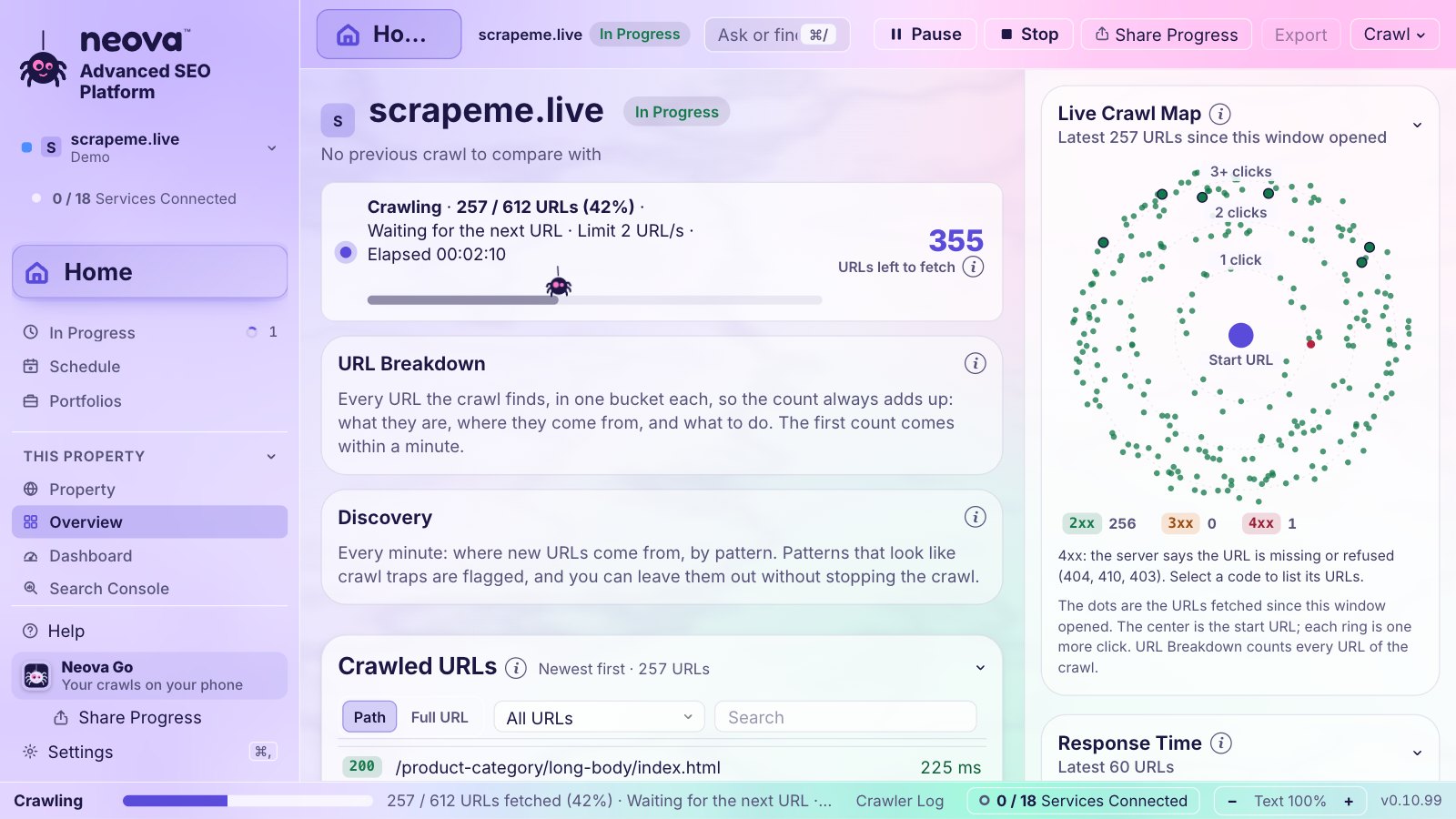
The Free plan crawls up to 1,000 URLs a crawl with every check, and Desktop can be tried free for 14 days without a card. See features and pricing.
Your First Spider Crawl
- Download Neova for your computer and open it.
- Choose Crawl, then New Crawl, type the site's address and click Start Crawl.
- Watch the first minutes. If Discovery shows a calendar or a filter multiplying URLs, exclude it and let the crawl carry on.
- When the checks finish, start from the Overview, then All Flags, Must Fix first. Common first finds: duplicate titles and meta descriptions over 155 characters. Our own seoprocheck.com crawl had 56 and 582.
The Your First Crawl help page shows each screen, and the how to crawl a website guide covers scope and exclusions in more depth.
Questions
What is an SEO spider?
A program that crawls a website the way a search engine does: it fetches a page, follows its links, and records what every URL answers. An SEO spider then checks that data for problems that get in the way of crawling and indexing.
Is there a free SEO spider?
Yes. Screaming Frog's SEO Spider has a free version for up to 500 URLs per crawl, and Neova has a Free plan for up to 1,000 URLs per crawl with all 694 checks. The free SEO crawler guide compares the options.
Is there an SEO spider online?
Yes. Cloud crawlers such as Lumar and JetOctopus, Sitebulb Cloud, and the site audits in Semrush and Ahrefs run in the browser. Neova runs on your computer and in the browser as Neova Online, on the same account.
Will an SEO spider slow down my site?
Not at a polite speed. A few URLs a second is light work for most servers, and good spiders slow down on their own when a server answers 429 or 503. Crawl faster only on a site you own, or with the owner's okay.
Can I download an SEO spider for Mac?
Yes. Neova runs natively on Macs with Apple silicon, and on Windows and Linux. Download Neova and start on the Free plan.