How to Crawl a Website for SEO, Step by Step
Crawling a website means fetching its pages the way a search engine does, following links from page to page. Here is how to crawl a website properly: politely, completely and without getting blocked.
What Crawling a Website Means
A website crawler for SEO starts at one URL, downloads it, reads the links in the HTML and adds them to a queue. Then it takes the next URL from the queue and does the same, until nothing new turns up or it hits a limit. Search engines do this at web scale. An SEO crawler does it for one site, and records what each URL answered so you can audit it.
For every URL, a crawl typically records the status code, the response headers, the title and meta description, the canonical, robots directives, the links in and out, and how many clicks it sits from the start page. Google describes how its own crawlers and fetchers work in its overview of Google crawlers.
Before You Crawl: Permission, robots.txt and Scope
Three questions to answer before you press start:
- Is it your site, or do you have permission? Crawling your own site or a client's is routine. For anyone else's site, stay polite: respect robots.txt and keep the speed low.
- What does robots.txt say? Open /robots.txt and read it. It tells crawlers what they may not fetch, and usually lists the XML Sitemaps. The rules follow RFC 9309, and Google explains how it reads them in its robots.txt introduction. The complete robots.txt reference on SEO ProCheck goes line by line.
- How much do you need? The whole site, one section, or a sample of each template. A sample answers most template questions in minutes; a full crawl is what you need for broken links and orphan pages.
How to Crawl a Website Step by Step
- Find the right start URL. Request http and https, with and without www. One should answer 200 and the others should redirect to it. Start there.
- Choose a mode. Spider mode follows links from the start URL. List mode crawls only the URLs you give it, which is useful for checking a set of old URLs after a migration.
- Add the XML Sitemaps. Crawling the sitemap URLs after the linked pages shows which pages the site lists but never links to.
- Set limits. A URL limit, a depth limit and rules for query parameters keep filters from running away with the crawl. The faceted navigation SEO guide on SEO ProCheck shows which filter URLs deserve crawling.
- Exclude what you do not need. Admin areas, cart and checkout URLs, internal search results. Use include and exclude patterns, and test a URL against them before you start.
- Pick a user agent. Your crawler's own name is the honest default. Crawling as Googlebot shows what Google is served, but some servers treat a fake Googlebot as an attack.
- Start, then watch the first few minutes. If the count of new URLs climbs much faster than the site's size, look at where they come from. Calendars and endless filters are the usual cause.
- Let the checks run. When the crawl ends, start with the issues that touch the most indexable pages.
How to Crawl a Website for All URLs
Following links finds only the pages that links reach. To crawl a website for all URLs, combine several sources:
| Source | Linked pages | Unlinked pages | Comes from |
|---|---|---|---|
| Link crawl | ✓ | – | The start URL |
| XML Sitemaps | ◐ | ✓ | robots.txt or /sitemap.xml |
| Seed URLs | ◐ | ✓ | Your own list |
| Server logs | ◐ | ✓ | Server or CDN |
| Search Console | ◐ | ✓ | Your Google property |
We found how much this matters on our own site. In the full Neova crawl of seoprocheck.com on October 17, 2026:
| Measure | seoprocheck.com |
|---|---|
| URLs fetched | 10,222 |
| Time | 61 minutes |
| HTML pages answering 200 | 4,561 |
| URLs in the XML Sitemaps | 1,835 |
| Reached by links, in no sitemap | 2,727 |
| In a sitemap, reached by no link | 1 |
| Completeness | 99.98% |
| Page bodies | 1.66 GB raw, 340 MB stored |
A sitemap-only audit would have missed 2,727 URLs, and a link-only crawl would have missed the one orphan. Pages that come only from sitemaps, logs or Search Console are orphans. Indexable orphans that get search traffic usually need internal links. Checks worth knowing here: Orphan URL Returns 200 and Is Indexable, Indexable URL Is Not in Any XML Sitemap and XML Sitemap Cannot Be Fetched or Parsed.
How to Crawl a Website Without Getting Blocked
Most blocks come from crawling too fast or looking like a bot the server does not trust. Crawl the way the site owner would want:
- Keep the speed low. 2 or 3 URLs a second is enough for most audits. Faster only on your own site.
- Say who you are. A clear user agent with a link to a page about the crawler is easier to allow than a fake browser string.
- Respect robots.txt. It is the site's stated wish, and ignoring it on someone else's site is the fastest way to get blocked.
- Ask to be allowed in. On a client site behind a firewall or bot protection, ask the IT team to allow your crawler, for example by a secret header only your crawler sends.
Then read the answers. Each status code says something different:
| Answer | Means | Do |
|---|---|---|
| 429 | Too many requests | Halve speed, honor Retry-After |
| 503 | Server busy or down | Slow down, retry later |
| 403 | Refused | Stop and ask |
| 401 | Login required | Ask for access |
| 5xx run | Server struggling | Pause the crawl |
Google's page on HTTP status codes and network errors explains how Googlebot itself treats 429 and 5xx answers.
Crawling JavaScript Websites
If the site is built with React, Vue, Angular or a similar framework, the HTML the server sends may be almost empty, with the content added by scripts. A plain crawl then finds few links and little text. Turn on JavaScript rendering, which loads each page in a headless browser, and compare the rendered page with the raw HTML. What matters is what is missing before rendering: main text, links, titles and canonicals that only appear after scripts run. Rendering is slower, so render a sample of each template first.
Crawl My Website With Neova
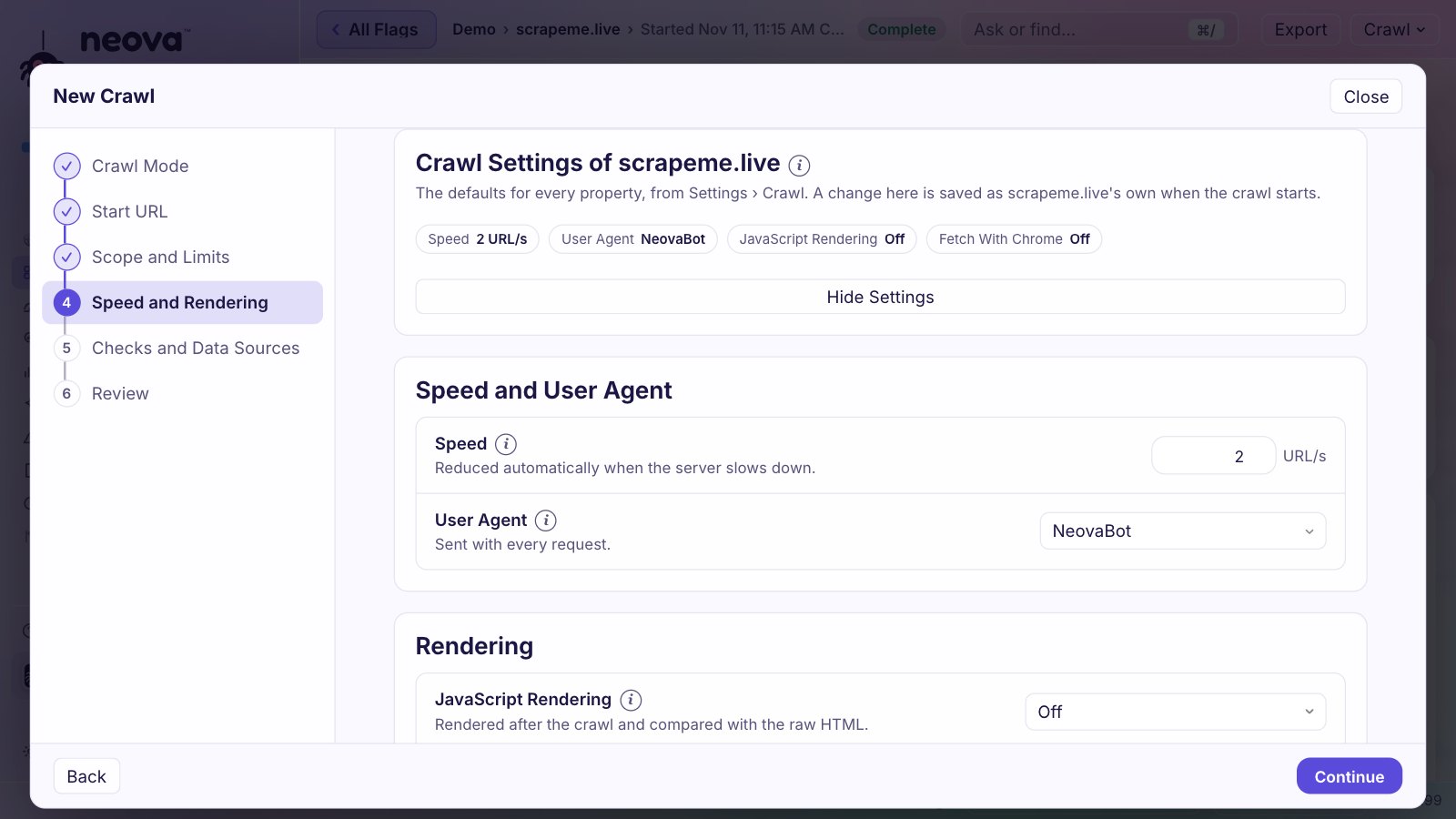
To crawl your own website with Neova, download the app, then choose Crawl, New Crawl, type the address and click Start Crawl. The Your First Crawl page shows each screen.
| Setting | Default |
|---|---|
| Runs on | |
| User agent | NeovaBot |
| Speed | 3 URLs a second |
| On 429 or 503 | Halves speed, honors Retry-After |
| robots.txt | Respected |
| CAPTCHA | Never solved |
| Free plan | 1,000 URLs a crawl |
- Start URL Check picks the version of the site (http or https, with or without www) that answers 200 and says what the others do.
- Modes and scope: Spider or List, Full Site, Specific Folders or Sample per Page Group, plus XML Sitemaps, seed URLs and include and exclude rules.
- Your own site: once you confirm it is yours, Neova can go faster and ignore robots.txt. The Allowlist Header makes a secret header sent only to that site, with the rule to hand the IT team.
- Blocked Crawl Explained: when a site refuses the crawl, Neova says why (rate limited, blocked by a firewall, forbidden) and what to do next.
- Discovery and URL Breakdown: while it runs, every URL found lands in one bucket and crawl trap shapes are flagged, with Skip or Exclude on the spot.
- Pause, Stop and Resume: stop when you like and run the checks on what was crawled, or Resume later from where it stopped.
Site owners can read how the crawler identifies itself, and how to block it, on the NeovaBot page.
What to Do With the Crawl
A crawl is a snapshot. Its value is in what you fix. Sort the findings by how many indexable pages they touch, fix template issues once rather than page by page, and crawl again to confirm. A short first pass that usually pays off:
- Internal links to 4xx and 5xx URLs. See Internal URL Returns 4xx, 5xx or No Response.
- Redirect chains between internal URLs. See Internal URL Is in a Redirect Chain.
- Indexable pages blocked by robots.txt. See Internal URL Is Disallowed by robots.txt.
- A robots.txt that cannot be fetched. See robots.txt Is Unreachable or Too Large.
- Pages missing from the XML Sitemaps, and sitemaps listing pages that redirect or are noindex.
- Important pages more than 3 clicks from the home page.
The technical SEO audit checklist puts the whole review in order.
Questions
How do I crawl a website for all URLs?
Combine a link crawl with the XML Sitemaps, then add URLs from Google Search Console and the server logs. Any page that only those sources find, and no internal link reaches, is an orphan worth a look.
How do I crawl a website without getting blocked?
Crawl slowly, use an honest user agent, respect robots.txt and slow down when the server answers 429 or 503. On a client site behind a firewall, ask the IT team to allow your crawler instead of trying to get around the block.
Is it legal to crawl a website?
Crawling public pages is common practice, but rules vary by country and by the site's terms. Crawl your own and your clients' sites freely, respect robots.txt everywhere, and read the site's terms when in doubt. This is not legal advice.
How long does it take to crawl a website?
Roughly the number of URLs divided by the speed. Our full crawl of seoprocheck.com on October 17, 2026 fetched 10,222 URLs in 61 minutes, about 2.8 URLs a second. At 3 URLs a second, 1,000 URLs take about 6 minutes and 100,000 about 9 hours, before rendering. Sampling each template is much faster.
Can I crawl my website for free?
Yes. Neova's Free plan crawls up to 1,000 URLs per crawl with every check, on Mac, Windows and Linux. See pricing for the larger plans.