Crawl Budget: What It Is, How to Check It and How to Stop the Waste
Crawl budget is how many URLs Googlebot can and wants to fetch on your site. Most sites never need to think about it. Large or fast-changing sites do, and the fix is usually the same: stop Googlebot from spending its time on URLs that do not matter.
What Is Crawl Budget?
Google defines crawl budget as the set of URLs Googlebot can and wants to crawl on a site. In its guide to managing crawl budget, it breaks this into two parts:
- Crawl capacity limit. How much Googlebot can fetch without overloading your server. If the site answers quickly, the limit goes up. If it slows down or returns server errors, Googlebot backs off.
- Crawl demand. How much Google wants to crawl. Popular URLs and URLs that change get crawled more. Stale or low-value URLs get crawled less.
Put together, crawl budget in SEO is the meeting point of what your server can handle and what Google thinks is worth fetching. You cannot buy more of it. You can make better use of what you get.
Does Crawl Budget Matter for Your Site?
Google says crawl budget is mainly a concern for three kinds of site. From its crawl budget guide:
| Site | Unique pages | Content changes | A concern |
|---|---|---|---|
| Large | 1,000,000+ | Weekly | ✓ |
| Medium or larger | 10,000+ | Daily | ✓ |
| Many pages Discovered, not indexed | Any | Any | ✓ |
| Most other sites | A few thousand | Any | – |
If new pages get crawled within a day or two, crawl budget is not your problem. Look at content quality, internal links and indexability instead. The Discovered, currently not indexed guide on SEO ProCheck covers that status and its causes.
The habits that save crawl budget, such as clean URLs, few redirects and no crawl traps, still help every site. They also make your own crawls faster and your audits easier to read.
How to Check Crawl Budget
There is no single crawl budget number. You read it from three places.
1. The Crawl Stats Report in Search Console
Open Settings, then Crawl stats. You get total crawl requests, total download size and average response time over the last 90 days, broken down by response code, file type, purpose (discovery or refresh) and Googlebot type. Host status shows whether robots.txt fetches, DNS or server connectivity had problems.
What to look for: a rising share of 3xx and 4xx responses, a response time that climbs, or most requests going to refresh while new pages wait.
2. Your Server Logs
Crawl Stats is a summary. Logs show every request, so you can see exactly which URLs Googlebot fetches, how often, and which ones it never touches. Import Instead of Connecting lists the log formats Neova reads and where each host keeps them.
3. A Crawl of Your Own
A crawler shows the URLs your links and sitemaps expose. Compare its count with the number of pages you actually want indexed. We did this on our own site:
| seoprocheck.com, Oct 17, 2026 | URLs |
|---|---|
| Fetched by the full crawl | 10,222 |
| HTML pages answering 200 | 4,561 |
| Listed in the XML Sitemaps | 1,835 |
| Reached by links, in no sitemap | 2,727 |
So fewer than half the URLs fetched were HTML pages that answered 200; the rest were files, redirects and other answers a bot also spends requests on. And 2,727 linked URLs sit in no sitemap, which is worth a look before blaming Google. If a site with 20,000 products produces 400,000 crawlable URLs, you have found your crawl budget waste.
Where Crawl Budget Waste Comes From
| Source | Looks like | Usual fix |
|---|---|---|
| Faceted navigation | A URL per filter combination | Block low-value combinations |
| Parameters | Tracking, session, sort | Strip from internal links |
| Crawl traps | Calendars, repeating folders | Cap, block or fix links |
| Redirect chains | 2 or more hops | Link to the final URL |
| Soft 404s | Not found, answers 200 | Return 404 or 410 |
| Duplicate URLs | Case, slash, parameter order | Redirect to one version |
| Dirty sitemaps | Redirects, noindex, errors | Indexable 200 URLs only |
| Slow responses | Response time climbing | Speed up the server |
Faceted navigation is the biggest source on most shops; the crawl budget explainer on SEO ProCheck walks through when each source matters.
Crawl Budget Optimization, Step by Step
- Count what should be indexed. Write down how many pages you want in Google. Everything above that is a candidate for waste.
- Crawl the site and sort the URLs. Separate clean page URLs from parameter variants, malformed URLs, crawl traps and resources.
- Find the patterns. Waste is rarely random. It is one filter, one calendar, one broken relative link repeated thousands of times.
- Block what never needs crawling. Use robots.txt for URL patterns with no search value, such as internal search results or sort orders. Test the rule against your crawled URLs before it ships.
- Fix the links that create the waste. Blocking hides the URLs; fixing the links stops them being made.
- Clean the XML Sitemaps. Only indexable URLs that answer 200, with lastmod dates that change when the page does.
- Return the right status codes. 404 or 410 for pages that are gone, not 200 with a not-found message.
- Shorten redirect chains and update internal links to point at final URLs.
- Watch the logs and Crawl Stats for a few weeks to confirm Googlebot shifts to the pages that matter.
What Not to Do
A few common crawl budget tips do not work the way people expect. From Google's crawl budget guide and its page on reducing the crawl rate:
| Tip | Saves budget | Why |
|---|---|---|
| Add noindex | – | Page is still fetched |
| Block pages for a while | – | Google advises against it |
| Crawl-delay in robots.txt | – | Googlebot ignores it |
| Return 503 or 429 | ◐ | Emergencies, 1 to 2 days |
| List URLs in a sitemap | ◐ | A hint, not an order |
| Block in robots.txt for good | ✓ | URL is never fetched |
Noindex helps indexing, not crawling. Block in robots.txt only URLs you never want crawled, and fix the links that create them.
How Neova Helps With Crawl Budget
Neova is a crawler, not Googlebot, so it cannot show Google's own budget. What it shows is where your site hands Googlebot extra work:
- Discovery runs while the crawl does. Every minute it says where new URLs come from by pattern and flags crawl trap shapes, such as calendars, repeating folders, session IDs, many parameters and very deep URLs, with Keep Crawling, Skip or Exclude on the spot.
- URL Breakdown puts every URL in one bucket: clean page URLs, parameter variants, malformed URLs, crawl traps and resources. The count is always explained.
- The robots.txt Tester explains every line, and the draft test lists the URLs a change would newly block or allow before you ship it.
- Server Log, in the desktop app, lists the HTML pages Googlebot never visited in the log window and the URLs bots ask for that the crawl does not know.
- Checks such as indexable URLs with search or filter parameters, the same parameters in a different order, soft 404 phrases, redirecting URLs in XML Sitemaps and a Googlebot recrawl interval that grew by 50% or more.
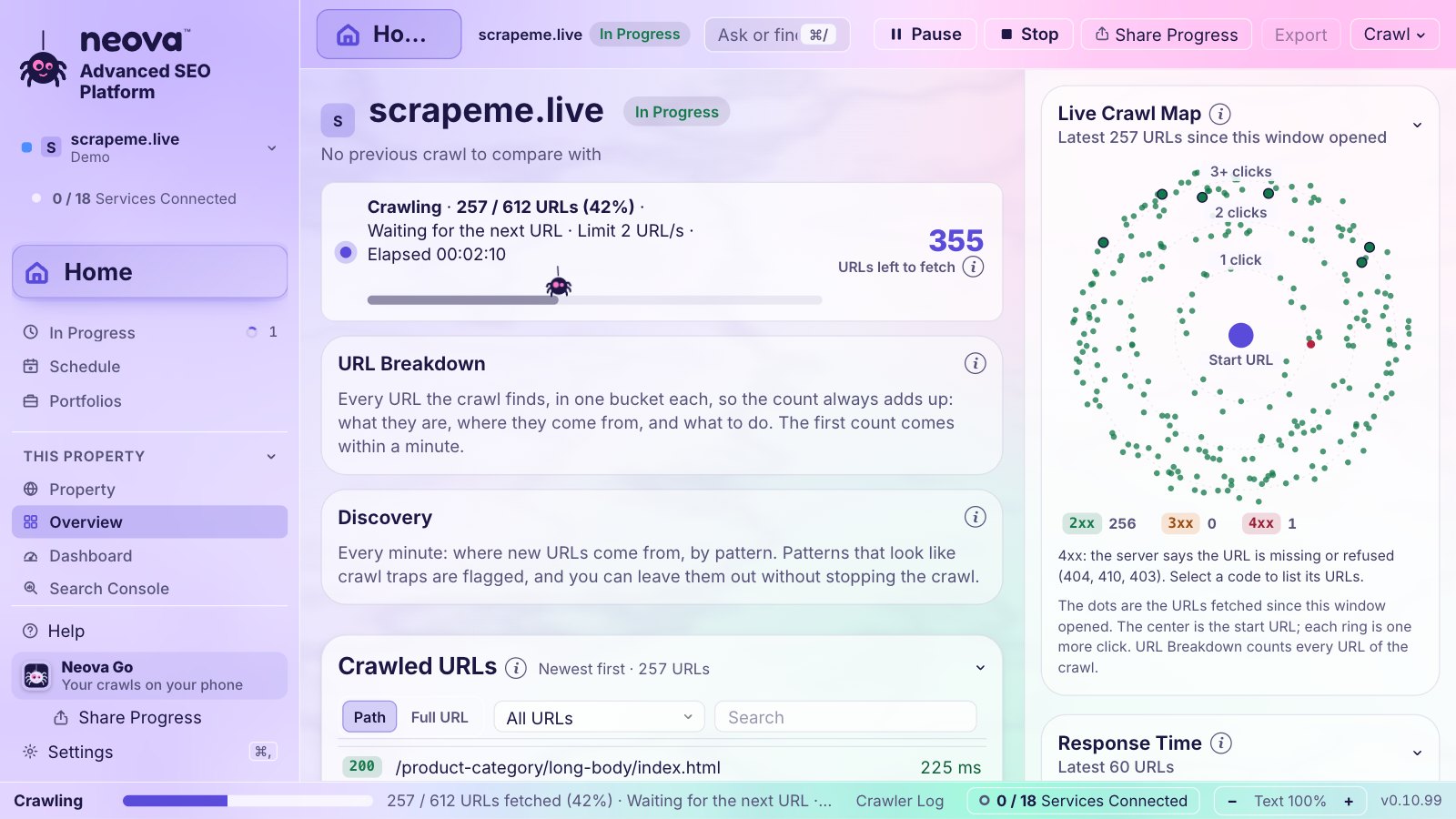
Neova crawls politely too: 3 URLs a second by default, halving its speed when the server slows down or answers 429 or 503. See Features or download Neova to try it.
Crawl Budget Checklist
| Signal | Healthy | Where |
|---|---|---|
| Response time | Steady or falling | Crawl Stats |
| 3xx and 4xx share | Not rising | Crawl Stats, logs |
| Crawlable URLs to wanted pages | Close to 1 to 1 | Your crawl |
| Crawl traps | 0 | Your crawl |
| Redirect hops | 1 at most | Your crawl |
| Removed pages | 404 or 410 | Your crawl |
| Sitemap entries | Indexable 200 only | Your crawl |
| URLs per sitemap file | 50,000 max | Your crawl |
| Days of logs read | 30 or more | Server logs |
| New key pages | Visited by Googlebot | Server logs |
Questions
What is crawl budget in SEO?
It is the number of URLs a search engine can and wants to crawl on your site in a given time. Google describes it as the combination of crawl capacity and crawl demand.
Does crawl budget matter for small sites?
Usually not. Google says it is mainly a concern for very large sites, sites that change daily, and sites with many pages discovered but not indexed. Small sites gain more from better content and internal links.
How do I increase crawl budget?
Make the server fast and stable, and give Google reasons to crawl: pages people link to and visit, and content that changes. Then stop wasting what you have on parameters, redirects and duplicates.
Does noindex save crawl budget?
No. Google has to crawl a page to read its noindex. To keep Googlebot away from a URL pattern for good, block it in robots.txt, and fix the links that create it.
Does Googlebot follow crawl-delay?
No. Google does not support crawl-delay in robots.txt. Bing has documented support for it. Neova flags a crawl-delay set for all user agents so you can decide if it is still wanted.