robots.txt Unreachable (5xx, 429 or Timeout) or Missing (404)
In Neova Runs from the crawl itself: nothing to set up.
Rule last reviewed October 17, 2026 · Guide updated July 22, 2026
A site does not need a robots.txt: a 404 means crawlers may fetch everything.
How Neova Finds It
Neova requests every address and reads what the server answers.
Why It Matters
Robots.txt controls crawler access to your site.
The Ticket It Writes
RO-001 · robots.txt Unreachable (5xx, 429 or Timeout) or Missing (404)
How to Check the Fix: 1. Run the check again in Neova
2. Spot-check sample URLs across affected templates
3. Record the re-check date and period label next to the baseline
Neova writes this ticket for every affected page group and sends it to Jira, Linear, Asana and the rest, after you approve it.
The Full Guide
AI Summary
A missing robots.txt is not a ranking penalty, but it leaves a 404 on every crawl and removes your chance to declare a sitemap or steer crawlers. Add a minimal file at the domain root with an allow all block and your sitemap URL, then confirm it returns a 200 status.
- robots.txt lives at the host root and must return 200 text/plain
- A minimal file needs a User-agent block plus a Sitemap line
- Disallow blocks crawling, not indexing, so use noindex to hide pages
- Never block CSS or JavaScript needed to render the page
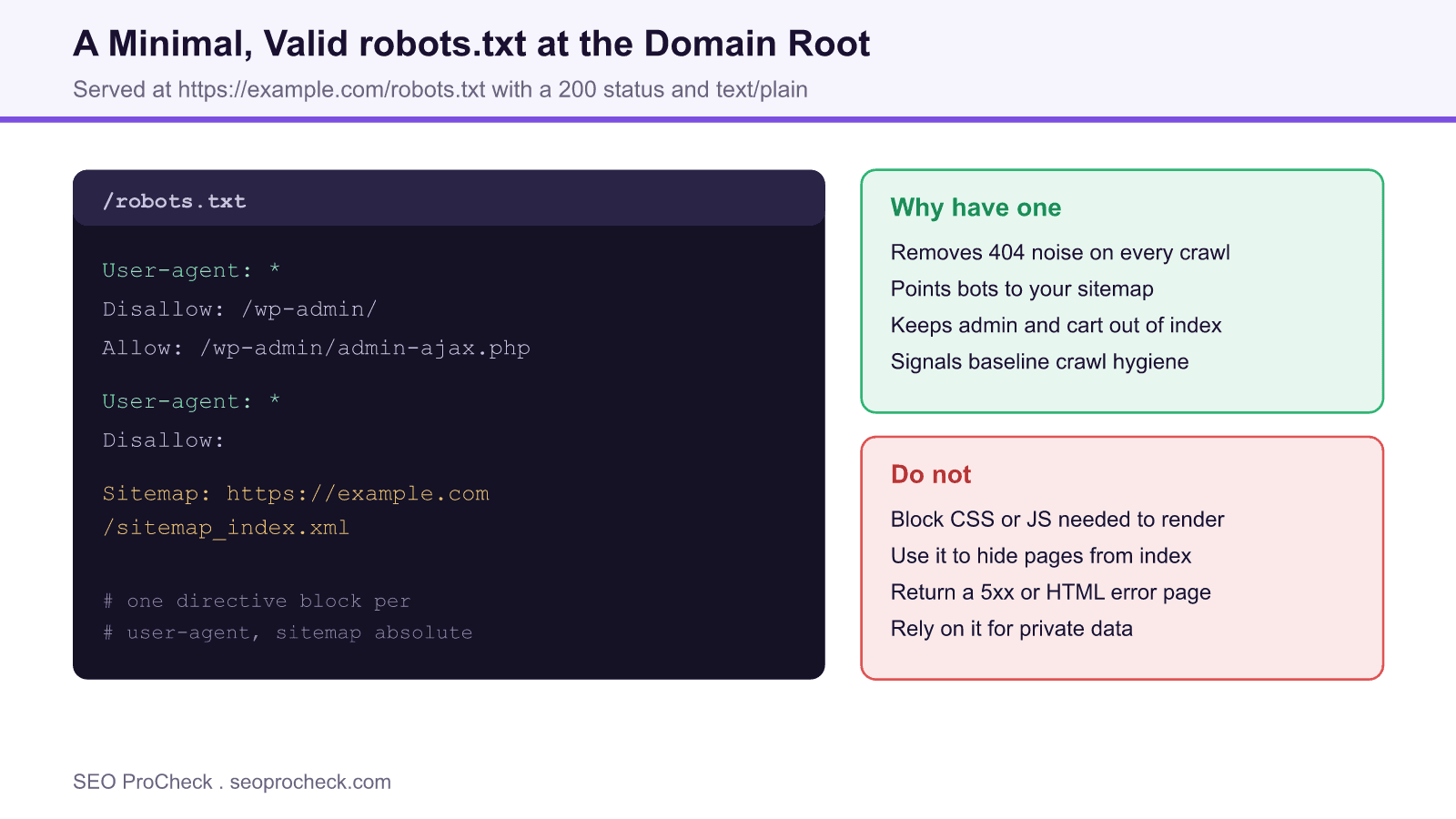
Every crawler that visits your site asks for one file before it does anything else: /robots.txt. When that request returns a 404, the site is treated as fully crawlable, which is usually fine, but you have given up a useful control surface and left a small error on every crawl. Adding a minimal, valid robots.txt is basic technical hygiene that costs nothing and closes the gap.
What robots.txt Is For
The file is a plain text set of instructions at the root of a host that tells compliant crawlers which paths they may or may not fetch. It does three practical jobs: it declares where your sitemap lives so discovery is faster, it keeps crawlers out of low value areas such as admin screens and internal search, and it signals that someone has thought about crawl hygiene. It is a request, not a wall: well behaved bots honour it, but it does not secure anything and it does not remove pages from the index.
A Minimal Valid File
You do not need a complex file to satisfy this check. The following allows all crawling and points bots at the sitemap, which is a sensible baseline for most sites:
User-agent: *
Disallow:

Sitemap: https://example.com/sitemap_index.xml
On a typical WordPress install you might also keep the admin area out of crawling while leaving the AJAX endpoint reachable:
User-agent: *
Disallow: /wp-admin/
Allow: /wp-admin/admin-ajax.php

Sitemap: https://example.com/sitemap_index.xml| Directive | Purpose | Example |
|---|---|---|
| User-agent | Names the crawler a block applies to | User-agent: * |
| Disallow | Blocks a path prefix from crawling | Disallow: /wp-admin/ |
| Allow | Re allows a path inside a blocked area | Allow: /wp-admin/admin-ajax.php |
| Sitemap | Declares your sitemap location | Sitemap: https://example.com/sitemap_index.xml |
| Empty Disallow | Explicitly allows everything | Disallow: |
Rules That Trip People Up
Robots.txt has sharp edges. It governs only its own host and scheme, so an HTTPS site and its HTTP version, or the root domain and a subdomain, each need their own file. The file must return a 200 status and a text/plain type; a soft 404 that returns an HTML page can confuse parsers. Disallow blocks crawling, not indexing, so a blocked URL linked from elsewhere can still appear in results without a description. And blocking render critical CSS or JavaScript can stop Google from seeing your layout, which is worse than having no file at all.
How to Check and Deploy
Request the file directly in a browser at https://yourdomain.com/robots.txt and confirm it loads with a 200 status and shows your directives. On WordPress, edit it through Rank Math or Yoast, or drop a physical file in the web root. After deploying, use the robots.txt report in Google Search Console to confirm Google can fetch and parse it, then submit or reconfirm your sitemap.
Quick Reference
Element Code: RO-001
Issue: Site has no robots.txt file
Impact: No crawler guidance
Fix: Create basic robots.txt file
Detection: Direct URL check
What Is This Issue?
Robots.txt provides crawler guidance and is best practice.
Why This Matters for Your Website
Missing it may indicate poor technical SEO hygiene.
How to Fix This Issue
- Create file: At /robots.txt
- Basic content: User-agent and sitemap
Tools for Detection
- Direct check: Visit /robots.txt
TL;DR (The Simple Version)
Create a robots.txt file at your domain root with at least your sitemap location.
Frequently Asked Questions
Is a Missing robots.txt an SEO Problem?
On its own a missing robots.txt is not a ranking penalty. Search engines will crawl a site that returns a 404 for robots.txt as if everything is allowed. The issue is hygiene: you lose a place to declare your sitemap, you generate a 404 on every crawl, and you have no lever to steer crawlers away from low value paths.
What Is the Minimum a robots.txt Should Contain?
At a minimum, an allow all block and your sitemap location. That is a User-agent line, an empty Disallow so nothing is blocked, and a Sitemap line with the absolute URL of your sitemap index. From there you can add targeted Disallow rules for admin, cart, or faceted URLs.
Where Does the File Have to Live?
Exactly at the root of each host, for example https://example.com/robots.txt. It must be served over the same scheme and host, return a 200 status, and use a text/plain content type. Subdirectories and subdomains each need their own file, because robots.txt only governs its own host.
Can robots.txt Hide Pages From Google?
No. Disallow stops compliant crawlers from fetching a URL, but a blocked URL can still be indexed without a snippet if it is linked elsewhere. To keep a page out of the index, allow crawling and use a noindex meta tag or header, or protect it behind authentication.
Should I Block CSS and JavaScript?
No. Blocking the CSS and JavaScript that a page needs to render prevents Google from seeing the page as users do, which can hurt rankings. Keep render critical resources crawlable. Only disallow paths that genuinely add no value to search, such as internal search results or admin.
How Do I Create One on WordPress?
WordPress serves a virtual robots.txt by default, but SEO plugins such as Rank Math or Yoast let you edit it from the dashboard, or you can place a physical robots.txt in the web root. After publishing, request the file directly in a browser and confirm it returns your rules with a 200 status.
Related Neova Checks and Guides
- The Complete robots.txt Reference
- Complete Guide to Robots.txt Configuration
- Crawl Budget Explained
- 403 Forbidden URL in XML Sitemaps
Written by Neova Labs · Back to the Check Library