SEO Monitoring: Scheduled Crawls, Alerts and Change Detection
Most SEO damage is not done by an algorithm. It is done by a release: a noindex that reached production, a robots.txt rule that blocked one folder too many, a template that lost its canonical. SEO monitoring is the habit of looking again on a schedule, so a change like that shows up in a day instead of in next quarter's traffic report.
What SEO Monitoring Covers
Monitoring is not a second audit. An audit asks what is wrong; monitoring asks what changed since last time. That makes it cheaper to run and faster to read. Four sources cover most of it:
| What to watch | Source | How often |
|---|---|---|
| Status codes, noindex, canonicals | Crawl | Weekly |
| robots.txt and XML Sitemaps | Crawl | Every crawl |
| Key pages only | List of URLs | Daily |
| Clicks and positions | Search Console | Daily |
| Core Web Vitals | Chrome UX Report | Weekly |
| Bot errors | Server logs | Daily |
| Algorithm updates | Google status page | When announced |
Google publishes confirmed ranking updates and incidents on its Search Status Dashboard. SEO ProCheck explains how to line those up with your own data in how to monitor algorithm updates.
Scheduled Crawls
A crawl on a fixed day and time, with the same settings each run, is the backbone of SEO monitoring. Same settings matters: a run with a different URL limit or speed will show differences that are not real. Pick the rhythm from how often the site changes:
| Site | Full crawl | Key pages |
|---|---|---|
| Brochure site, under 500 pages | Monthly | Weekly |
| Blog or news site | Weekly | Daily |
| Shop with daily stock changes | Weekly | Daily |
| Site with weekly releases | After each release | Daily |
| During a migration | Daily | Daily |
Count the cost before you add a schedule. A weekly crawl of 750 URLs is about 4 runs and 3,000 URLs a month. Run on quiet hours for the server, and keep the crawler's speed polite: Google's guide to managing crawl budget is a reminder that a server under load slows every crawler, including Googlebot. The crawl budget guide goes deeper.
Change Detection: The Changes That Matter
Every crawl differs a little from the last. The skill is knowing which differences to wake someone up for:
| Change | Urgency | Why |
|---|---|---|
| robots.txt rules changed | Now | Can block whole folders |
| noindex added to indexable pages | Now | Pages leave the index |
| 200 pages fell sharply | Now | Section gone or blocked |
| Canonical changed | Today | Google may pick another URL |
| New 4xx or 5xx URLs | Today | Broken links, lost pages |
| New redirect chains | This week | Extra hops for every visit |
| Title or H1 changed | This week | Snippet and relevance change |
| Meta description changed | Review | Snippet only |
Keep every crawl, not just the latest. When clicks fall in March, the crawl from February is the only proof of what the pages said before.
What Monitoring Caught on Our Own Site
We found this on our own site. Our SEO pass on neova.app on November 20, 2026 turned up two robots.txt rules that blocked more than we meant, and a few other things a weekly crawl would have flagged the first week:
| Found | Pages | Effect | Fixed |
|---|---|---|---|
| robots.txt blocked /cdn-cgi/ email script | 1,320 | Script Google could not fetch | ✓ |
| Favicon files behind Disallow: / | Every result | Letter shown, not our logo | ✓ |
| http:// answered 200 | Every page | Two copies of each page | ✓ |
| Unknown URLs answered 503 | Every mistyped URL | Looked like an outage | ✓ |
| Descriptions over 160 characters | 1,354 fixed | Cut off in results | ✓ |
None of these showed in a browser. All of them showed in a crawl. That is the case for monitoring in one table. The robots.txt tester guide tells the full story of the two robots.txt rules.
Alerts With Clear Thresholds
An alert that fires every day gets muted. Set thresholds that mean something, and say in the alert what crossed the line:
| Alert when | Threshold | Source |
|---|---|---|
| Core Web Vitals grade changes | Google's good and poor lines | Chrome UX Report |
| Clicks fall | 20% or more, last 7 days | Search Console |
| Tracked search leaves top 10 | Position 10 crossed | Search Console |
| Tracked search slips | 3 positions or more | Search Console |
| New flags after a crawl | Any new flag | Crawl |
| 200 page count swings | Over 25% | Crawl |
| Bot errors rise | Share doubles, over 1% | Server logs |
Search Console keeps 16 months of performance data. Export or archive it if you want to compare this year's alerts with the same week two years ago.
Core Web Vitals Snapshots
Core Web Vitals in Search come from field data: the Chrome UX Report, a 28 day rolling average of real Chrome users. That is why daily snapshots move slowly and a weekly one is enough. The thresholds, measured at the 75th percentile, are set out on web.dev:
| Metric | Good | Needs work | Poor |
|---|---|---|---|
| LCP | 2.5 s or less | Up to 4 s | Over 4 s |
| INP | 200 ms or less | Up to 500 ms | Over 500 ms |
| CLS | 0.1 or less | Up to 0.25 | Over 0.25 |
The CrUX History API returns 25 weekly periods by default and up to 40, updated each Monday, so you can draw a trend on day one. Snapshots you keep yourself go further back than that. Lab tools like Lighthouse help find the cause, but the field number is the one to monitor. SEO ProCheck's page on field data vs lab data explains the difference, and the Core Web Vitals checker guide covers fixes.
Where Alerts Should Reach You
An alert is only useful if someone sees it the same day. Send each kind where the person who acts on it already looks:
| Channel | Best for |
|---|---|
| System notification | Crawl ended, on your computer |
| Menu bar | Progress and latest alerts |
| Phone page | A look away from the desk |
| Slack channel | Team, per client |
| Microsoft Teams channel | Team, per client |
| Shared crawl link | Client following one crawl |
For agencies, one channel per client keeps alerts from drowning each other. The SEO audit for agencies guide covers the rest of that setup.
SEO Monitoring With Neova
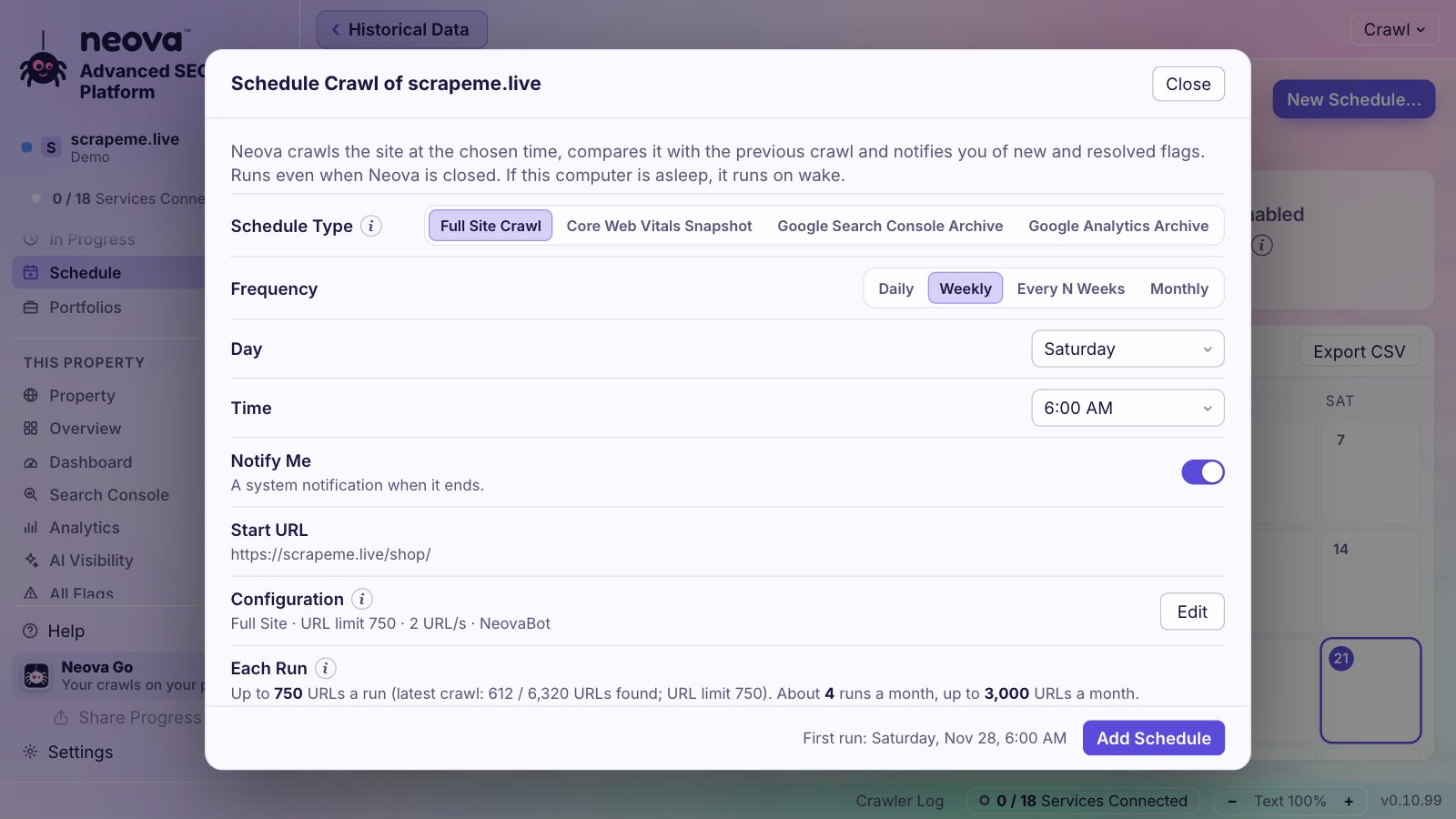
In the Neova desktop app:
- Scheduled Crawls run Full Site Crawls Daily, Weekly, Every N Weeks or Monthly with the property's settings, with the window closed. Neova says what a schedule costs before you add it, warns 15 minutes before a run, and lets you Postpone or Skip one run.
- Watch Crawl fetches only a list of pages, with no discovery, and raises page alerts for status, redirect target, title, canonical, noindex, H1 and size changes.
- Changes Light Up While Crawling shows the old value struck through beside the new one as each URL is fetched, and Compare Crawls lists URLs new, removed and changed and flags new and resolved.
- Alert Rules raise alerts for a Core Web Vitals grade change, clicks of the last 7 days falling 20% or more, a tracked search entering or leaving the top 10 or losing 3 positions, and new flags. The Alerts list keeps the latest 300.
- Core Web Vitals Snapshot schedules read the Chrome UX Report with no crawl, weekly recommended, and keep every snapshot. With your own Chrome UX Report key, the trend starts with about 40 weeks on the first day.
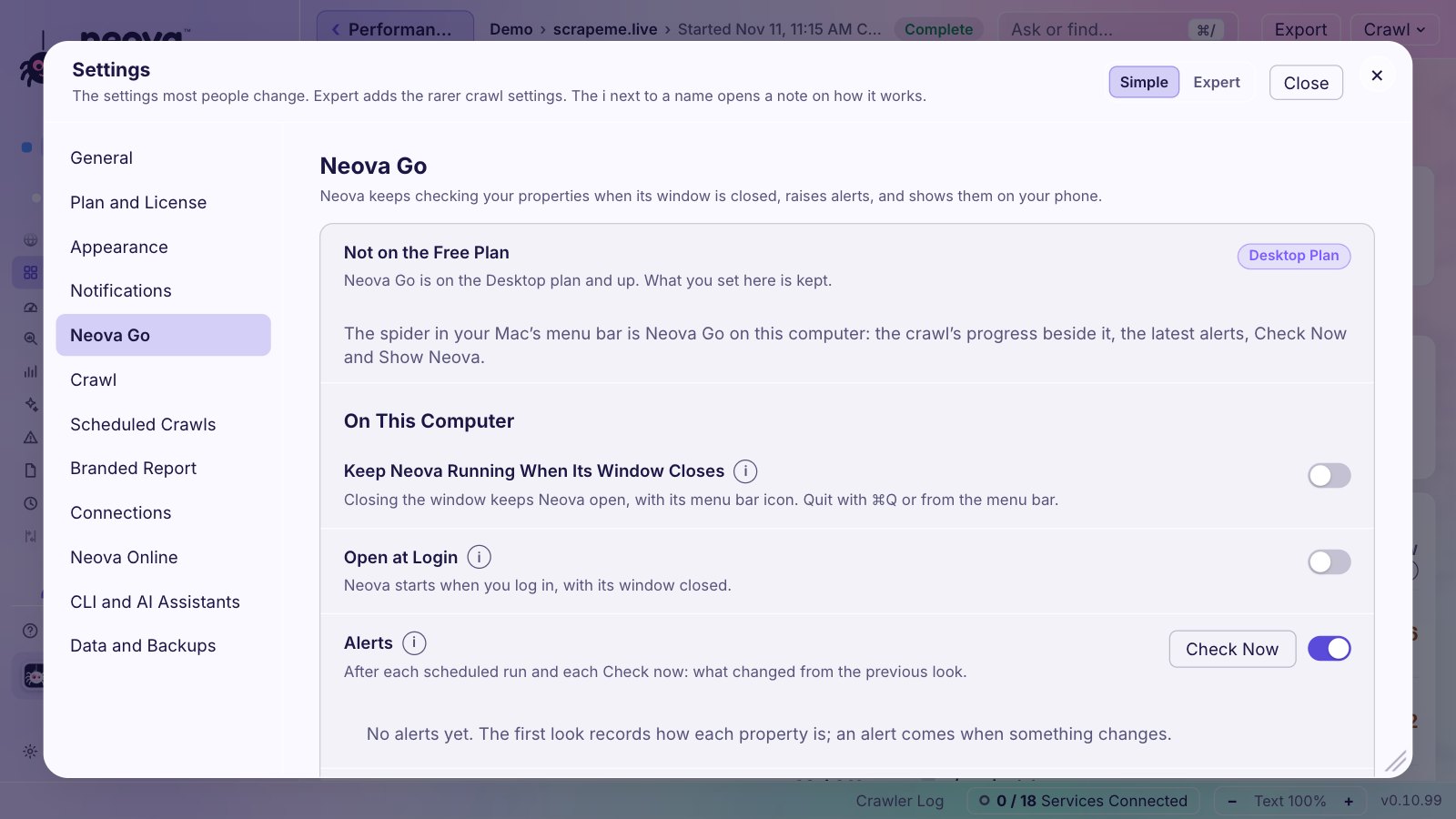
- Neova Go keeps Neova in the Mac menu bar when its window closes, and puts each property's latest crawl, Core Web Vitals, clicks and next run on your phone; the Mac refreshes it every 2 minutes while a crawl runs. Alerts also post to Slack and Microsoft Teams, per portfolio or property.
The checks built for monitoring:
- robots.txt Rules Changed Since the Previous Crawl
- Crawlable URL Count Changed Sharply Since the Previous Crawl
- Search Bot Share of 3xx, 4xx or 5xx Responses Is Rising
- HTML Is Over 2 MB or Core Web Vitals Miss the Good Range and CLS Is Over 0.1 in Lab or Field Data
- Server Response Time Is Slow in Lab or Field Data
- Favicon Is Missing, Broken or Blocked, the one that caught our logo
- Noindex Directive Is Present
Neova Go is on the Desktop plan and up. The Schedule and Monitoring help page walks through the setup step by step.
Questions
What is SEO monitoring?
Checking a site again on a schedule and comparing it with the last check: status codes, indexing directives, robots.txt, clicks, positions and Core Web Vitals, with alerts when something crosses a set line.
How often should I crawl my site for SEO monitoring?
Weekly suits most sites. Crawl after each release if the site ships often, daily during a migration, and monthly for a small site that rarely changes. Watch the most important pages daily.
What is the difference between an SEO audit and SEO monitoring?
An audit is a full review that asks what is wrong. Monitoring repeats a lighter check on a schedule and asks what changed since last time, so new problems are caught within days.
How often should I check Core Web Vitals?
Weekly. The Chrome UX Report is a 28 day rolling average, so a daily reading moves very little. Look at the 75th percentile against Google's lines: LCP 2.5 s, INP 200 ms and CLS 0.1.
What should trigger an SEO alert?
Changes that can cost traffic quickly: robots.txt rules that changed, noindex on indexable pages, a sharp fall in 200 pages, new 4xx or 5xx URLs, clicks down 20% or more in a week, and a Core Web Vitals grade getting worse.