Something Went Wrong?
If a crawl stops or Neova closes by itself, one click puts everything we need in a ZIP for you to send.
Report a Problem
- In Neova, click Help, then Report a Problem…. On a crawl that stopped, the same button is on its panel.
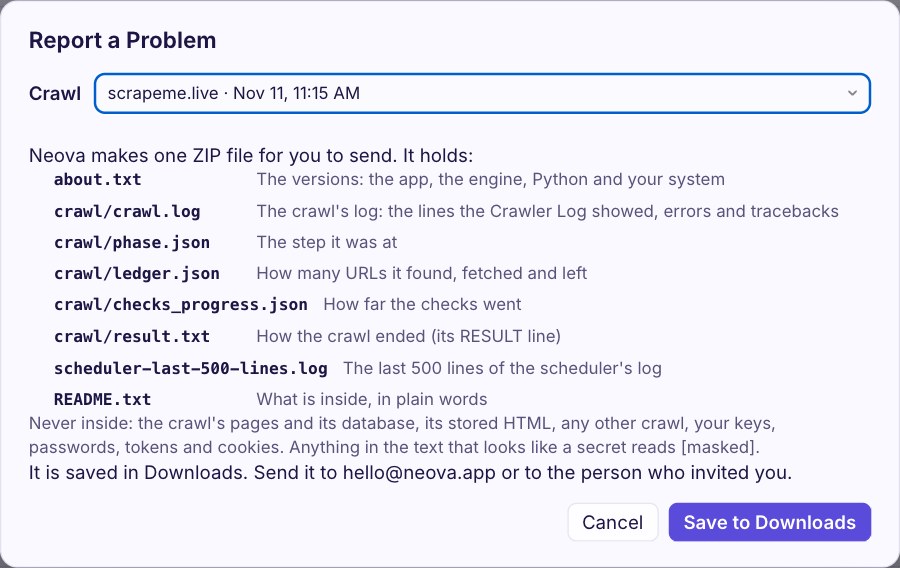
- Neova shows exactly what the ZIP will hold before it makes it: the versions of Neova and your system, that crawl's own log and its small files, and the last lines of the scheduler's log. Never your pages, your keys or your passwords.
- Click Save to Downloads (in Neova Online, Download the Report).
- Send the ZIP to hello@neova.app, or to the person who invited you, with one sentence on what happened. A screenshot helps too: Windows key + Shift + S on Windows, Shift + Command + 4 on a Mac.
This is in Neova 0.10.33 and later. On an older version, install the latest first: your crawls stay where they are. A crawl that ran before 0.10.33 has no log of its own, but its small files still go in the ZIP.
Every Crawl Keeps Its Log
Each crawl writes its own crawl.log as it runs, line by line, so it is there even if Neova closes by itself. It sits in that crawl's folder: on Windows, press Windows key + R, type %APPDATA%\Neova\runs and press Enter; on a Mac, in Finder choose Go, then Go to Folder, and type ~/Library/Application Support/Neova/runs. The newest folder starts with the site's name and the date. Report a Problem picks it up for you, so you only need this if Neova will not open.
While It Is Still on Screen
Crawler Log, at the bottom of the Neova window, shows the crawl live; Copy Log puts it on your clipboard for a quick message.
Don't Delete the Crawl
Open it and click Resume: Neova usually continues where it stopped, with its own settings.