Internal Linking Tool: How to Audit and Improve Your Internal Links
Internal links are the one ranking signal you fully control. They decide how search engines find your pages, how much weight each page gets, and what each page is about. An internal linking tool should show you the link graph as a crawler sees it, point out the pages that are buried or cut off, and help you decide which links to add. Here is what to look at and how to act on it.
What an Internal Linking Tool Does
People searching for an internal linking tool usually want one of two things. Some want a tool that suggests links while they write, often a CMS plugin. Others want a tool that audits the links a site already has, usually a crawler. Both help, at different moments:
| Job | Suggestion plugin | Crawler audit |
|---|---|---|
| Suggests links while you write | ✓ | ◐ |
| Whole-site link graph | – | ✓ |
| Click depth per page | – | ✓ |
| Pages with one inlink or none | ◐ | ✓ |
| Adds links for you | ◐ | – |
| Runs on | Inside the CMS |
A suggestion plugin is good at the moment of writing: it reminds you of related posts while the page is open. A crawler follows every link from the home page, the way a search engine does, and shows which pages get many links, which get one and which sit six clicks deep. Use the audit to find where links are missing, then the suggestions to fill them.
Why Internal Links Matter for SEO
- Discovery. Google's link best practices say Google finds most new pages through links, and that every page you care about should have a link from at least one other page on your site.
- Weight. Links pass importance from page to page. A page linked from the home page and from many relevant articles is treated as more important than one reached through a single footer link.
- Meaning. The anchor text of a link tells search engines and visitors what the target page is about.
- Visitors. A related link at the right spot keeps people reading and moves them toward the pages that matter to the business.
SEO ProCheck covers the topic end to end in internal linking: the complete guide.
Links Search Engines Can Follow
Before counting links, make sure they are links. Google's guidance is that it can reliably follow an a element with an href attribute that holds a real URL. Things that look like links to a visitor but are not, to a crawler:
| Markup | Followed |
|---|---|
<a href="https://neova.app/guides/crawl-budget"> | ✓ |
<a href="https://neova.app/pricing" rel="nofollow"> | – asks not to |
<a onclick="goTo('/pricing')"> | – |
<span data-href="https://neova.app/pricing"> | – |
<button onclick="location='/pricing'"> | – |
| Link added by JavaScript | ◐ after rendering |
Also watch for links that only exist after JavaScript runs. Google renders pages, but a link in the raw HTML is found sooner, and links that exist only in the rendered page can be missed by crawlers that do not render. And remember that rel=nofollow on an internal link asks search engines not to follow it, so a page reached only through nofollow links has no followed path to it.
Anchor Text That Describes the Target
Google asks for anchor text that is descriptive, reasonably short and relevant to the page it points to. Compare:
| Anchor text | Describes the target |
|---|---|
| Click here | – |
| Read more | – |
| Image with no alt text | – |
| One exact phrase on 500 pages | ◐ |
| See the robots.txt tester guide | ✓ |
| How crawl budget works on large sites | ✓ |
Vary the wording naturally across pages rather than repeating one exact phrase hundreds of times. The text around a link helps too, so a link inside a relevant sentence says more than the same link in a list of twenty.
Click Depth and Link Score
Two numbers summarize where a page sits in the link graph:
- Click depth is the number of links needed to reach a page from the start URL, usually the home page. The home page is depth 0, pages it links to are depth 1, and so on. No search engine publishes a maximum, but pages many clicks deep tend to be crawled less often and get less internal weight. Depth 4 or more is a common point to take a look.
- Link score is an internal PageRank: it spreads weight from page to page over the followed links of the crawl and rates each URL by how much it receives. It is not Google's number, which nobody outside Google can see, but it shows how your own structure distributes weight.
| Depth | Typical page | Flagged |
|---|---|---|
| 0 | Home page | – |
| 1 | Main categories | – |
| 2 | Subcategories, top articles | – |
| 3 | Products, articles | – |
| 4 or more | Deep products, old posts | ✓ if indexable |
Neova counts depth in followed links and redirects from the start URL, each redirect one level, and flags indexable URLs at 4 or more with Indexable URL Is at Crawl Depth 4 or More.
Read them together. A key product page at depth 5 with a low link score is a clear candidate for more links. A legal page with a high score because it is in every footer is normal and not a problem.
How to Audit Internal Links, Step by Step
- Crawl the whole site from the home page to the end. A crawl stopped at a URL limit makes deep pages look missing. For scale, our own full crawl of seoprocheck.com on October 17, 2026 fetched 10,222 URLs in 61 minutes, 99.98% complete.
- List your priority pages: the products, services, categories and guides that should rank.
- Check their depth and link score. Priority pages should sit near the top of both lists.
- Find pages with one inlink or none. Pages linked from a single URL hang on one link; pages with none are orphans, which a link crawl only finds when you compare it with sitemaps, Search Console or logs. The orphan pages guide covers that comparison.
- Review anchors for empty or generic text.
- Fix links that point to the wrong URL: redirects, errors and canonicalized URLs. Link straight to the final, canonical address.
- Look by template. Most link problems come from a template, so one fix to a category or article template can repair thousands of pages.
SEO ProCheck's internal linking FAQ answers the common questions on structure and strategy.
Turning the Gaps Into New Links
The audit gives you a list of pages that need links. To decide where those links come from:
- Start from strong, related pages. A page with a high link score that covers a related topic passes more than a weak one. Link from where a reader would naturally want to go next.
- Use mentions you already have. Many pages already name another page's topic in their text without linking to it. Those are the easiest links to add, since the sentence is already written.
- Build hubs. A category or guide page that links to every page on a topic, and is linked back from them, keeps a cluster shallow.
- Fix the template when a whole page type lacks related links, breadcrumbs or pagination links.
Be careful with automated insertion. A tool can find candidates, but a person should read each one: a link that fits the words but not the reader's intent does little. Footer and sidebar links on every page add little meaning; one link from a relevant paragraph usually does more. Internal linking is step 9 of the technical SEO audit checklist, and on large sites it ties into crawl budget.
Audit Internal Links With Neova
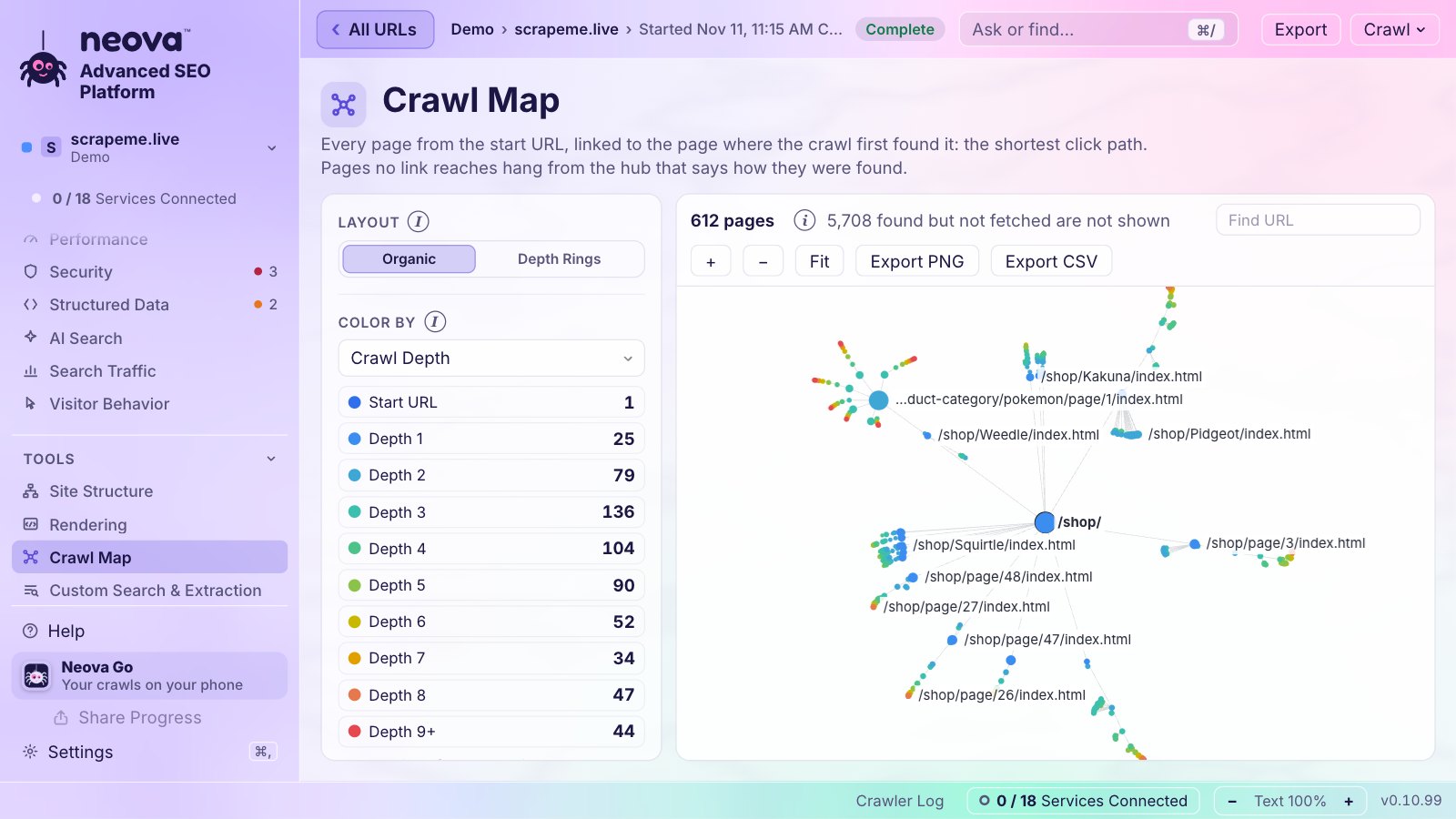
Neova crawls your site the way a search engine discovers it and lists every link to and from each URL with its anchor text. Each URL gets a Crawl Depth and a Link Score from 0 to 100, an internal PageRank over the followed links. The Crawl Map draws the crawl as a tree from the start URL, and Page Groups sort pages by template so you can see which template is short of links. Link Opportunities suggests internal links from the text of your pages: pages that mention another page's topic without linking to it. Neova does not change your site; you review each suggestion and add the links in your CMS. The checks behind it include:
- Indexable URL Is at Crawl Depth 4 or More
- Indexable URL Has Followed Inlinks From Only One URL, on a complete crawl
- Orphan URL Returns 200 and Is Indexable, from sitemaps, Search Console or server logs
- URL Only Receives Nofollow Internal Links and Indexable URL Has Inlinks Only From Non-Indexable URLs
- Followed Internal Inlinks Use Non-Descriptive Anchor Text and Internal Link Has No Anchor Text
- Link Destination Is Only in an Onclick Attribute
- Internal Link Points to a Canonicalized URL
- HTML Page Has No Internal Outlinks
With JavaScript Rendering on, the links are read after rendering, so you can compare them with the raw HTML. See Features or download Neova; the Free plan crawls up to 1,000 URLs with every check.
Questions
What is an internal linking tool?
A tool that shows or improves the links between pages of your own site. Crawlers audit the links a site already has, with depth, inlink counts and anchor text; suggestion tools propose new links, often while you write in the CMS.
How many internal links should a page have?
No search engine sets a number. Google asks that every page you care about has a link from at least one other page on the site. Beyond that, link where it helps a reader, and give your priority pages more links from related pages.
What is a good click depth?
There is no official limit, but keeping important pages within three clicks of the home page is a common goal. Pages at depth 4 or more are worth a look, especially if they should rank.
Do internal links with nofollow pass value?
Nofollow asks search engines not to follow the link, so it should not be your way of linking to pages you want found and ranked. Use plain followed links internally, and keep pages out of the index with noindex instead.
Can a tool add internal links for me?
Some CMS plugins can insert links automatically. A crawler like Neova finds the gaps and suggests candidates, and you add the links yourself. Either way, read each link before it goes live so it fits the sentence and the reader.