Article Schema: Headline, Author, Dates and Images Google Can Read
Article schema is structured data for news stories, blog posts and other written pages. It tells Google the headline, who wrote it, when it was published and changed, and which images represent it. Google lists no required properties for it, only recommended ones, so most of the work is getting authors and dates right. Verified against Google's documentation on November 21, 2026.
What Article Schema Does
Google's Article structured data documentation says the markup helps Google understand more about a page and show better title text, images and dates for it in Search and in other Google surfaces. There is no special result type for it. What it does is make the facts of the article explicit: which text is the headline, which person wrote it, which date is the first publication and which is the last real change.
Those facts matter because Google can also guess them from the page. When the markup and the page agree, the guess becomes easy. When they disagree, for example on a date, Google has to choose, and it may not choose yours.
Article, BlogPosting or NewsArticle
All three are Schema.org types Google reads with the same properties. Pick the one that describes the page:
| Type | Use for | Example |
|---|---|---|
Article | Any written article | A guide, a report |
BlogPosting | A blog post | A post on /blog/ |
NewsArticle | News reporting | A dated news story |
The choice changes nothing in Google's requirements. It helps other readers of the markup sort the page. A product page or a category page is not an article; do not add Article markup just to have markup.
Article Schema Properties at a Glance
Google lists no required properties for Article and recommends adding those that apply:
| Property | Status | Expects | Rule of thumb |
|---|---|---|---|
headline | Recommended | Text | Same as the visible title |
image | Recommended | URL or ImageObject | 3 ratios, 50K pixels |
datePublished | Recommended | ISO 8601 date | With time zone |
dateModified | Recommended | ISO 8601 date | Only for real changes |
author | Recommended | Person or Organization | One entry per author |
author.name | Recommended | Text | Name only |
author.url | Recommended | URL | Profile page |
| Required properties | 0 listed | None | Add what applies |
Google accepts sameAs in place of author.url. A paywalled article also needs isAccessibleForFree set to false, as Google's paywalled content guide explains.
Images and Dates: The Numbers
| Rule | Value |
|---|---|
| Aspect ratios | 16x9, 4x3, 1x1 |
| Minimum size | 50,000 pixels, width x height |
| Crawlable and indexable | ✓ |
| Logo as the image | – |
| Date format | ISO 8601 |
| Time zone | Include it |
| Without time zone | Googlebot time zone used |
An image of 300 by 168 pixels is 50,400 pixels and just passes. Give high resolution versions instead, since a larger preview looks better than a stretched small one. Google also asks that the images be about the article and represent the marked up content, so a site logo or a decorative divider does not qualify. A date such as 2026-10-02T08:00:00-06:00 carries the time zone; 2026-10-02 alone is valid but leaves the hour to Google.
Authors Done Right
Google's author best practices, in short:
| Do | Instead of |
|---|---|
Person for people | Thing or the wrong type |
Organization for a company | A person type for a brand |
Name only in author.name | "Posted by Dana Ortiz" |
Job titles in jobTitle | Titles inside the name |
| One author entry per person | Two names in one field |
| All visible authors listed | Only the first author |
Publisher in publisher | The site name as author |
For author.url, link a page that identifies the author: a bio page on your site or a social profile. For an organization as author, link its home page. An author page can carry ProfilePage markup of its own; SEO ProCheck's ProfilePage schema for author bios shows how.
A Valid Article Schema JSON-LD Example
A blog post with two authors, three images and an update:
<script type="application/ld+json">
{
  "@context": "https://schema.org",
  "@type": "BlogPosting",
  "headline": "How to Choose Trail Running Shoes for Wet Ground",
  "image": [
    "https://www.example.com/img/wet-trail-16x9.jpg",
    "https://www.example.com/img/wet-trail-4x3.jpg",
    "https://www.example.com/img/wet-trail-1x1.jpg"
  ],
  "datePublished": "2026-10-02T08:00:00-06:00",
  "dateModified": "2026-11-14T09:30:00-07:00",
  "author": [
    {
      "@type": "Person",
      "name": "Dana Ortiz",
      "url": "https://www.example.com/authors/dana-ortiz"
    },
    {
      "@type": "Person",
      "name": "Sam Lee",
      "url": "https://www.example.com/authors/sam-lee"
    }
  ],
  "publisher": {
    "@type": "Organization",
    "@id": "https://www.example.com/#organization",
    "name": "Example Outdoor"
  },
  "mainEntityOfPage": "https://www.example.com/blog/wet-trail-shoes"
}
</script>
The publisher refers to the Organization markup on the home page by its @id, so the company is described once. The Organization schema guide covers that block.
We use the same pattern on this site. Every guide on neova.app carries Article JSON-LD with a headline, a description, datePublished, dateModified, an Organization as author with a URL to our home page, and a publisher with a logo. The dates come from the same fields that print the Updated date you see at the top of the page, so the two cannot drift apart.
Common Article Schema Mistakes
| Mistake | Effect | Fix |
|---|---|---|
| dateModified before datePublished | Impossible dates | Fix the template |
| dateModified on every rebuild | Freshness looks fake | Change it on edits only |
| Date in markup, none visible | Nothing to confirm it | Show a labeled date |
| Headline differs from title | Mixed signals | Use the H1 text |
| Logo as article image | Not a valid image | Use a content image |
| Author name with "By" | Wrong name read | Name only |
| Several authors in one name | One author read | One entry each |
Date conflicts are the most common, because three systems often write dates: the CMS, the sitemap and the server's Last-Modified header. When they disagree, none of them is believable. SEO ProCheck's Article schema check lists the fields it tests.
Check Article Schema With Neova
Neova reads JSON-LD, microdata and RDFa from every HTML page of a crawl. For articles, these checks find the problems above:
- Dates Conflict in Structured Data, Sitemap Lastmod or Last-Modified, when dateModified precedes datePublished, a date is in the future, or sitemap lastmod is over 7 days after dateModified
- Structured Data Lacks Required Properties or Differs From Visible Text, also when under 70% of the words of an article headline are in the visible text
- Structured Data Lacks Recommended Properties
- Visible Date Is Missing or Differs From the Structured Data Date
- Article Has No Author Byline Linked to an Author Profile
- Paywalled HTML Page Lacks isAccessibleForFree False
The last three are read by the AI reader, which runs with AI on your own computer. Each check shows when it flags, what it usually means and what you could do:
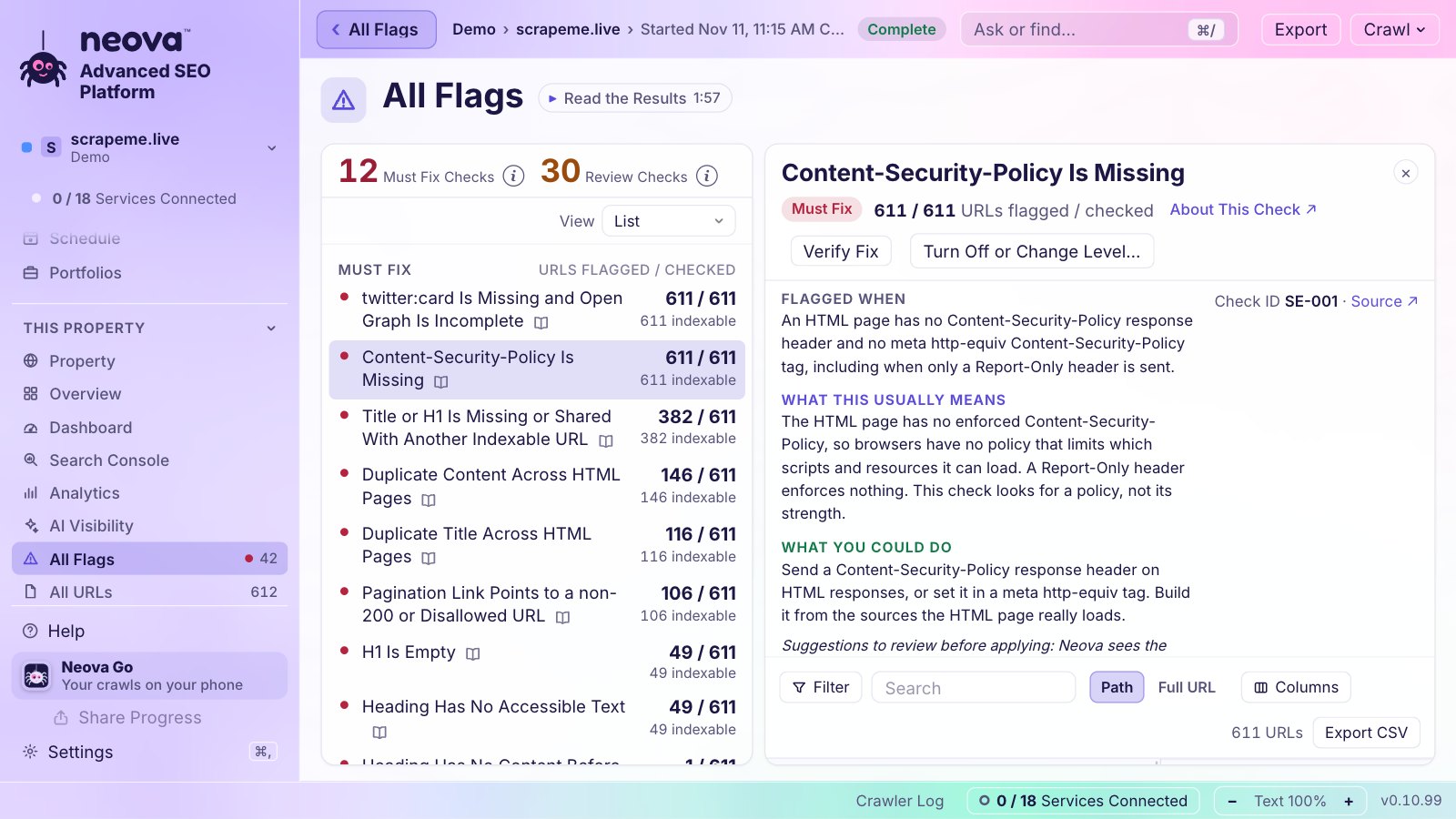
The Free plan crawls up to 1,000 URLs with every check, on Mac, Windows and Linux. See Features or download Neova.
Questions
What are the required properties for article schema?
There are none. Google recommends headline, image, datePublished, dateModified and author with author.name and author.url, and asks you to add those that apply.
Should I use Article or BlogPosting?
Use BlogPosting for blog posts, NewsArticle for news and Article for other written pages. Google reads all three with the same properties.
What image size does article schema need?
At least 50,000 pixels when width is multiplied by height, ideally in three aspect ratios: 16x9, 4x3 and 1x1. The image must be crawlable, indexable and about the article, not a logo.
Should dateModified change every time the page is rebuilt?
No. Change it when the content really changes. A date that moves on every deploy tells Google nothing and makes the real updates harder to trust.
Can the author be an organization?
Yes. Use the Organization type with the company name and a URL to its home page. Use Person for people, one entry per author shown on the page.