What's New
What changed in each version of Neova SEO Platform, newest first. The app shows the same list in Help, then What's New.
In the App
Neova shows this same list in Help, then What’s New…, and opens the new version’s part once by itself after you update.
When a newer build is out, Neova tells you at the top left of its window, first in the Help menu, in Settings, then General, and in the menu bar with Check for Updates…. It asks every 30 minutes and each time you come back to it.
Download the latest build; install it over the one you have, and your crawls stay.
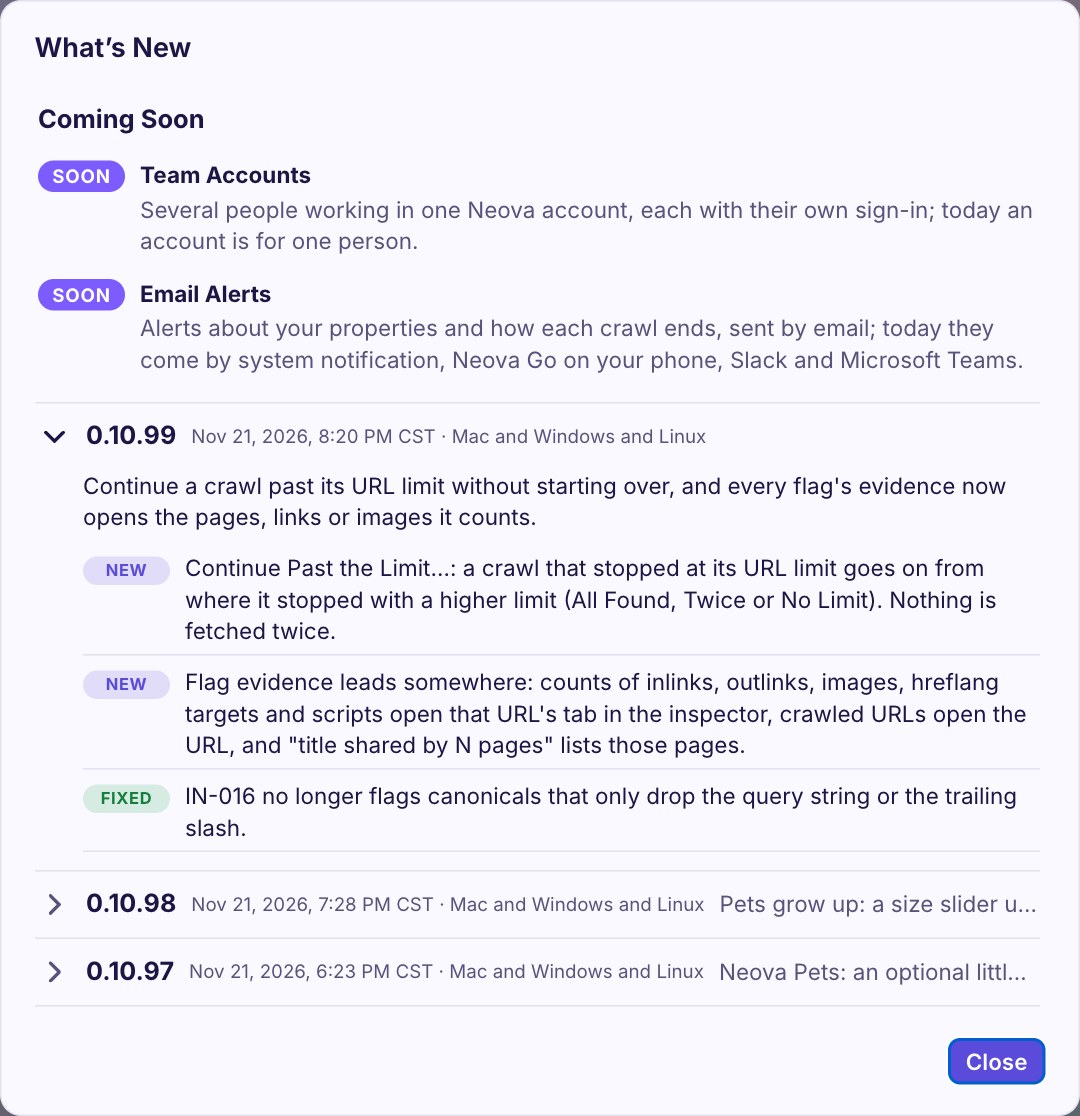
Coming Soon
227 versions, from the first build on October 27, 2026. Open one to see what changed.
0.10.99Nov 21, 2026, 8:20 PM CST · Mac and Windows and Linux
Continue a crawl past its URL limit without starting over, and every flag's evidence now opens the pages, links or images it counts.
- NewContinue Past the Limit…: a crawl that stopped at its URL limit goes on from where it stopped with a higher limit (All Found, Twice or No Limit). Nothing is fetched twice.
- NewFlag evidence leads somewhere: counts of inlinks, outlinks, images, hreflang targets and scripts open that URL's tab in the inspector, crawled URLs open the URL, and "title shared by N pages" lists those pages.
- FixedIN-016 no longer flags canonicals that only drop the query string or the trailing slash.
0.10.98Nov 21, 2026, 7:28 PM CST · Mac and Windows and Linux
Pets grow up: a size slider up to Colossal, pixel art for every pet, and a toolbar under the pet.
- NewPets: a size slider from Tiny to Colossal (Big by default), pixel art for every pet, and a toolbar under the pet: open what it last said, New Crawl, In Progress and more.
- FixedSettings: its corner resizes the window instead of closing it, and a × closes it.
- FixedThe pet on the desktop was drawn at 60 px whatever its size.
0.10.97Nov 21, 2026, 6:23 PM CST · Mac and Windows and Linux
Neova Pets: an optional little companion that tells you when a crawl is done or needs you.
- NewSettings › Appearance › Pets: pick a mascot (off by default). It sits in a corner, moves a little, and speaks up when a crawl finishes, stops or needs your attention; a click opens the screen it talks about.
0.10.96Nov 21, 2026, 5:11 PM CST · Mac and Windows and Linux
Competitors fits a smaller window, and Connections shows every logo at once.
- FixedCompetitors: on a 1440 px window every property's column is in view, with no sideways scroll.
- FixedSettings › Connections shows each service's logo as soon as it is read, without opening the sheet again.
0.10.95Nov 21, 2026, 3:55 PM CST · Mac and Windows and Linux
A new Crawl Map, and tables you can read while they scroll.
- NewCrawl Map, rebuilt: one map from the start URL, pages no link reaches grouped by how they were found (Only in XML Sitemaps), two layouts (Organic and Depth Rings), color by depth, status code, page group, indexability, flags or Search clicks, and the click path of any page from the start URL.
- FixedThe pinned header of every tool's table (Competitors, External Links and others) let the rows scrolling under it show through. It is solid again.
- FixedThe sidebar no longer cuts a row in half at its top and keeps the open screen in view; Dashboard › Algorithm & Landscape no longer shows "[object Object]"; long names wrap instead of being cut.
0.10.94Nov 21, 2026, 2:02 PM CST · Mac and Windows and Linux
Clearer names: each data screen and the checks that use its data are told apart and linked both ways.
- BetterThe Google Search Console category is now Search Traffic: the checks that use Search Console and Analytics data. It links both ways with the Search Console and Analytics screens.
- BetterVisitor Experience is now Visitor Behavior: what real visitors do on each page, from Microsoft Clarity.
- BetterSearch & Extraction is now Custom Search & Extraction. On the Dashboard, the Performance tab is now Traffic and the AI Search tab is AI Visibility.
- BetterThe AI Visibility screen and the AI Search category, and the External Links tool and the Internal & External Links category, now link to each other.
0.10.93Nov 21, 2026, 11:49 AM CST · Mac and Windows and Linux
International and Local SEO categories, and Search Console and Google Analytics read together: page groups, AI visibility and changes against traffic.
- NewHreflang is now International, with two new tabs: Hreflang Matrix (every hreflang set by language, each URL's state) and Markets (Search Console clicks and Google Analytics visits by country for each version).
- NewLocal SEO, a new category: 14 checks on location pages and their LocalBusiness markup, from Google's guide, and a Locations tab. Local Rank Grid and Listings Check run with your DataForSEO account, the cost shown before each run.
- NewSearch Console and Analytics each have a Page Groups tab: clicks, impressions, organic sessions and key events per page group, beside each group's flags. The Dashboard has the same as a block.
- NewAI Visibility, under Analytics: AI-referred sessions, citations in AI answers, AI bot requests, Bing AI citations and how ready each URL is for AI search, in one screen.
- NewCompare Crawls › Changes Against Traffic: what changed on each URL next to its clicks and sessions in both crawls.
- NewNew checks: pages losing their Search clicks, CTR far under the norm for its position, Discover pages without a large image, visits from a country landing on another hreflang version, and little main text on a page with impressions (a notice).
- BetterTickets go up one priority when their pages have organic sessions or key events in Google Analytics, as Clarity visits already raise them.
0.10.92Nov 21, 2026, 10:01 AM CST · Mac and Windows and Linux
Make Your Own dashboards by drag and drop: the blocks on the left, your dashboard on the right, live.
- NewDashboard › Make Your Own: drag blocks from the list onto your dashboard, drag them to move, and drag a block's right edge to change its width. Each block shows the crawl's own data as you build. Preview shows the result.
- BetterHome stands apart in the sidebar, and your own dashboards come first in the Dashboard's tabs.
- FixedThe Google Analytics and Microsoft Clarity blocks can now be added to a dashboard of your own.
0.10.91Nov 21, 2026, 8:58 AM CST · Mac and Windows and Linux
Quit no longer waits for hours on a crawl checking its links to other sites: Stop is heard there, and Close Now is always offered.
- FixedStop, Quit and an update now end the check of links to other sites at once. What was checked is kept, and Resume checks only the rest.
- FixedSaving Before Neova Quits no longer waits on a crawl that has already ended, and Close Now shows after 15 seconds even when only a background crawl is being saved.
0.10.90Nov 20, 2026, 10:00 PM CST · Mac and Windows and Linux
Neova is out of beta: the first-launch screen is the Terms of Use, and nothing is asked again if you already accepted.
- BetterThe screen Neova shows before its first use is now the Neova Terms of Use: four points in short and a link to the full text. If you accepted the Beta Tester Agreement, nothing is asked again.
- BetterSettings › Plan and License: Every Feature On replaces During the Beta. Neova Online's sign-in says it comes with the Desktop + Online and Agency plans.
0.10.89Nov 20, 2026, 5:00 PM CST · Mac and Windows and Linux
Your crawls now move between your computers through Neova Online on their own, and Neova shows whose license it is.
- NewSettings › Neova Online: Download New Crawls brings every crawl that is only in Neova Online to this computer, newest first, one at a time, keeping 5 GB of the disk free. Upload New Crawls is now on by default. Together, each computer signed in to Neova Online gets the crawls of the others. Both can be turned off.
- NewForgot your password? next to each place Neova asks for your Neova Online password (sign in, Create Key, Bring My Connections).
- NewSettings › Plan and License says whose license it is: the email it was given to or bought with.
0.10.88Nov 20, 2026, 3:07 PM CST · Mac and Windows and Linux
On Windows and Linux, every language now shows its own words where the Mac's are meant, and Neova Online can reset a forgotten password.
- FixedOn Windows and Linux, in the 14 languages other than English, sentences that mentioned the Mac (Settings › Neova Online, Plan and License, the keyboard shortcuts) stayed in English. They are translated now, and say PC, Explorer and Ctrl where the Mac's say Mac, Finder and ⌘.
- NewNeova Online: Forgot your password? on the sign-in page sends a link by email to choose a new one.
0.10.87Nov 20, 2026, 12:42 PM CST · Mac and Windows and Linux
Save every crawl for later and resume them from one menu, and Home is easier to reach.
- NewA Crawl menu in the Mac menu bar: Pause and Save All Crawls saves what every crawl fetched and leaves its checks for later, so you can quit Neova or install an update without ⌘Q; Resume Saved Crawls continues them all. In Progress has the same two buttons, on Windows and Linux too.
- NewWhen Neova opens, the crawls you saved for later, with the Crawl menu, Stop's Pause and resume later or Quit's Save and Quit, are offered in a banner with Resume Saved Crawls.
- BetterHome is bigger and bold, at the top left, with the house, and at the top of the sidebar. Back to another screen is larger too, in the accent color.
0.10.86Nov 20, 2026, 11:41 AM CST · Mac and Windows and Linux
Stop can now pause a crawl for later: everything fetched is saved, so you can quit Neova or install an update, and Resume continues it.
- NewStop › Pause and resume later: no more requests and no checks for now, and everything fetched is saved. You can quit Neova or install an update meanwhile; Resume continues where the crawl stopped, then runs the checks. A banner says the crawl is paused, with Resume. (Mac and Linux; on Windows, Stop already keeps the crawl for Resume.)
0.10.85Nov 20, 2026, 10:58 AM CST · Mac and Windows and Linux
Search Console and Analytics get screens of their own, built from your archives, and Home counts the checks with flags.
- NewSearch Console and Analytics screens, under Dashboard, built from the months kept on this computer: pick a period and compare it with the one before, see the totals with their change and two daily charts, then Google's own tabs: Queries, Pages, Countries, Devices, Search Appearance and Dates for Search Console (with its search type), Channels, Sources, Landing Pages, Pages, Countries, Devices, Browsers and Languages for Analytics.
- NewOn those screens, every page row shows the open crawl's status code, indexability and flags, and opens the URL on its Search and Visits tab.
- BetterThe archives keep more: Search Console months now keep countries, devices, search appearance and the Image, Video, News and Discover search types; Analytics months keep landing pages for every channel, views, devices, browsers and languages. Months kept before are completed by the next pull.
- BetterHome's Flags column leads with the number of checks that have flags, with the flag count small under it, so a few site-wide checks counted once per page no longer make the number huge. Sorting, the trend and the CSV follow it.
0.10.84Nov 20, 2026, 9:05 AM CST · Mac and Windows and Linux
Search Console and Google Analytics on every URL, and a shorter New Crawl.
- NewAll URLs shows what Google says about each URL, from the data each crawl already reads: Position, Top Query, Queries, Google Index Status, Google Canonical and Last Googlebot Crawl from Search Console, and Organic Sessions, Engagement Rate, Key Events, AI-Referred Sessions and Views from Google Analytics. Position and Organic Sessions show by default; the others are in Columns and in the Google Search Console category.
- NewPage Details has a Search and Visits tab: the URL's clicks, impressions, position and its 10 busiest searches, what URL Inspection said, its Google Analytics and Microsoft Clarity numbers, and what this crawl found on it, side by side.
- BetterAll Flags has Organic Sessions and Key Events columns, and a category's Sort By has Sessions and Key Events, so the checks on the pages people reach from search come first.
- BetterNew Crawl asks only what changes from one crawl to the next: the level, the scope, seed URLs and authentication. The property's other crawl settings are one line each under Crawl Settings of the site, which says whether they are its own or the defaults; Show All Settings opens them in place.
0.10.83Nov 20, 2026, 8:46 AM CST · Mac and Windows and Linux
Competitors are suggested from the start, from the ones you list and your own searches, and none is crawled before you see it.
- NewCompetitors are suggested early: when a property's crawl ends, Neova asks DataForSEO for its competitors (once in 30 days at most) and says how many it found. Find Competitors… on the Competitors screen shows them to choose from. Nothing is crawled until you choose.
- BetterThe suggestions also start from the competitors you list: a site that competes with several of them comes first, so a new or small site gets suggestions too. When those are few, Neova adds the sites in Google's top 10 for the property's own searches. Each suggested site says why it is there.
- BetterThe list asks for the competitors you know, and after you add one, Find More Like These looks for sites like it (about $0.02 each, kept 30 days). Directories and review sites such as G2 and Capterra are never suggested.
- FixedA Full Audit no longer crawls competitors you have not seen: when it finds some while it runs, it waits, says so in its step and in a banner, and Review Competitors… lets you choose before anything is crawled or bought.
- FixedAI assistants: listing your crawls no longer fails when one stored crawl is damaged or half-copied. That crawl gets its own error line and the others are listed.
0.10.82Nov 19, 2026, 5:35 PM CST · Mac and Windows and Linux
Settings follow one logic: the defaults in Settings, each property's own on its screen, and every row says how it works.
- BetterSettings › Crawl holds this computer's settings and the defaults every property starts from; it no longer opens on the property on screen. A property's own crawl settings open from its screen, Property Settings › Crawl Settings…, where each value that differs from the defaults says Own Setting.
- BetterThe property's head is simpler: Property Settings (color, portfolio, code, crawl settings, schedules), Run a Full Audit…, and one crawl button for the next step, Resume, Crawl the Rest or Re-Crawl…, whose arrow lists the other ways to crawl and what each does. Each button has its (i).
- BetterEvery setting has its (i), in Simple too, with the same words in Settings, New Crawl and Resume With Changes. Resume With Changes now uses the same names and controls as Settings: the speed in URL/s, Fetch With Chrome and Follow Internal Nofollow as switches that say On or Off.
- FixedResume With Changes: the Resources boxes (Images, CSS, JavaScript, PDFs) were not drawn on the Mac, so nothing showed whether each was crawled. A speed such as 1.5 URL/s is no longer rounded to 1, and Cancel and Resume stay in view.
- FixedNew Crawl: a new site starts on your defaults instead of 3 URL/s, the Speed box takes 1, 2 and 3, and Review says AI Review only when it will run. A scheduled crawl made after a sample runs the full site it says, and follows a change of the defaults.
- FixedLorem Ipsum Placeholder Text Is Present no longer flags a translated page that names Lorem Ipsum at the start of a sentence, such as Japanese, Korean or Turkish copy.
0.10.81Nov 19, 2026, 3:33 PM CST · Mac and Windows and Linux
Lighthouse runs by default again, on competitor crawls too, and Clarity's help is one click away.
- FixedLighthouse read as off in Settings and in New Crawl when it had never been set, so crawls ran without it. It is on unless you turn it off, and properties saved with it off under the old default are switched on once. Crawls started by an AI assistant or the command line run it too.
- BetterCompetitor crawls (the Full Audit's, and the competitor samples) run Lighthouse too, so their lab speed can be set beside yours.
- BetterConnections › Microsoft Clarity: How to Connect Clarity opens Neova's own guide (neova.app/help/clarity): the token, Clarity's limits, AI Visibility and importing a file.
0.10.80Nov 19, 2026, 2:10 PM CST · Mac and Windows and Linux
Microsoft Clarity joins the connections: what visitors struggle with on each page changes what Neova flags and puts first.
- NewMicrosoft Clarity: connect it in Connections › Microsoft with a Clarity Data Export token per project. Neova keeps a daily archive of each site's visits (Clarity itself keeps 3 days), brings the last 28 days into each crawl, and reads which pages AI answers cite and which pages AI bots request.
- NewA new check category, Visitor Experience (UX-900 to UX-910): rage clicks, dead clicks, quick backs, excessive scrolling and JavaScript errors page by page, visited pages the crawl never found or that answer an error, cited pages that are broken or not indexable, and friction on phones twice the desktop's. Tickets on pages people visit or AI answers cite go one priority up.
- BetterAll Flags has a Visits column and Sort By Visits; the Dashboard shows Visitor Friction and Pages Cited in AI Answers.
- BetterImport Instead of Connecting takes Clarity's exports too.
- FixedHistory's GA4 Archive Now and the Dashboard's Visits read nothing in the installed app: the app never allowed the step that saves the GA4 archive.
- FixedImporting a file into a crawl that already had a connection's data now adds to it.
0.10.79Nov 19, 2026, 9:00 PM CST · Mac and Windows and Linux
A sample crawl takes its pages per page group on every site again, not only on WordPress.
- FixedSample crawls (Pages: a sample of N pages of each page group) no longer keep going on sites whose pages name no template, such as the NFL club sites: articles that differ only in their embeds, galleries or ad slots now count as one kind of page, and a page group never takes more than 8 times the sample size. A sample of 20 of patriots.com had fetched over 9,000 pages with 46,000 still to go.
0.10.78Nov 19, 2026, 8:00 PM CST · Mac
Each kind of run has its own mark and colour, a crawl stopped after it fetched everything says so, and Quit names background work for what it is.
- BetterIn Progress, Schedule and Home: each kind of run has its own mark and colour, its name in bold: a gauge for a Core Web Vitals snapshot, a globe for a full crawl, a magnifier for Search Console, bars for Analytics, and more.
- BetterA crawl stopped after every URL was fetched, in a later step such as Data Sources or Rendering, now reads Crawled, Data Sources Stopped, not just Stopped. Every status tag's tooltip says how the crawl ended.
- FixedQuit Neova? no longer calls every job running in the background a scheduled crawl: a crawl started by an AI assistant or from the command line, or its checks running again, is named for what it is.
0.10.77Nov 19, 2026, 7:00 PM CST · Mac
Home's List folds too: each property's competitors, and each portfolio.
- NewHome, List: a chevron by each property folds its competitors, and Collapse All folds them all. Sorted by the Portfolio column, the List is in one section per portfolio, each with its own chevron. The folds are the same as on the cards, and Home remembers them.
0.10.76Nov 19, 2026, 6:00 PM CST · Mac
Home deletes properties and competitors in bulk, folds each portfolio, and keeps pinned properties on top.
- NewHome, Cards: a box at the left of each property and each competitor, and Delete Selected deletes them all at once. Their crawls go to the Trash, where Put Back restores them.
- NewHome, Cards, Sort By Portfolio: each portfolio is a section with its own chevron to fold it, and Home remembers which ones are folded, as it does for each property.
- BetterA pinned property comes first on Home, in Cards and List, whatever the sort, with a star by its name.
- FixedHome, List: the Re-Crawl button and the ⋯ menu stay in view at the right edge when the table is wider than the window.
0.10.75Nov 19, 2026, 10:02 AM CST · Mac and Windows and Linux
In Progress counts every crawl the same way, and four checks stop flagging what is fine.
- FixedIn Progress: a crawl that ended outside the window (a scheduled crawl, the AI assistant's or another window's) leaves Running Now within seconds, so Tasks Running Now and Crawl Slots in Use always count the same crawls.
- FixedA link to a site such as developers.google.com is no longer called a staging or development host (IN-122): only a host named dev, staging, test or the like counts.
- FixedLinks inside a closed menu, and a button hidden until you scroll, are no longer flagged as covered by an overlay or as invisible controls (TE-049, TE-047).
- FixedA page that only mentions lorem ipsum, such as a list of checks, is no longer flagged as placeholder text (ON-039); real placeholder text still is, and the flag quotes it.
0.10.74Nov 18, 2026, 5:20 PM CST · Mac and Windows and Linux
A license Neova gives you shows when it ends instead of a renewal date.
- BetterSettings › Plan and License: a license given by Neova, to a tester or a partner, says "A free license from Neova" with the day it ends, never a renewal, and its key reads "Given to" your email.
0.10.73Nov 18, 2026, 4:53 PM CST · Mac and Windows and Linux
Pages are asked for the way search engines ask, so sites that hand AI agents Markdown show Neova their real pages, and a crawl keeps track of the site's platform.
- FixedNeova asks for pages the way Googlebot does, so a site that serves Markdown to AI agents (nextjs.org does) answers with its HTML pages, and XML Sitemaps are asked for as XML.
- BetterA crawl notes the platform the site runs on from every answer it gets, so the platform checks run on the right sites, and when a Salesforce Commerce Cloud, Adobe Experience Manager or Magento site refuses the crawl, the message says how to get through on that platform.
0.10.72Nov 18, 2026, 4:05 PM CST · Mac and Windows and Linux
A check category with nothing to fix lists what passed instead of standing empty, and a license is now one computer per person, with Move It Here to switch.
- BetterA check category with no Must Fix or Review checks opens its Passed and Not Run lists, so you see which checks ran and passed, and which did not run and why.
- NewSettings › Plan and License: a license is one computer per person on the plan. Activating on another computer names the one that has it and offers Move It Here, up to 10 times in 30 days.
0.10.71Nov 18, 2026, 4:00 PM CST · Mac and Windows and Linux
Bring your Search Console, Analytics and Bing data or your server logs by file, import crawls from 16 more tools, and New Crawl knows your site's platform.
- NewSettings › Connections › Import Instead of Connecting: when your company's rules keep Neova from connecting, import a Search Console, Google Analytics 4 or Bing Webmaster Tools export instead. Neova shows what it read before it writes anything, runs the same checks on it, and keeps it for the site's next crawls.
- BetterThe Server Log reads logs from Apache, Nginx, IIS, CloudFront, Amazon load balancers, Cloudflare, Google Cloud and Akamai, JSON and CSV, plain, .gz or a .zip of several files.
- BetterImport a Crawl knows the exports of 16 more tools, from Ahrefs, Semrush and Lumar to Botify, Oncrawl and JetOctopus, and links to the guide for each.
- NewNew Crawl names the platform a site runs on (Shopify, WordPress, WooCommerce and others) and offers its settings; Settings › Crawl removes them. Eight checks run only on the platform they are for.
- FixedResuming a sample crawl now fetches every page the sample left out, and a finished sample offers Crawl the Rest.
- BetterA Shopify store that refuses crawlers: New Crawl has an Add Shopify Signature Headers preset for the owner's crawler access signature, and a crawl switches to another kind of connection when the store refuses the usual one.
0.10.70Nov 18, 2026, 11:30 AM CST · Mac and Windows and Linux
The Dashboard shows your Google Analytics visits, a running crawl no longer blocks Neova Go or the live numbers, and more of the app is translated.
- NewThe Dashboard's Visits block reads the Google Analytics archive: sessions, organic visits and key events over 28 days with the change, and sessions per day over 90 days.
- FixedDuring a large crawl, Neova Go's first update and the window's live numbers could wait until a batch of pages was saved. They now read the crawl while it runs.
- Better162 more sentences of the app are translated in the 14 languages.
0.10.69Nov 18, 2026, 10:00 AM CST · Mac and Windows and Linux
Reading Google data never hangs a crawl any more, Export to Google Drive uses the account you chose, and Google Drive refusals are explained.
- FixedA crawl could wait for ever at Data Sources when Google Search Console stopped answering. Every Google request now has a time limit and is asked again, the step says what it is reading, and what Google did not answer is marked not checkable instead of holding the crawl.
- FixedWhile the connected services were read, the crawl screen said no URL was fetched and suggested stopping the crawl. It now says it is reading the connected services.
- FixedExport to Google Drive sent the All Flags workbook to the default Google account whatever Save To said. It now uses the account Save To names.
- FixedWhen Google Drive refused an upload, Neova only showed a status code. It now says why, for example a Google account with no Drive storage, and what to do.
0.10.68Nov 17, 2026, 5:00 PM CST · Mac and Windows and Linux
Your Google Analytics months kept on your computer, scheduled crawls run again, the AI review never loads a model too large for the computer, and a resumed crawl reads Complete when it ends.
- NewThe Google Analytics archive, beside the Search Console one: Neova keeps your GA4 months on this computer, 14 months back, with the organic landing pages, channels, sources and countries of each, and keeps adding new months on its own schedule, so your history outlives what Google keeps.
- FixedScheduled crawls did not start since November 10: the scheduler started the engine the wrong way since it became compiled. They run again, on Mac, Windows and Linux.
- FixedThe AI review could pick a local model larger than this computer can hold, which filled its memory. It now never picks one larger than a fifth of the memory, and lets the model go after 5 minutes.
- FixedA crawl resumed with every URL already fetched (stopped during rendering, for example) read Interrupted once its Resume ended, with a Resume that had nothing left to do. It now reads Complete.
0.10.67Nov 17, 2026, 4:00 PM CST · Mac and Windows and Linux
Resume finishes whatever a crawl did not: a crawl stopped during rendering or any later step goes on from there, and the screens say exactly where it stopped.
- FixedA crawl stopped during rendering (or the extra requests, Lighthouse, the data sources or the server log) with every URL fetched could not be resumed, and a Resume never rendered. Resume now goes on from the step where the crawl stopped, with the crawl's own settings, then runs the checks; a crawl quit while crawling renders too when it was set to.
- BetterA stopped crawl says where it stopped and what Resume does: "Stopped during Rendering in Chrome: all 1,338 URLs fetched, 745 of 1,263 pages rendered." The Crawl Steps show the rendering and where Resume goes on, and the checks as run once Run the Checks ends.
- NewWhen Neova ended a stuck step by itself, the crawl says so, and Resume runs that step again and the checks, without reading the data sources twice.
0.10.66Nov 17, 2026, 3:00 PM CST · Mac and Windows and Linux
A crawl can no longer stay stuck: a page with lazy video players no longer stops rendering, and a step that stops moving is ended by Neova, which tells you.
- FixedRendering could stand still for hours on a page with video players that load lazily below the fold (YouTube embeds): the page checks waited forever for a frame that was never loaded. Those frames are now left out, and every page has a time limit: a page that does not finish ends with the reason, and the next one starts.
- NewWhen nothing has moved for 3 minutes, the live overview says so and what to do, with a button that opens Stop. Rendering, extra requests and Lighthouse are ended by Neova itself after 15 minutes without progress (Lighthouse 20): what was done is kept, a notification says so, and the crawl goes on with the next step.
- BetterWith a crawl running, New Version Available says to let the crawl end before installing: installing stops it, and Resume goes on from where it stopped.
0.10.65Nov 17, 2026, 9:35 AM CST · Mac and Windows and Linux
Shopify stores and other sites that limit a shopper's session no longer stop a crawl after about 120 pages.
- FixedA site that limits each visitor's session (Shopify stores among them) answered 429 after about 120 pages and the crawl stopped: Neova sent the site's session cookie back, so the whole crawl was one shopper. Neova now keeps no cookie from the site, the way search engines read it; cookies you set in the site's Settings are still sent.
0.10.64Nov 17, 2026, 7:38 AM CST · Mac and Windows and Linux
A live crawl shows what changed since the last crawl in a panel of its own, the most important first; each language says one word for Neova's checks.
- BetterLive crawl: Changes Since the Last Crawl is a panel of its own, in amber, apart from the others. The changes that can cost traffic come first, in red (an error status code, a new noindex, a canonical pointing away), then the ones to check, size changes last, in KB with how much they moved. Select a kind to see only its changes; what just came in is marked.
- BetterEach language says one word for Neova's checks everywhere in the window, the glossary's word, and the New Crawl wizard's Review step has its own word.
- FixedMac: on a macOS version whose spelling service no longer reports grammar, Grammar Errors says it could not run instead of finding none.
0.10.63Nov 16, 2026, 5:10 PM CST · Mac and Windows and Linux
A site that limits Neova's crawler, not the pace, is said as such, with Resume With Chrome; every screen fits a narrow window.
- NewResume With Changes has Fetch With: Neova, or Chrome as a visitor. A crawl fetched with Chrome goes on with Chrome when it resumes.
- FixedA site that answers 429 to Neova's crawler while a plain request gets through no longer stops as a plain rate limit: Neova says the site limits its crawler, not the pace, and offers Resume With Chrome first, keeping everything fetched.
- FixedNarrow windows: Full Audit's cards no longer overlap, All Flags shows its counts whole and wraps long check names, the robots.txt Tester's crawler table fits its words, and the top bar keeps the site's name.
- FixedThe Live Crawl Map fits its card: its ring labels no longer run into the card's subtitle.
- FixedThe video buttons' tooltips name their video.
0.10.62Nov 16, 2026, 6:00 PM CST · Mac and Windows and Linux
Resume With Changes: change a crawl's speed, user agent, limits and scope, then go on.
- NewResume With Changes: a stopped, paused or running crawl goes on with another speed, user agent, URL limit, depth limit, Include, Exclude, resources, URL parameters or nofollow setting. Everything fetched is kept, and later Resumes keep the changes.
- FixedResume keeps the crawl's URL limit. It went on with no limit before.
- BetterThe buttons at the top of each screen are clearer: each has its icon, and the main one stands out.
0.10.61Nov 16, 2026, 4:30 PM CST · Mac and Windows and Linux
Resume keeps the crawl's speed; Neova asks for your email when it first opens.
- FixedResume goes on at the crawl's own speed. After a site refused too many requests (429), it goes on at the slowest, 0.5 a second, instead of the fastest.
- NewWhen Neova first opens on a computer, it asks for your name and email with the Beta Tester Agreement, and may send a code to confirm the email.
0.10.60Nov 16, 2026, 2:15 PM CST · Mac and Windows and Linux
Sharing tells you when to sign in and lets you do it right there; the Beta Tester Agreement; try Desktop free for 14 days.
- FixedShare Progress, share links, Neova Go and Publish never give a link that cannot open. When this computer is not signed in to Neova Online, Neova says so before anything is made and lets you sign in right there; the share then goes on by itself. Each link is shown only once it opens.
- NewThe Beta Tester Agreement: accepted once on each computer before Neova opens, and once in Neova Online. The full text is at neova.app/beta-agreement.
- NewTry Desktop free for 14 days, no card: Settings › Plan and License. The sidebar counts the days left.
- BetterLinks to Neova's site open its new addresses: Download, Videos and What's New.
0.10.59Nov 16, 2026, 11:20 AM CST · Mac and Windows and Linux
Share links work on every computer signed in to Neova Online; a crawl in the queue never waits silently; Settings › Plan and License.
- FixedShare links, Share Progress and Neova Go now work on every computer signed in to Neova Online. They used a key only one computer had, so on others they stopped before sending anything. New links use share.neova.app; links already sent keep working.
- FixedA crawl in the queue no longer waits for good when nothing runs. Start Now always says why a crawl cannot start, and can let go of a job that ended without Neova hearing it.
- BetterShared links show their preview in Slack, Teams and Outlook.
- NewSettings › Plan and License: your plan, its computers and a box for a license key. During the beta every feature stays on.
0.10.58Nov 15, 2026, 1:30 PM CST · Mac and Windows and Linux
NEOVA™ in the app; the Watch links find the right video again; Help and the check library open on neova.app.
- NewThe Neova name carries ™ in the sidebar, and the Help menu and the About box say “NEOVA™ is a trademark of Neova LLC.”
- FixedThe ▶ Watch links on the screens open the right video again. The tutorial series was renumbered, and the links followed the numbers; they now follow each video by its name.
- BetterHelp, the check library and the other links in the app now open on neova.app. The old app.neova.app addresses still lead there.
0.10.57Nov 14, 2026, 9:08 AM CST · Mac and Windows and Linux
The tutorial videos in the app: Help › Videos…, and a Watch link on the screens they explain; a column dragged wider shows more of its text.
- NewHelp › Videos… plays the tutorial series inside Neova: nine short videos, from Neova in Two Minutes to Go Further. A screen a video explains shows a small ▶ link next to its title (Home, Overview, All Flags, the For the Client card and more); one checkbox in the Videos window hides them. New videos appear without a new version.
- FixedA column dragged wider now shows more of its text: the Portfolio column, and URLs in the tools' tables, kept cutting at their old width.
0.10.56Nov 13, 2026, 3:00 PM CST · Mac and Windows and Linux
New Crawl takes a site's saved settings when you type its address; the Client Pack keeps the PDF you made before it; the Columns menu ends on Close.
- FixedCrawl › New Crawl…, then a site's address typed: the form opened on its defaults (Full Site, 3 URL/s), not the settings saved for that site. It now takes them, as it does when you start the crawl from the site itself; your own last answers for the site still come first.
- FixedMaking the Client Pack after the PDF took that PDF out of Downloads, while Files still listed it: the pack made its own PDF there under the same name. It now makes its PDF inside the pack, and the one you made stays where it was.
- BetterThe Columns menu ends on a Close button, as Filter does.
0.10.55Nov 13, 2026, 11:57 AM CST · Mac and Windows and Linux
The Client Pack works on Windows; Share a Link: a portfolio or a property, read-only, with its crawls, Labs and files.
- FixedOn Windows, the Client Pack stopped on "ValueError: Invalid format string", and some dates showed "an earlier date": a date format Windows does not take. Every build now checks that none is left.
- NewShare a Link… (a portfolio's or a property's ⋯ menu, the property screen, the property list): one read-only link for your people. Tick the properties, their crawls (two or more to compare), the Action Plan, analyses and competitors, and the files to download (from Files, or Add a File… for any other, such as a Neova file). Locked on your computer: the key is only in the link. Update it later and the same link shows the new copy; turn it off and it stops opening.
- BetterA big file in a link (a Neova file, a Client Pack) downloads from Neova's server and unlocks in the browser, in pieces up to 2 GB: no Google Drive virus-scan page in the way.
0.10.54Nov 13, 2026, 11:10 AM CST · Mac and Windows and Linux
The Google Sheet your team works in, and Files: every export remembered with where it went.
- NewFor the Client › Google Sheet: one spreadsheet built for Google Sheets. An Overview with the figures and charts and the 10 tickets to fix first; the Action Plan, one row per ticket in the order to fix them, with why it matters, how to fix and where (the template or page by page), and Owner, Status and Due date to fill in; every issue, every URL, the page groups, redirects and errors, rendering and AI, and what every column means. Uploaded to a Google account signed in to Neova as a new Google Sheet each time, or saved as an Excel file built for Sheets.
- NewFiles, on each property: every file Neova made from its crawls (the Client Pack, the PDF, the workbook, the Google Sheet, each export, each Neova file) with where it went, a folder on this computer, Google Drive or the export server. Open, Show in Finder, Open in Google Drive and Copy the Path in each row's ⋯. Screaming Frog and Sitebulb forget an export once it is made; Neova keeps the list.
- FixedIn the 14 languages, an Open button said the ticket state (Ouvert, 未解決) instead of the action (Ouvrir, 開く).
0.10.53Nov 13, 2026, 10:21 AM CST · Mac and Windows and Linux
Share as a Neova File saves to Google Drive, a drive or a folder, without the Mac's Save dialog.
- BetterShare as a Neova File… has Save To, as the Client Pack: Downloads, Google Drive (uploaded through a Google account signed in to Neova), a drive, the export server, or Choose a Folder or Drive…. The Mac's Save dialog could hang on Google Drive folders; it opens now only when you choose a folder yourself.
0.10.52Nov 13, 2026, 10:10 AM CST · Mac and Windows and Linux
Neova files on any drive and any system.
- BetterShare as a Neova File…: a drive that cannot hold the file (USB keys formatted FAT32 stop at 4 GB) or that is full says so and what to do, and no half file is left on it.
- BetterInstall a Neova File…: a crawl or a file whose name Windows does not accept comes in under a name every system takes, so a file made on a Mac installs on Windows and Linux too.
0.10.51Nov 13, 2026, 9:27 AM CST · Mac and Windows and Linux
The Client Pack, PDF report and workbook work again; share a crawl, a property or a portfolio as a Neova file.
- FixedThe Client Pack, the PDF report and the Excel workbook failed in 0.10.49 and 0.10.50: a part of Neova they need was left out of the build. Every build now checks that nothing is left out before it starts.
- NewShare as a Neova File…: one file of a crawl, a property (its crawls, color and code, competitors, Action Plan and data) or a portfolio, from the Crawl menu or a property's or portfolio's ⋯ menu. The stored HTML is a choice, with its size. Schedules, connections, keys and passwords never go in.
- NewInstall a Neova File… (the property list's menu, or Import a Crawl…) says what is new and what is already on this computer, then installs it without replacing anything.
- FixedThe Rendering screen scrolls down to By Page Group and the pages list; a folded card keeps its width and its space.
0.10.50Nov 13, 2026, 8:31 AM CST · Mac and Windows and Linux
A Rendering screen, and a Rendering block on the Dashboard.
- NewTools › Rendering: how many HTML pages carry their content in the HTML the server sends, only partly, or need JavaScript, each count opening its pages; what only JavaScript shows (main text, internal links, title, meta description, H1, canonical, and what JavaScript changes); what each AI crawler may take and is served; the split by page group; and every page not all in the HTML, with what Neova read.
- NewThe Dashboard's Technical and AI Search tabs have a Rendering block: pages in the HTML, pages that need JavaScript, pages whose main content appears only with JavaScript, and the AI crawlers served the full page.
0.10.49Nov 13, 2026, 7:59 AM CST · Mac and Windows and Linux
Rendering and AI Visibility in the client report and the workbook.
- NewRendering and AI Visibility, in the PDF report and as a sheet of the workbook: the HTML pages whose content is in the HTML the server sends, only partly, or that need JavaScript, overall, per page group and page by page; what robots.txt lets each AI crawler take and what the server hands it; the AI Search checks.
- BetterMake the Client Pack runs the AI bot test first when the crawl never had it, so its AI crawlers part is filled in.
0.10.48Nov 12, 2026, 6:52 PM CST · Mac and Windows and Linux
A running crawl's Property follows it live.
- FixedA running crawl's Property no longer looks stuck: its Crawl Steps and URLs Fetched follow the crawl, and the screen is drawn again when the crawl ends.
- FixedA crawl you opened while others ran stays on screen after they end: a crawl the queue starts later no longer takes its place.
0.10.47Nov 12, 2026, 6:21 PM CST · Mac and Windows and Linux
Table columns fit their content and resize with a visible grip; finished jobs say so; running crawls never offer Resume.
- BetterTable columns fit each table's own content: URLs are no longer cut while a short column takes the width, the width left is shared, and short columns (Status Code, Crawl Depth) wrap their head. Every column head shows its grip: drag to resize, double-click to fit. A column you size keeps your width.
- FixedA job's box says it ended (Checks Run Again on…, URLs Re-Fetched on…, or Stopped on…) instead of still showing its running step, its progress bar and Share Progress; In Progress and Home drop it at once.
- FixedA crawl running again after Resume reads In Progress on its property, with Open the Crawl, instead of Stopped with a Resume that queued it behind itself.
0.10.46Nov 12, 2026, 5:30 PM CST · Mac and Windows and Linux
Run the Checks Again on any crawl, even while other sites crawl.
- NewRun the Checks Again, in the Crawl menu for the crawl you have open and in a crawl's ⋯ menu in Property › Crawls: every check runs again on what the crawl fetched, nothing is fetched again. Use it after an update that fixes a check.
- BetterRunning the checks on a stored crawl no longer waits for every crawl to end: it runs beside the crawls of other sites.
0.10.45Nov 12, 2026, 5:03 PM CST · Mac and Windows and Linux
The client report's numbers add up, and a CDN's image formats are no longer flagged.
- FixedThe PDF report counts flagged URLs among the URLs crawled (it could say more flagged URLs than crawled), and every check is under its category, so the table of categories adds up to the Must Fix and Review counts.
- BetterChecks that measure one problem from two sides, such as tracking parameters in links and their Google Analytics part, count once in the report, the second listed with the first. Each check's examples are different pages, and a long URL is shortened.
- FixedSE-011 no longer flags an image served in another image format, as a CDN does when it picks WebP or JPEG: browsers read images by their content. Run the Checks again on a crawl to update it.
0.10.44Nov 12, 2026, 3:00 PM CST · Mac and Windows and Linux
A crawl waits out a lost internet connection, Resume works after a restart, and the Client Pack is made.
- FixedA crawl no longer stops when this computer loses its internet connection: it says Offline, waits for the connection, then goes on where it was. A site that stops answering while the connection works still stops the crawl, and it says why.
- FixedAfter a restart of the computer, Resume works again: a crawl that was running before no longer says it is still running, and its Resume no longer waits in the queue for good.
- FixedProperty › For the Client › Make the Client Pack makes the ZIP again, saved to Downloads or Google Drive (it said unknown: report pack). Settings › Neova Online › Storage shows what your account holds.
0.10.43Nov 12, 2026, 1:45 PM CST · Mac and Windows and Linux
Open any crawl or property while crawls run: they go on behind it.
- FixedWhile crawls run, every crawl and property opens again (Home, Portfolios, In Progress, Schedule, Competitors): the window no longer says A crawl is running: open another when it ends. The crawls go on behind it; 2 Crawls Running (or 1 Crawl Running) at the bottom left brings them back, and a crawl that starts or ends meanwhile never takes the screen from the crawl you opened.
- FixedA crawl running its checks or rendering pages in Chrome no longer says Waiting for the Site: that tag is for the crawl itself, when no URL came back for 2 minutes.
0.10.42Nov 12, 2026, 1:13 PM CST · Mac and Windows and Linux
Share the Crawl works in Neova Online, and Google Natural Language says how to make its key.
- FixedShare the Crawl works in Neova Online: it stopped before uploading, because the server had no key for the share service.
- BetterConnections › Google Natural Language: Open the Natural Language API opens the API's own page in Google Cloud, where you enable it (the old link opened the Credentials page, which never says so), and the card lists the 4 steps to make the key and restrict it to that API.
0.10.41Nov 12, 2026, 11:31 AM CST · Mac and Windows and Linux
New Crawl recognizes a staging site that links to the live one, and sets up the crawl of its every page in one click.
- NewLinks to the Live Site: when a site's home page links mostly to its live version (staging.example.com linking to www.example.com), Scope and Limits says so and Rewrite and Add the Sitemap adds the URL Rewriting rule and the live site's XML Sitemap in one click, so the staging crawl reaches every page, not only the few linked by their own address.
- FixedAn XML Sitemap added in New Crawl that lists another site's pages no longer gives 0 URLs in silence: New Crawl says so as you type it, offers Add the Rule, and does not go on without one.
- FixedThe XML Sitemaps step applies URL Rewriting too, so the live site's sitemap crawls a staging site even when its URLs are read after the links. And the live screen no longer says No XML Sitemap found while it crawls pages from one.
0.10.40Nov 12, 2026, 10:06 AM CST · Mac and Windows and Linux
Staging sites crawl with URL Rewriting, and a site without an XML Sitemap is no longer waited for.
- BetterURL Rewriting crawls a staging site whose pages link to the live site: in New Crawl, a rule such as ^https://www\.example\.com/ => https://staging.example.com/ follows those links on the staging site and records them there. Before, they were dropped as links to another site and the crawl stopped after a few pages.
- FixedA site that answers every address with a web page, /sitemap.xml included, is no longer waited for: Neova says it has no XML Sitemap and goes on, where a crawl could sit for a minute or two with No URL fetched. Each wait for a sitemap now says why.
0.10.39Nov 12, 2026, 9:10 AM CST · Mac and Windows and Linux
Every check reads in your language, and each Neova Online account has its own room and says how much of it is used.
- BetterThe 656 checks speak your language: each one's title, What This Usually Means, What You Could Do and Flagged When are translated into the 14 languages of Settings › General › Language. Until now they showed in English. Spot a wording a native SEO would not use? Write to hello@neova.app.
- NewSettings › Neova Online › Storage says what Neova Online holds for your account and what it may keep (10 GB), with the number of crawls there. Past it, an upload or a crawl started online is refused with what to delete, and the row warns from 85%.
- BetterNeova Online watches its own disk and tells us when it runs low, so a full server never surprises anyone.
- FixedTurn Off or Change Level… on a check's panel is translated too, and IndexNow Key File Is Missing or Does Not Hold the Key (TE-039) explains the key file in words, so it translates like the others.
- BetterSearch Console Security Issues and Manual Actions Reports Read by Hand (SE-022) uses Google's own words: both reports must say "No issues detected".
- BetterLinux: the package installer shows Neova Labs and what Neova is, and the help page says what to do when the screen dims and no password box shows.
0.10.38Nov 11, 2026, 9:59 PM CST · Mac and Windows and Linux
Several sites crawled at once, a REST API for Neova Online, and New Version Available where you will see it.
- NewCrawl several sites at once: up to 4 crawls run at the same time, each at its own pace and URL limit, and a memory guard holds the next one back when the computer runs low. Settings › Crawl › Crawls at Once (2 by default); In Progress shows each crawl with its own Pause, Stop and Open.
- NewA REST API for Neova Online, at app.neova.app/api/v1: read portfolios, properties, crawls, flags, URLs and tickets, start a crawl and manage tickets from a script or a spreadsheet. Make a key in Settings › Neova Online › API Keys. Every endpoint: app.neova.app/help/rest-api.
- BetterNew Version Available now shows at the top left of the window, first in the Help menu and in Settings › General, and Check for Updates… is in the menu bar. Neova asks every 30 minutes and each time you come back to it.
- FixedThe five checks retired in 0.10.37 no longer show in crawls made before it, nor in the Demo.
- BetterNeova Online keeps you signed in for 30 days from your last visit, and says so when a phone opens it inside another app's browser.
- FixedLinux: the .deb is 0.10.38 itself. The .deb of 0.10.35, 0.10.36 and 0.10.37 held 0.10.34 by mistake (the AppImage was right): install this one.
0.10.37Nov 11, 2026, 8:06 PM CST · Mac and Windows and Linux
Coming Soon in What's New, the new checks in every language, two checks made clearer and five retired.
- NewHelp › What's New… opens with what is coming soon: crawling several sites at once, team accounts, a REST API and email alerts. Each one also shows, with a Soon badge, in the place it will live, with what to use today.
- BetterThe four new checks of 0.10.36, and 30 older check titles, now read in all 15 languages instead of English.
- BetterClearer explanations for two checks: AI Overview sources checked against page one, and query parameter order.
- BetterFive checks retired. Two repeated other accessibility checks, and three flagged a missing llms.txt, Markdown version or agent manifest, which no search engine requires. Neova still reports on those files when a site publishes them. Neova now runs 656 checks.
0.10.36Nov 11, 2026, 6:30 PM CST · Mac and Windows and Linux
Four checks from the checks list of November 11: explicit-content labels and age gates, license metadata on licensed images, the Search Console security and manual-action reports, and AI Overview sources against page one.
- NewIndexability: Page Is Labeled Explicit or Answers With an Age Gate (IN-123). The pages that carry the adult rating or the RTA label, in a meta tag or a Rating header, and the pages that answer the crawler with an age gate in place of their content, listed for review. The SafeSearch Off and Filter test stays a step by hand.
- NewImages: Licensed Image Carries No License Metadata (IM-011). For a site that licenses images, the ImageObject markup without license, acquireLicensePage, creator, creditText or copyrightNotice, and, with extra requests on, a sample of the served files read for the IPTC Web Statement of Rights. A site that licenses no images says so in decisions.json beside the crawl (licenses_images: false); with no sign of licensing the check is not applicable.
- NewSearch Console: Security Issues and Manual Actions Reports Read by Hand (SE-022). Google's API has no endpoint for either report, so every crawl lists the two reports' links for the connected property, to open and read.
- NewAI Search: AI Overview Sources Checked Against Page One for a Tracked Search (CO-047). With DataForSEO on, each of the property's tracked searches is asked of Google three times with the AI Overview loaded; the report says how many of the Overview's sources are page-one results, whether the site's page is on page one and cited, and the sub-questions shown. The estimate before Start counts these calls.
- FixedThree checks kept their own definitions when the checks list reused their IDs for other checks (IN-118, IN-119 and IN-120, rows added to the list on October 31).
0.10.35Nov 11, 2026, 5:05 PM CST · Mac and Windows and Linux
Every theme on every computer, Neova Marble back in the list.
- FixedSettings › Appearance › Theme offered only your system's own looks, so Neova Marble and Terminal disappeared from the list once you chose another theme. Every computer now offers all eight: Neova, Neova Marble, macOS, Liquid Glass, Windows 11, Linux, Terminal and High Contrast, with your system's own marked.
0.10.34Nov 11, 2026, 4:13 PM CST · Mac and Windows and Linux
Google connects on every computer, and Bring My Connections brings the keys you connected in Neova Online to this computer in one step.
- NewNeova for Linux: a .deb for Ubuntu 24.04, Linux Mint 22, Debian 13 and later, and an AppImage that runs without installing, both at app.neova.app/help/download.
- FixedConnections › Google said "Google sign-in is not configured in this build" on every computer but the one Neova was set up on: Google Search Console and Google Analytics now connect on any Mac or PC. While Neova is in testing, Google lets in only the addresses on our testers list.
- NewSettings › Neova Online › Bring My Connections… copies the keys Neova Online holds (DataForSEO, Bing Webmaster Tools, Chrome UX Report, the AI providers, Slack, Jira and the others) to this computer: the ones you check, with your Neova Online password. Only the last 4 characters of a key are shown, and a key this computer already has stays unless you choose Replace.
- NewSend This Mac’s Connections… does the opposite: this computer’s keys go to your Neova Online account, which uses them for the crawls you run there.
- NewRight after you sign in to Neova Online on a computer, Neova offers once to bring your connections too, and Connections says when Neova Online holds some this computer does not.
- BetterGoogle: Neova Online’s Google sign-in works only in Neova Online, because Google ties a sign-in to the app that made it. Bring My Connections says so, with the account, and Connect… opens Connections to sign in once on this computer. Your properties’ Google choices already sync.
0.10.33Nov 11, 2026, 3:17 PM CST · Mac and Windows
Every check links to its page, a crawl log and Report a Problem, What’s New, and the fixes found by our first testers.
- NewEvery check Neova names links to its own page in the check library (app.neova.app/checks): why it matters, how to fix it, and its source. Look for the small book beside a check’s name, or About This Check in its pane.
- NewEvery crawl keeps its own log on your computer, and Help › Report a Problem… puts what we need in one ZIP for you to send, after showing you what is inside. It is also on a stopped crawl’s panel.
- NewHelp › What’s New… shows this list, and Neova shows what changed once after each update.
- NewWhen a newer version is out, New Version Available shows at the top right of the window; a click opens the download page. Neova checks when it opens and every 6 hours.
- NewHelp › Neova SEO Platform Help opens the help pages and the tutorial video at app.neova.app/help.
- BetterUpdates are checked at app.neova.app, and Download opens the tester downloads.
- BetterNew Crawl starts from the property’s saved settings (crawl type, pace, rendering), not the form’s defaults.
- BetterSigning in to Neova Online for the first time merges both sides when one already holds everything the other has; when they differ, Merge Both is recommended, the one choice that loses nothing.
- BetterAsk (with Ollama) answers in seconds, counts the seconds while it thinks, and says why when it cannot answer.
- BetterIndexNow: with a key connected, Neova sends the changed and new pages after a crawl, as Connections says.
- BetterThe live crawl notice ("No URL fetched for…") is translated in all 14 languages, and the Branded Report says flags, like the rest of Neova.
- FixedWindows: dragging a property by its handle (⋮⋮) on Home did nothing, and the Dashboard’s blocks could not be dragged either.
- FixedSettings › Neova Online could say "Reading the Crawls Failed: database disk image is malformed" while a crawl was downloading from Neova Online.
- FixedThe live crawl card stayed at 0 URLs while the crawl ran.
- FixedCompare Crawls said "No previous crawl to compare with" when the earlier crawl was a Sample Crawl.
- FixedThe number of checks that work with nothing connected was not the same on Home, in Connections and in the help: it is 471 of 657 everywhere.
0.10.32Nov 11, 2026, 10:37 AM CST · Windows
The first Windows tester build.
- NewNeova SEO Platform for Windows (Windows 11, or Windows 10 with WebView2), installed for your own account, no administrator password.
- FixedSettings › Neova Online said "This Mac" on a PC.
0.10.31Nov 11, 2026, 9:23 AM CST · Windows
A Windows test build, not sent to testers.
- FixedEvery crawl on Windows stopped at its start.
0.10.30Nov 10, 2026, 7:29 PM CST · Mac
The first Mac tester build: Neova Online sync, and Home in your own order.
- NewNeova Online: sign in once in Settings › Neova Online, and your portfolios and settings stay the same on your computer and at app.neova.app. Upload a crawl to look at it from your phone or another computer.
- NewHome: drag a property by its handle (⋮⋮) to put them in your order, fold a property to one line, and search them.
- BetterGoogle’s products are named in full (Google Search Console, Google Analytics 4), with their logos.
- BetterCards and screens carry the same icons as the sidebar.
- BetterNeova Online on a phone: Settings and New Crawl fit the screen.
0.10.29Nov 10, 2026, 10:25 AM CST · Mac
- The engine ships as native code (compiled), not bytecode.
0.10.28Nov 10, 2026, 9:22 AM CST · Mac
- The workbook lists every HTML page (HTML Pages sheet).
- Neova Go tabs, Redirects and Errors, translated phone page.
- Dashboard Social, Algorithm & Landscape, Program.
0.10.27Nov 10, 2026, 8:58 AM CST · Mac
- Neova Go: tabs in a clearer order, Redirects and Errors for the whole crawl, translated phone page.
- Dashboard: Social, Algorithm & Landscape and Program tabs on real data.
0.10.26Nov 9, 2026, 7:06 PM CST · Mac
- Re-Crawl and Run a Full Audit say how they differ.
0.10.25Nov 9, 2026, 6:54 PM CST · Mac
- Competitor crawls: 750 URLs, XML Sitemaps read first and a larger crawl offered when needed.
0.10.24Nov 9, 2026, 5:57 PM CST · Mac
- Third review in 14 languages.
- Competitors grouped in a sub-portfolio (proposed first).
- Clearer sidebar with no property open.
0.10.23Nov 9, 2026, 5:27 PM CST · Mac
- Competitors grouped in a sub-portfolio (proposed first).
- Clearer sidebar with no property open.
0.10.22Nov 9, 2026, 5:13 PM CST · Mac
- Third review: an ⓘ on every column and count, bigger numbers, comparisons in color, details behind numbers.
0.10.21Nov 9, 2026, 2:58 PM CST · Mac
- A malformed link never ends a crawl.
- The links-to-other-sites check shows its progress.
- Competitor samples fetch pages only.
- One crawl per site in the queue.
0.10.20Nov 9, 2026, 2:13 PM CST · Mac
- In Progress, bulk crawl delete and the sidebar in 14 languages.
- Native confirm questions and their buttons translated.
- Add Competitors takes a pasted list and queues the sample crawls.
- New crawl reads a slow site's robots.txt and sitemaps in time and says when it could not.
0.10.19Nov 9, 2026, 1:28 PM CST · Mac
- The connection gate, Google Drive accounts, Bing and IndexNow key steps, Drive results and competitor lines in 14 languages.
- Teams Workflows errors in words with what to do (a suspended workflow showed as raw JSON).
- Chat_test.py checks it.
- Search positions read through Google's mobile goto links (0 of 25 tracked searches ranked any site on Red Baron's and bibigo's audits).
- Market_test.py checks it.
- D161 in the decision log.
- Deleted crawls leave the window at once and the sidebar follows.
0.10.18Nov 9, 2026, 12:27 PM CST · Mac
- The ⓘ texts of Home and the images' choice in 14 languages.
- Home list fits the window with its ⓘ: portfolio paths on one line, narrow columns step aside under 1520 px.
- Each Google account is checked.
- A revoked sign-in of the property's account is said before a crawl or an audit starts.
- The Google sign-in warnings in 14 languages.
- Connections hold a crawl until they work.
- Google Drive through Neova's sign-ins.
0.10.17Nov 9, 2026, 11:23 AM CST · Mac
- Home: an i on every column and count.
- A property's portfolio with its parent and a sub-portfolio count. The Property screen speaks of the crawl running. The images' choice explained. A crawl whose checks ran again to the end reads Complete.
0.10.16Nov 9, 2026, 11:01 AM CST · Mac
- The app counts a crawl's pages as Neova Go does, by where each page was found (links or only the XML Sitemaps). Plus everything in 0.10.15.
0.10.15Nov 9, 2026, 10:48 AM CST · Mac
- Every request to a site at the speed asked.
- Crawls queued by a Full Audit keep their property's speed.
- A site that refuses without saying how long is waited for longer each time. The Property screen speaks of the crawl running. Run a Full Audit never offers a tiny or unchecked crawl. Google Drive lists only the accounts you turned on. Regression tests for every bug of November 9.
0.10.14Nov 9, 2026, 9:36 AM CST · Mac
- Portfolio Pack and PDF ask Prepared For and Prepared By, and the agency branding, kept per property. Stop and delete only ever deletes the running crawl. A site that asks to slow down (429) is waited for instead of stopping the crawl at once.
- A crawl the site cut short is Stopped, not Complete. Stop the Audit ends a stuck audit. A Full Audit starts its competitors' crawls by itself.
0.10.13Nov 9, 2026, 9:09 AM CST · Mac
- Portfolio Pack (ZIP): choose the PDF, the workbook (detailed or brief), the tickets with all their URLs, the Jira and Linear files, every flagged URL.
- One ZIP in Downloads with a README. The workbook on big crawls: Summary, Tickets in the order to fix them, By Page Group, 1,000 URLs per check, in a minute instead of hours. Portfolios on two levels (Schwan's > Red Baron | Competitors). Remove From Portfolio reads cleanly.
0.10.12Nov 9, 2026, 7:54 AM CST · Mac
- Brian's tickets: drhorton.com in 8 page groups (604 tickets) instead of 6,774, and the tickets step no longer takes 31 GB of memory. For the Portfolio on the Property screen: the PDF, the Excel workbook and the tickets, one button each. Run a Full Audit asks which crawl to use, the latest by default. Stores and delivery apps are never suggested as competitors. A hidden window no longer stalls the queue or the audit. The checks prepare faster on big crawls.
0.10.11Nov 8, 2026, 7:59 PM CST · Mac
- Neova Go on the whole crawl: response times, every page's depth, the steps' timeline and pace, reading matched to the crawl.
- Start the Queue asks during Run the Checks.
0.10.10Nov 8, 2026, 7:42 PM CST · Mac
- Start the Queue asks during Run the Checks (now, or when they end).
- The checks' box names its site and opens it.
0.10.9Nov 8, 2026, 7:19 PM CST · Mac
- The checks' preparing fast on large crawls.
- The part being prepared named with its time.
- Started with the time zone.
- Running the Checks instead of Stopped.
- Neova Go as a brand in the sidebar.
0.10.8Nov 8, 2026, 6:57 PM CST · Mac
- The tree's names, numbers of checks and percentages larger.
- Plus 0.10.7.
0.10.7Nov 8, 2026, 6:53 PM CST · Mac
- The queue and New Crawl beside Run the Checks.
- The tree folds.
- Back says where it goes.
- Run the Checks no longer reads as Stopping on the shared page.
0.10.6Nov 8, 2026, 6:39 PM CST · Mac
- The checks' preparing in the tree (Ready, Preparing Now, Waiting).
- The tree as a list once a category is open, Open All.
- Share Progress under Neova Go.
0.10.5Nov 8, 2026, 6:18 PM CST · Mac
- Run the Checks: URLs left to check, the audit tree, Share Progress, the screens say it runs.
- The checks' preparing is counted.
0.10.4Nov 8, 2026, 5:58 PM CST · Mac
- Property codes on tickets ([DRH] …, a label in exports).
- Clean Page URLs and Malformed URLs.
- Plus 0.10.3: what is left big (fetch, then check), the audit by category, Neova Go, phone fixes.
0.10.3Nov 8, 2026, 5:32 PM CST · Mac
- What is left, big (fetch, then check).
- The audit by category with floating nodes.
- Neova Go.
- Phone table and back-to-top.
- No empty image box.
- Step 2 count after Resume.
0.10.2Nov 8, 2026, 3:56 PM CST · Mac
- A Now line says what the crawl does at this moment. The steps are stacked, with the checks count in color. The shared page has full views of each section, and the Neova Go lists sites in columns with their icons and refreshes every 2 minutes during a crawl.
0.10.1Nov 8, 2026, 3:10 PM CST · Mac
- Every card folds again when its fold button is clicked: the images' choice, Crawl Steps, the property screen's cards and Overview's.
0.10.0Nov 8, 2026, 2:45 PM CST · Mac
- The images' sample table sits beside its explanation, without wasted space.
- After a Resume the image choice shows the sample in force. The Neova Go on the phone is refreshed every 15 minutes while Neova is open.
0.9.99Nov 8, 2026, 11:45 AM CST · Mac
- Wording that informs, never orders: each check says Flagged When, What This Usually Means and What You Could Do, with one standing line by every suggestion, in tickets, the Action Plan, Analysis and the PDF report.
- A first-run note on Home. Images served by a CMS media library (Sitecore /-/media/) count as images.
- URL Breakdown says when files are copies under page folders. The images' choice counts every image right and its times follow the pace of the last 10 minutes. The Neova Go setting shows how long ago it last sent.
0.9.98Nov 8, 2026, 9:49 AM CST · Mac
- Images: crawl a sample per page group (1 to 100 pages, each size with its images, what is left and the time at the current pace), skip the rest or crawl every one.
- A sample also works after Skip Images. Stylesheets are read: fonts, background images and imported CSS are found and checked. URL Breakdown says why CSS and JavaScript counts are small and lists what the pages load from other hosts. Step 2 counts its pages like step 1.
- HTML pages from links and from the XML Sitemap in two lines.
- Skipped files shown as not crawled. Quick skip and variants choices say their counts and time.
0.9.97Nov 8, 2026, 7:24 AM CST · Mac
- Resume comes back for a crawl that was stopped, resumed, then ended without its end (it read Complete). Crawl Steps on the property screen and Overview of a crawl that did not finish: done, where it stopped, what is left. Run the Checks on a crawl that ended without them. A guided choice for the images: keep crawling every one or skip the rest once enough are fetched, with what each changes and the requests left at the current pace. Scheduled Core Web Vitals snapshots no longer fail on crawls without page groups.
0.9.96Nov 7, 2026, 9:08 PM CST · Mac
- The full review: every screen checked against your requests of the day. XML Sitemap count, URL Breakdown (counts the sitemap URLs too), colored steps with the queued count, 4xx / 5xx / No Response named everywhere, Crawled URLs folds and pages, Resume shows the XML Sitemap step, Settings Simple and Expert, macOS glass, Flags rows with share, indexable and change, shared page themes, 14 px text, translations.
0.9.95Nov 7, 2026, 6:07 PM CST · Mac
- Crawled URLs folds and pages (10, 25, 50, 100).
- Bigger section titles on the live screen.
- Status codes back to small colored pills.
- Good is green, worth a look orange.
- Resume first on stopped crawls.
- Category purpose lines.
- Title Case fixes.
0.9.94Nov 7, 2026, 5:29 PM CST · Mac
- URL Accounting and Discovery fold.
- One clear color per kind of URL with a key.
- The shared page shows the map, response time and links whether the crawl runs or is stopped, says Resumed, and pages through the latest URLs.
0.9.93Nov 7, 2026, 5:08 PM CST · Mac
- The shared progress page is a copy of the live screen: progress, URL Accounting, the live crawl map, response time, the latest URLs, While You Wait and Links & News, each section folding.
0.9.92Nov 7, 2026, 5:02 PM CST · Mac
- URL Accounting's bar shows what is fetched and what is still to fetch.
- The shared page shows when the crawl started and how long it has run, at the top.
0.9.91Nov 7, 2026, 4:46 PM CST · Mac
- The brand says what it is: Neova, Advanced SEO Platform. The shared link follows a resumed crawl again and shows the live screen in small.
0.9.90Nov 7, 2026, 4:42 PM CST · Mac
- The shared link follows a resumed crawl again.
- The app and its shared pages say what Neova is: Neova SEO Platform, Advanced SEO Crawler and Site Audit.
0.9.89Nov 7, 2026, 4:36 PM CST · Mac
- Share progress shows the live screen in small: the steps, pages, images and files, URL Accounting and the latest URLs fetched.
0.9.88Nov 7, 2026, 4:13 PM CST · Mac
- Connections by account and channel: Google Drive accounts used only once you turn them on.
- Slack and Teams with steps and several channels.
- Each portfolio and property picks its channels and export folder. Status codes colored everywhere, clearer type, and a live crawl screen with bigger steps, the site's favicon and state, folding boxes and the progress split into pages, images and files.
0.9.87Nov 7, 2026, 3:19 PM CST · Mac
- URL Accounting: every URL of a crawl in one bucket, so the count adds up and nothing climbs without a reason.
- Clear steps.
- Keep, Skip or Exclude with what each changes.
- The app icon carries its name.
0.9.86Nov 7, 2026, 2:36 PM CST · Mac
- Saving a crawl is quick and says what it does (only the pages fetched since the last stop are written, with a progress bar and Close Now).
- Titles are in Title Case everywhere. Also includes 0.9.85: the disk a crawl needs before it starts, and a safe stop before the disk is full.
0.9.85Nov 7, 2026, 1:31 PM CST · Mac
- Before a crawl, New crawl estimates its size and the disk it needs (approximate, from the XML Sitemaps and a few pages).
- While it runs, the disk is shown and a crawl stops safely before the disk is full, so Resume continues instead of starting over.
0.9.84Nov 7, 2026, 11:54 AM CST · Mac
- Scheduled crawls warn before they start, and a run can be postponed (1, 3, 6, 9 hours or a date), skipped or stopped and postponed from Home or the menu bar. The live crawl's steps read like steps, with arrows. Discovery says what to do with each group and what it changes.
- Deep pages are a warning. Links & News folds and shows Google's latest. XML Sitemaps everywhere.
0.9.83Nov 7, 2026, 11:15 AM CST · Mac
- Everything in 0.9.82, and a scheduled crawl cut by an update or a Stop now waits for its next scheduled time instead of starting again from zero every 10 minutes.
0.9.82Nov 7, 2026, 11:10 AM CST · Mac
- A crawl stops and saves by itself if Neova is updated under it, also a scheduled one with the window closed. Quit names a scheduled crawl running in the background and can stop it first. The menu bar shows a running scheduled crawl with Stop, and a notification says when one starts.
0.9.81Nov 7, 2026, 10:54 AM CST · Mac
- Quit saves a running crawl first, then quits by itself. Slack and Microsoft Teams in Settings › Connections (alerts and crawl ends). A crawl the app quit on is never lost from the list. Home's queue says what to do and offers Resume instead. Calendar is now Schedule. The sidebar stays readable with no property open.
0.9.80Nov 7, 2026, 10:19 AM CST · Mac
- The live crawl screen shows its stages (pages from links, XML sitemaps, resources, rendering, checks) and Discovery: where new URLs come from every minute, crawl traps flagged, Exclude or Skip without stopping. Links and Google Search news beside the crawl. Search & extraction, shorter. The status bar in your language.
0.9.79Nov 7, 2026, 9:40 AM CST · Mac
- Pages first: the HTML pages are fetched before the images, CSS and scripts, with a Crawl order option. Once every page is fetched, Stop can skip the remaining resources. Resume keeps the crawl's own settings.
0.9.78Nov 7, 2026, 8:46 AM CST · Mac
- The merge of the redesign: the window of 0.9.77 with the wall and Terminal looks, the connection status in three places, the finder on ⌘/, the games link while a crawl runs.
0.9.77Nov 6, 2026, 9:40 PM CST · Mac
- Share progress, a link for one running crawl only.
0.9.76Nov 6, 2026, 8:43 PM CST · Mac
- Delete a property or a portfolio from any list.
0.9.75Nov 6, 2026, 3:36 PM CST · Mac
- Maintenance build.
0.9.74Nov 6, 2026, 11:24 AM CST · Mac
- A robots.txt Sitemap line with two entries, Neova Go easy to find.
0.9.73Nov 6, 2026, 10:24 AM CST · Mac
- Confirmations work again, a sitemap that answers HTML, rendering progress.
0.9.72Nov 6, 2026, 9:18 AM CST · Mac
- Competitors found automatically, primary and secondary.
0.9.71Nov 5, 2026, 7:14 PM CST · Mac
- Full audit: everything at once with its own screen (every check on, competitors found and crawled, rankings with AI Overviews, keyword gaps, backlinks, plan, analysis, PDF, monthly). Search-data cards on the Dashboard. Every language aligned on one word per concept.
0.9.70Nov 5, 2026, 6:08 PM CST · Mac
- The whole window in 15 languages. Sidebar and table fixes for long labels.
0.9.69Nov 5, 2026, 5:16 PM CST · Mac
- The whole window in French. Dates in your language, with a Date format and Clock choice in Settings › General. New installer window.
0.9.68Nov 5, 2026, 9:12 AM CST · Mac
- DataForSEO in New crawl, with a cost estimate and a spending cap. Neova Go: keep the Dock icon when the window is closed.
0.9.67Nov 5, 2026, 8:25 AM CST · Mac
- Neova Go: Neova can stay in the menu bar and open at login, checks your properties and raises alerts (Core Web Vitals, clicks, tracked searches, new flags).
0.9.66Nov 5, 2026, 7:34 AM CST · Mac
- Renamed Neova SEO Platform. Neova Neova Go: your properties on your phone, locked so only your phone can read them. Analysis: Write analysis runs on this computer.
0.9.65Nov 4, 2026, 10:20 PM CST · Mac
- Dashboard in the sidebar: Core Web Vitals trend, tracked searches, a color per property.
0.9.64Nov 4, 2026, 6:05 PM CST · Mac
- Google sign-in no longer hangs after you accept in the browser.
0.9.63Nov 4, 2026, 2:00 PM CST · Mac
- Crawls never write inside the app.
0.9.62Nov 4, 2026, 1:28 PM CST · Mac
- A crawl never keeps running on an old version after an update.
0.9.61Nov 4, 2026, 1:12 PM CST · Mac
- AI answers show pages found but not cited.
- Staging-link check fixed.
- One signature for every update.
0.9.60Nov 4, 2026, 12:20 PM CST · Mac
- One signature for every update: Little Snitch asks once.
0.9.59Nov 4, 2026, 7:53 AM CST · Mac
- Portfolio color and logo.
- Delete property.
- Every XML sitemap found listed in New crawl.
0.9.58Nov 4, 2026, 7:22 AM CST · Mac
- SEO Gets in Connections, through its MCP server with your MCP key.
0.9.57Nov 3, 2026, 9:23 PM CST · Mac
- The queue, said and offered: Add to queue while idle, Start the queue, resume and re-crawl queue while a crawl runs.
0.9.56Nov 3, 2026, 9:17 PM CST · Mac
- Resume says what it kept and shows one row.
0.9.55Nov 3, 2026, 9:11 PM CST · Mac
- A resumed crawl counts on from what it had fetched.
0.9.54Nov 3, 2026, 8:48 PM CST · Mac
- Robots.txt, line by line.
0.9.53Nov 3, 2026, 8:36 PM CST · Mac
- Stop asks what next (move on to the XML sitemaps, run the checks, delete).
- Add XML sitemaps.
0.9.52Nov 3, 2026, 8:14 PM CST · Mac
- Resume a stopped crawl, not only an interrupted one.
0.9.51Nov 3, 2026, 8:05 PM CST · Mac
- Cloudflare connector: the server log of sites behind Cloudflare, with no file and no server access.
- Cloudflare connector.
- Path or Full URL everywhere.
- Open any URL in the browser.
0.9.50Nov 3, 2026, 6:51 PM CST · Mac
- An i everywhere a thing needs explaining, and Ask for the log.
0.9.49Nov 3, 2026, 6:32 PM CST · Mac
- One state with its time for every connection, and green for working states.
0.9.48Nov 3, 2026, 6:17 PM CST · Mac
- Connections: green when connected, orange with a flag, red when not connected, and when it was verified.
0.9.47Nov 3, 2026, 5:53 PM CST · Mac
- New crawl, Checks: the count large with its bar, needs with their numbers, a tile per category.
0.9.46Nov 3, 2026, 5:43 PM CST · Mac
- Node.js found when the app opens from the Dock.
0.9.45Nov 3, 2026, 10:46 AM CST · Mac
- Property screen on one grid of three equal columns.
0.9.44Nov 3, 2026, 9:37 AM CST · Mac
- MCP write tools and diagnose_crawl.
- One crawl-settings file with the exclusion list every crawl uses.
- Check switches per property.
- Link positions, check switches in the window, Markdown export, HR-042.
- The exclusion list of every crawl in Settings.
- Screaming Frog 25.0 features in Neova's own form, Mac build only (no push).
0.9.43Nov 2, 2026, 4:18 PM CST · Mac
- Full-window audit: one vocabulary and layout on every screen, Portfolio, Historical data, audit levels, real Compare crawls, Stop at every stage, checks and rendering many times faster.
0.9.42Nov 1, 2026, 6:07 PM CST · Mac and Windows and Linux
- Organization and Historical data screens.
- Data sources and Connections rows read the same way.
- The migration picker names each crawl.
- The toast readable on dark glass.
0.9.41Nov 1, 2026, 5:55 PM CST · Mac and Windows and Linux
- Organization and Historical data screens.
- The migration picker names each crawl.
- The toast readable on dark glass.
- Minutes kept in translated sentences.
0.9.40Nov 1, 2026, 5:52 PM CST · Mac and Windows and Linux
- Organization and Historical data screens.
- The migration picker names each crawl.
- The toast readable on dark glass.
0.9.39Nov 1, 2026, 5:15 PM CST · Mac and Windows and Linux
- Audit levels: Crawl only, Site audit, Full audit. Every sentence translated in 14 languages.
0.9.38Nov 1, 2026, 4:46 PM CST · Mac and Windows and Linux
- Every label audited for standard terms.
- The whole window translated in 14 languages.
0.9.37Nov 1, 2026, 4:21 PM CST · Mac and Windows and Linux
- Standard terms in every label.
0.9.36Nov 1, 2026, 4:10 PM CST · Mac and Windows and Linux
- One Crawl menu, the sidebar in groups, the Neova Labs audit in one button.
0.9.35Nov 1, 2026, 3:23 PM CST · Mac and Windows and Linux
- A property is one site with its history.
- A portfolio groups properties.
- Competitors per property.
0.9.34Nov 1, 2026, 3:13 PM CST · Mac and Windows and Linux
- Bigger brand.
- Weekly Core Web Vitals per page group.
- Google Search Console archive beyond 16 months.
0.9.33Nov 1, 2026, 3:04 PM CST · Mac and Windows and Linux
- The property as the umbrella.
- Core Web Vitals checks without a crawl.
0.9.32Nov 1, 2026, 2:58 PM CST · Mac and Windows and Linux
- Neova Labs in the app: Analysis, Competitors, Plan.
0.9.31Nov 1, 2026, 2:07 PM CST · Mac and Windows and Linux
- Nothing see-through.
- Schedules every N weeks.
- Calendar and Server log under Tools.
- Drag handles.
0.9.30Nov 1, 2026, 1:30 PM CST · Mac and Windows and Linux
- Overview and All flags: the strip, new and fixed since the last crawl, flags by topic, What next.
0.9.29Nov 1, 2026, 1:14 PM CST · Mac and Windows and Linux
- Calendar of crawls past and planned.
- The strip that says where you stand.
0.9.28Nov 1, 2026, 12:52 PM CST · Mac and Windows and Linux
- The toolbar's menus open over the panels.
0.9.27Nov 1, 2026, 12:22 PM CST · Mac and Windows and Linux
- A crawl never waits in silence: refusals and no-answers said at once and ended after a streak.
- Resume runs live.
0.9.26Nov 1, 2026, 11:13 AM CST · Mac and Windows and Linux
- Resume works and runs live.
- Help menu with Report a bug.
- Settings in the app menu.
0.9.25Nov 1, 2026, 11:03 AM CST · Mac and Windows and Linux
- Home: favicons for sites that refuse bots, a filter and sort bar.
0.9.24Nov 1, 2026, 10:52 AM CST · Mac and Windows and Linux
- Settings: an i with a longer note on every row that needs one.
0.9.23Nov 1, 2026, 10:37 AM CST · Mac and Windows and Linux
- Settings with sections on the left, Crawl regrouped, Connections in one pane, schedules from Settings.
0.9.22Nov 1, 2026, 10:07 AM CST · Mac and Windows and Linux
- New crawl in five steps with one card layout.
- Light glass gradient.
0.9.21Oct 31, 2026, 7:53 PM CDT · Mac and Windows and Linux
- The window opens on Home with no crawl chosen. The rendering chip in the top bar is gone. A crawl cut short (the app quit or replaced while it ran) is listed as Interrupted, with Resume. The light Liquid Glass look reads better.
0.9.20Oct 31, 2026, 7:26 PM CDT · Mac and Windows and Linux
- Home: a type scale of its own, and Cards, List or Compact views like Finder's.
0.9.19Oct 31, 2026, 7:21 PM CDT · Mac
- The site switcher reads well in the Liquid Glass look.
- Shopify sites start at 1 URL/s.
0.9.18Oct 31, 2026, 5:49 PM CDT · Mac and Windows and Linux
- Home (click the logo): your properties, the crawl running and the queue. New crawl stays available during a crawl and queues. A wait notice when a server asks to slow down. Each page says whether its content is in the HTML or needs JavaScript. Rendering samples N pages of each page group, 5 by default. The Liquid Glass wallpaper drifts.
0.9.17Oct 31, 2026, 4:45 PM CDT · Mac and Windows and Linux
- The installer carries the engine as bytecode only and no built-in Chrome UX Report key.
0.9.16Oct 31, 2026, 2:35 PM CDT · Mac and Windows and Linux
- Mac, Windows and Linux from the same code.
- The Overview's By topic table reads well on narrow screens.
0.9.15Oct 31, 2026, 1:16 PM CDT · Mac and Windows
- Windows and Linux builds from the same code.
- The window speaks Windows (Ctrl shortcuts, this PC, Explorer).
- Secrets, scheduler and notifications per system.
0.9.14Oct 31, 2026, 9:03 AM CDT · Mac and Windows
- Settings reordered, each section collapsible and its state kept.
- Expand all.
0.9.13Oct 31, 2026, 8:46 AM CDT · Mac
- Crawl settings per property.
- Notification and sound when a crawl ends.
- New crawl now starts from the Settings defaults.
0.9.12Oct 31, 2026, 8:20 AM CDT · Mac
- Bigger window on first start and size remembered.
- Menu bar item with crawl progress.
- Settings in cards.
- Report branding per property.
0.9.11Oct 30, 2026, 8:03 AM CDT · Mac
- Send to Google Drive for the All flags workbook.
0.9.10Oct 30, 2026, 7:40 AM CDT · Mac
- All flags workbook (Excel) in Export.
- Version number at the bottom right.
0.9.9Oct 29, 2026, 12:59 PM CDT · Mac
- External links report (summary, URLs, top domains, links, CSV).
- Links to other sites checked on every crawl.
0.9.8Oct 29, 2026, 8:27 AM CDT · Mac
- Backlinks from Ahrefs, Majestic, Moz and Semrush per URL.
- AI prompts on pages with Ollama, Anthropic, OpenAI or Gemini.
0.9.7Oct 29, 2026, 8:05 AM CDT · Mac
- Clicks at risk.
- Verify fix.
- Template leak and staging link checks.
- Redirect mapper and staging diff.
- Date and price consistency.
- Dated content.
- Link opportunities.
- SEO gate for CI.
0.9.6Oct 29, 2026, 7:28 AM CDT · Mac
- Crawl profiles.
- URL rewriting and limits.
- Authentication, cookies and headers.
- Robots.txt tester.
- Segments.
- Link Score.
- Export of every table.
- Pasted URL lists and single-page audits.
0.9.5Oct 29, 2026, 7:09 AM CDT · Mac
- Filters on any column and saved views.
- Extraction by XPath, CSS or regex saved as columns.
- Crawl map.
- Portfolio PDF report.
- XML sitemap.
- Scheduled crawls.
0.9.4Oct 28, 2026, 7:42 PM CDT · Mac
- Site structure.
- Custom search.
- Re-crawl menu.
- Panels.
0.9.3Oct 28, 2026, 7:39 PM CDT · Mac
- Site structure.
- Custom search.
- Re-crawl menu.
- Panels.
0.9.2Oct 28, 2026, 7:34 PM CDT · Mac
- Re-crawl failed/5xx/4xx/selected URLs.
- Custom search and extraction.
- Panels.
- Resume keeps page bodies.
0.9.1Oct 28, 2026, 7:13 PM CDT · Mac
- Professional wording.
- User agents.
- New crawl in the sidebar.
0.9.0Oct 28, 2026, 6:45 PM CDT · Mac
- Crawl configuration, checks presets, user agents, industry wording.
0.8.9Oct 28, 2026, 6:41 PM CDT · Mac
- What to crawl, What to check, user agents, start from a list.
0.8.8Oct 28, 2026, 6:21 PM CDT · Mac
- Several Bing keys.
- Connections from New crawl use its site.
0.8.7Oct 28, 2026, 6:16 PM CDT · Mac
- Connections from New crawl use New crawl's site.
0.8.6Oct 28, 2026, 6:03 PM CDT · Mac
- Settings backup.
- Choose where crawls are saved.
- First-row question.
0.8.5Oct 28, 2026, 5:57 PM CDT · Mac
- Import and lists ask whether the first row is the column names or a title.
0.8.4Oct 28, 2026, 5:50 PM CDT · Mac
- First row is the column names (import).
- List files skip a title line.
- No Screaming Frog launch.
0.8.3Oct 28, 2026, 5:32 PM CDT · Mac
- Ask before quitting (⌘Q and close button).
- Several Google accounts.
- Liquid Glass.
0.8.2Oct 28, 2026, 5:28 PM CDT · Mac
- Ask before quitting.
- Several Google accounts.
- Liquid Glass.
0.8.1Oct 28, 2026, 5:24 PM CDT · Mac
- Several Google accounts.
- Liquid Glass.
- Consistent accents.
0.8.0Oct 28, 2026, 5:11 PM CDT · Mac
- Resizable sidebar, crawls list and flag list.
- Aligned headers.
- Settings revamp.
0.7.9Oct 28, 2026, 4:56 PM CDT · Mac
- Settings: appearance in place, compact density, AI assistants, Ollama status.
0.7.8Oct 28, 2026, 4:14 PM CDT · Mac
- Overview cards show what is behind each number.
0.7.7Oct 28, 2026, 4:07 PM CDT · Mac
- Overview links to the top flag per topic and page group.
- Back button.
0.7.6Oct 28, 2026, 3:59 PM CDT · Mac
- DataForSEO login plain or Base64.
- Show/hide eye on key fields.
0.7.5Oct 28, 2026, 3:32 PM CDT · Mac
- AI checks no longer stall a crawl.
- What each check needs.
- CrUX built in.
0.7.4Oct 28, 2026, 3:29 PM CDT · Mac
- What each check needs, in topics and New crawl.
- CrUX built in.
0.7.3Oct 28, 2026, 2:55 PM CDT · Mac
- Connections: same status line for every service.
- Back to Settings.
0.7.2Oct 28, 2026, 2:38 PM CDT · Mac
- Inlinks grouped by page.
- Flag titles wrap.
- Connection status dots.
- Anchors with line breaks.
0.7.1Oct 28, 2026, 2:20 PM CDT · Mac
- Bing key link and test message fixed.
- Google sign-in ready.
- Import banner wording.
0.7.0Oct 28, 2026, 12:47 PM CDT · Mac
- Crawl with Screaming Frog, safer imports, Ahrefs, Semrush and Lumar keys.
0.6.0Oct 28, 2026, 11:37 AM CDT · Mac
- Import any CSV, the neova command, Neova in Claude.
0.5.2Oct 28, 2026, 11:06 AM CDT · Mac
- New crawl: progress, data sources, all checks, resizable.
0.5.1Oct 28, 2026, 10:58 AM CDT · Mac
- Translation note under Language.
0.5.0Oct 28, 2026, 10:38 AM CDT · Mac
- Logo, fuller Overview with links to every place, new property in New crawl.
0.4.0Oct 28, 2026, 10:19 AM CDT · Mac
- Smart New crawl: reads the site, asks only what matters.
0.3.0Oct 28, 2026, 9:35 AM CDT · Mac
- New layout: topics, crawls in the sidebar, flags beside their pages, subdomains.
0.2.0Oct 27, 2026, 6:54 PM CDT · Mac
- Redesign: properties tree, presentation mode, rebuilt screens.